SQL Slides
George Hagstrom
Relational Databases
- Database is a collection of related tables
- Database schema defines the structure/relationships
![]()
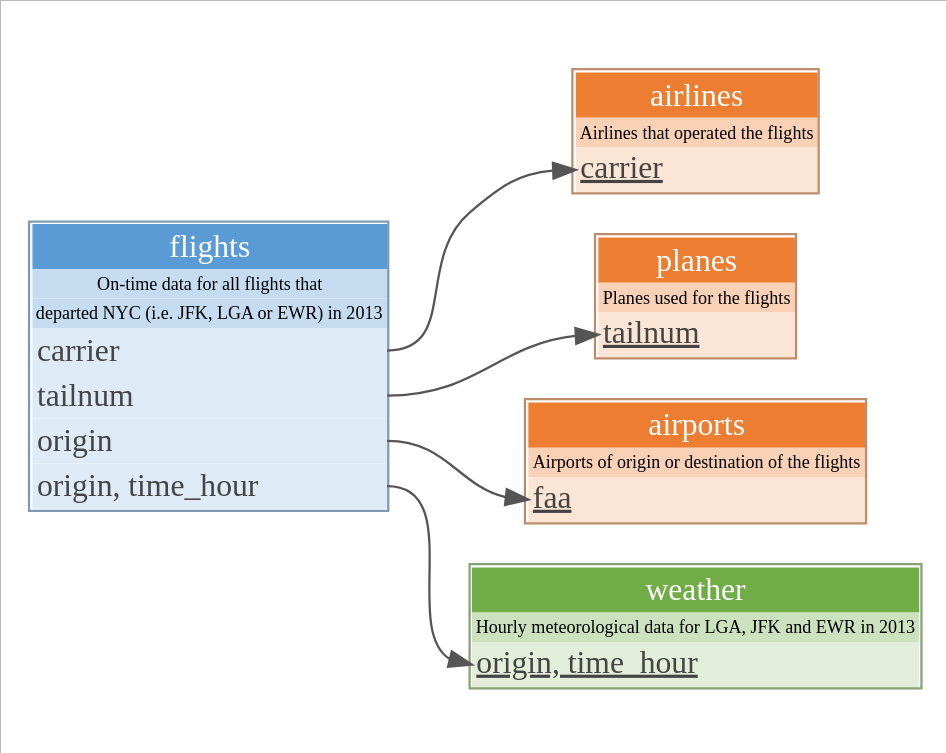
Features
- Tables linked by keys
- Common to create a separate unique index/id-number to serves as primary key
- Tables correspond to entities
- Each table about 1 “thing”
- Rows called records
Entity Relationship Diagram (ERD)
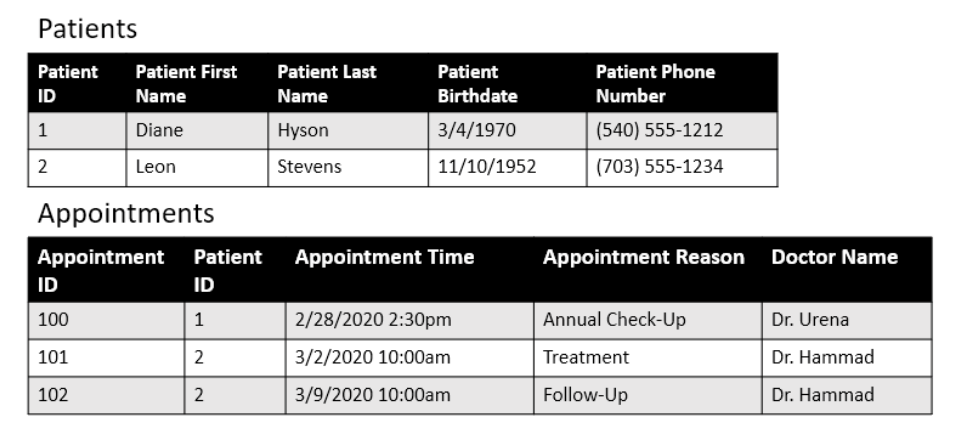
Teate SQL4DS
Entity Relationship Diagram (ERD)
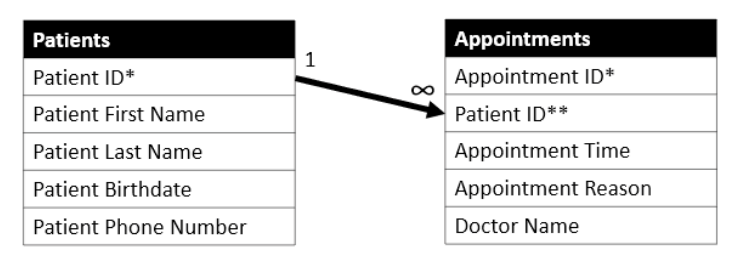
Teate SQL4DS
- Stars mark primary and foreign keys
- 1 and Infinity symbol indicate one-many relationship
More Complex ERD
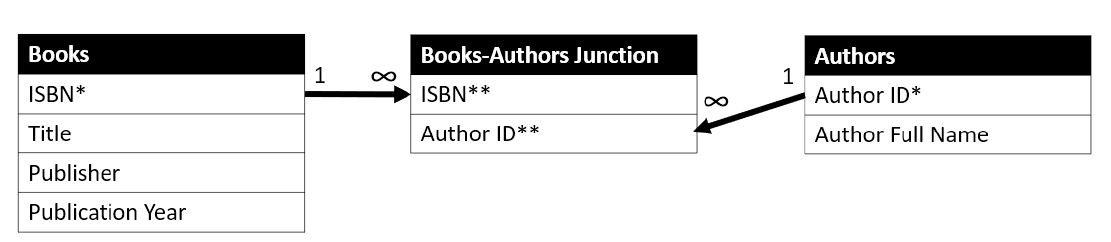
Teate SQL4DS
- Here authors and books have a many-many relationship
- Associative Table used as a junction Authors and Books
- Combo of ISBN and Author ID are primary key for Books-Authors
Normalization Schemes
- Databases often organized according to strict rules called
normalization - These improve things like space efficiency, data consistency, etc
- Massive research topic in the 1970s
![wikpedia]()
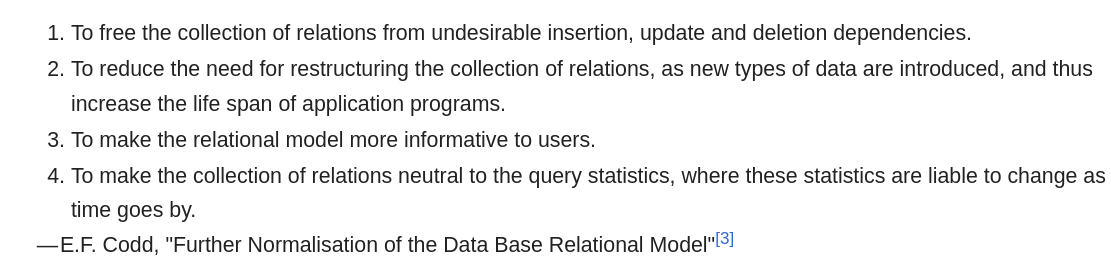
Normalization Schemes
- Databases often organized according to strict rules called
normalization - These improve things like space efficiency, data consistency, etc
- Massive research topic in the 1970s
- Ideas often involve separating data into tables corresponding to entities
- Each fact stored in one place
- Can make a career as a database designer/architect
Trade Offs
When should you use a relational database instead of regular file(s) for your project?
- If many people are using the data
- If the data takes up lots of space
- If the data has complex organization
- If you are planning to scale up
But it is likely that your organization will be using it and so knowing how to interact with databases is key, will make you more efficient and more independent!
DBMS Classes
Use Database Management Systems to access data/interact with databases
- Client-Server: (Most Traditional). Database hosted on a central server to which you connect (IBM, Oracle, MySQL server)
- Cloud: Database hosted on cloud. Newer, easier to scale resources (Google, Amazon, Snowflake)
- In Process: For smaller datasets with few users. Best for data analysis and learning (
sqlite,duckdb)
Structured Query Language (SQL)
- Stored on disk, queried to generate smaller dataset for analysis elsewhere
- Queries composed of clauses (must be in order):
SELECT,FROM,WHERE,GROUP BY,ORDER BYSELECTis combo ofmutate,select,rename,summarize,relocate,summarize- Also has
JOINS
dbplyrtranslates tidyverse manipulations to SQL- SQL is a standard with many flavors
Connecting to a Database in R
DBIlibrary has functions to manipulate databases
dbConnect()connections and initializes an empty databaseduckdb()creates an instance of a duck database- Can use many options with
DBI
Writing Tables
- dbWriteTable writes data from R to your database
Reading Tables
dbReadTablereads data from your database to R
# A tibble: 336,776 × 7
    year month   day dep_time sched_dep_time dep_delay arr_time
   <int> <int> <int>    <int>          <int>     <dbl>    <int>
 1  2013     1     1      517            515         2      830
 2  2013     1     1      533            529         4      850
 3  2013     1     1      542            540         2      923
 4  2013     1     1      544            545        -1     1004
 5  2013     1     1      554            600        -6      812
 6  2013     1     1      554            558        -4      740
 7  2013     1     1      555            600        -5      913
 8  2013     1     1      557            600        -3      709
 9  2013     1     1      557            600        -3      838
10  2013     1     1      558            600        -2      753
# ℹ 336,766 more rows
Queries
dbGetQueryruns SQL queries
query = "
SELECT dep_delay, month, sched_dep_time
FROM flights
WHERE carrier = 'UA'
"

con |> dbGetQuery(query) |> as_tibble()
# A tibble: 58,665 × 3
dep_delay month sched_dep_time
<dbl> <int> <int>
1 2 1 515
2 4 1 529
3 -4 1 558
4 -2 1 600
5 -2 1 600
6 -1 1 600
7 0 1 607
8 11 1 600
9 -4 1 627
10 -2 1 630
# ℹ 58,655 more rowsdbplyr
- library that translates
dplyrtoSQL - Use it both to run queries and learn
SQL
# Source:   table<planes> [?? x 9]
# Database: DuckDB 1.4.0 [georgehagstrom@Linux 6.12.10-76061203-generic:R 4.5.1//home/georgehagstrom/work/Teaching/DATA607Fall2025/website/meetups/Meetup7/duckdb]
  tailnum  year type               manufacturer model engines seats speed engine
  <chr>   <int> <chr>              <chr>        <chr>   <int> <int> <int> <chr>
1 N10156   2004 Fixed wing multi … EMBRAER      EMB-…       2    55    NA Turbo…
2 N102UW   1998 Fixed wing multi … AIRBUS INDU… A320…       2   182    NA Turbo…
3 N103US   1999 Fixed wing multi … AIRBUS INDU… A320…       2   182    NA Turbo…
# ℹ more rows
Lazy Evaluation
dbplyrdoesn’t immediately execute code, builds up big query insteadshow_query()to see it
flights_tab |> inner_join(planes_tab) |>
  group_by(tailnum) |>
  summarise(num_flights = n()) |>
  arrange(desc(num_flights)) |> print(n=4)
# Source: SQL [?? x 2]
# Database: DuckDB 1.4.0 [georgehagstrom@Linux 6.12.10-76061203-generic:R 4.5.1//home/georgehagstrom/work/Teaching/DATA607Fall2025/website/meetups/Meetup7/duckdb]
# Ordered by: desc(num_flights)
tailnum num_flights
<chr> <dbl>
1 N354JB 333
2 N355JB 282
3 N358JB 271
4 N374JB 236
# ℹ more rowsLazy Evaluation
dbplyrdoesn’t immediately execute code, builds up big query insteadshow_query()to see it
flights_tab |> inner_join(planes_tab) |>
  group_by(tailnum) |>
  summarise(num_flights = n()) |>
  arrange(desc(num_flights)) |> show_query()
<SQL>
SELECT tailnum, COUNT(*) AS num_flights
FROM (
SELECT flights.*, "type", manufacturer, model, engines, seats, speed, engine
FROM flights
INNER JOIN planes
ON (flights."year" = planes."year" AND flights.tailnum = planes.tailnum)
) q01
GROUP BY tailnum
ORDER BY num_flights DESCLazy Evaluation
dbplyrdoesn’t immediately execute code, builds up big query insteadcollectto execute it
flights_tab |> inner_join(planes_tab) |>
  group_by(tailnum) |>
  summarise(num_flights = n()) |>
  arrange(desc(num_flights)) |> collect()
# A tibble: 92 × 2
tailnum num_flights
<chr> <dbl>
1 N354JB 333
2 N355JB 282
3 N358JB 271
4 N374JB 236
5 N373JB 232
6 N368JB 230
7 N827JB 125
8 N37465 111
9 N36469 102
10 N37468 102
# ℹ 82 more rowsSQL Basics
- SQL queries composed of statements in order:
SELECT,FROM,WHERE,GROUP BY,ORDER BY
- Evaluation occurs in different order:
FROM WHERE GROUP BY SELECT ORDER BYSELECT FROM:
SQL Basics
WHEREis likefilter()ORDER BYis likearrange()
SELECT aggregates
flights_tab |>
  group_by(carrier) |>
  summarise(dep_delay = mean(dep_delay,na.rm=TRUE),
            num_flights = n()) |>
  show_query()
<SQL>
SELECT carrier, AVG(dep_delay) AS dep_delay, COUNT(*) AS num_flights
FROM flights
GROUP BY carriersummarisevariables put in select statement
select, rename, relocate
<SQL>
SELECT tailnum, "type", manufacturer, model, "year"
FROM planesplanes_tab |>
select(tailnum, type, manufacturer, model, year) |>
rename(year_built = year) |>
show_query()<SQL>
SELECT tailnum, "type", manufacturer, model, "year" AS year_built
FROM planesplanes_tab |>
select(tailnum, type, manufacturer, model, year) |>
relocate(manufacturer, model, .before = type) |>
show_query()<SQL>
SELECT tailnum, manufacturer, model, "type", "year"
FROM planesSELECT and mutate
mutateformulas appear as inSELECTstatements
<SQL>
SELECT flights.*, distance / (air_time / 60.0) AS speed
FROM flightsflights_tab |>
mutate(speed = distance/(air_time/60.0)) |>
collect() |>
select(origin,dest,time_hour,carrier,flight,speed) |>
head(5)# A tibble: 5 × 6
origin dest time_hour carrier flight speed
<chr> <chr> <dttm> <chr> <int> <dbl>
1 EWR IAH 2013-01-01 10:00:00 UA 1545 370.
2 LGA IAH 2013-01-01 10:00:00 UA 1714 374.
3 JFK MIA 2013-01-01 10:00:00 AA 1141 408.
4 JFK BQN 2013-01-01 10:00:00 B6 725 517.
5 LGA ATL 2013-01-01 11:00:00 DL 461 394.HAVING clause
- If you
filteraftersummarise,HAVINGinstead ofWHERE
<SQL>
SELECT carrier, AVG(dep_delay) AS dep_delay, COUNT(*) AS num_flights
FROM flights
GROUP BY carrier
HAVING (COUNT(*) > 100.0)Sub-queries
SQLuses sub-queries to create sources of data for further queries:
<SQL>
SELECT q01.*
FROM (
  SELECT flights.*, distance / (air_time / 60.0) AS speed
  FROM flights
) q01
WHERE (speed > 450.0)- query name
q01generated bydbplyr - Saw this in join example earlier
Pitfalls
dbplyrwon’t always write nicest code- It takes deep knowledge to write performant/fast queries for large databases
- If you need to become a pro in this, read use the index, Luke
- Many many SQL standards