Meetup 8: Functions and Iteration
This week
- No Lab!
- Work on your project proposals, reach out if you want my opinion
- Today:
- Functions
- Iterations
- Vignettes will be synced with next week’s material
HW Comments
- Check LLM answer
- Accuracy of LLM solutions varied a lot
- A few exact answers- are you sure my answer wasn’t in your context window?
- Regex subtlety
- My fault:
[^aeoui]will match things like “1” or “$” - Self Contained HTML (hat tip to Masoud):
- Brightspace strips HTML submissions of resources etc
When to use each join?
left_joinandright_joinare the most commonfull_joinis rare: for messy datasets or data quality checksinner_joinonly when you want to also filter dataanti_joinusually to search for missing valuessemi_joinwhen you don’t need the dataanti_joinmissing values
Meetup Next Wednesday
Case Study: Functions Make Your Code Simpler
- I want to make a statistical model of how the ratio of carbon to phosphorus in marine phytoplankton varies with environmental conditions
- I have a mathematical model for what phytoplankton do at different levels of temperature, nutrients, and environments.
- There are some unknown parameters, use data to constrain them
Case Study: Statistical Model
- Environmental vars: \(\mathrm{Temp}\), \(\mathrm{Irr}\), \(\mathrm{NO_3}\), \(\mathrm{PO_4}\),
- Parameters \(\mathrm{pars}\)
- error \(\sigma\)
- Function CP that I created (could be linear regression, a neural network, anything, my case something fancy)
- Use Maximum Likelihood or a Bayesian model with priors on parameters: \[ \mathrm{{C{:}P}} \sim \mathrm{lognormal}(CP\mathrm{(Temp,Irr,NO_3,PO_4,pars)},\sigma)\]
- What does this look like in code?
Defining Functions
- Function has several parts:
Defining Functions
- Function has several parts:
- Name
- Function name defined on first line
Defining Functions
- Function has several parts:
- Arguments
- Arguments are external data passed to function
Defining Functions
- Function has several parts:
- Body
- Body of function performs computations
Defining Functions
- Function has several parts:
- Output
- Last line is output
Defining Functions
- Function has several parts:
- Output
- Can use
returnstatement also
Calling Functions:
[1] 1.2e+08[1] 3.1415 2.0000 -100.0000[1] 1 1 NA [1] NA NA NA NA NA NA NA NA NA NA NA NA NA NA NA NA NA NA NA NA NA NA NA NA NA
[26] NA NA NA NA NA NA NA NA NA NA NA NA NA NA NA NA NA NA NA NA NA NA NA NA NA
[51] NA NA NA NA NA NA NA NA NA NA NA NA NA NA NA NA NA NA NA NA NA NA NA NA NA
[76] NA NA NA NAWhat are Functions Good For?
If you find yourself repeating code more than a few times, consider turning it into a function
- Functions make code easier to read
- If you change your code, easier to change it in one place
- Functions make it easier to avoid bugs, enable testing
- It is easy to share a function
Scoping Rules in R
Scoping: Environments
- R variables and functions live in nested environments
- functions (and some flow control) create inward scope
- R will look for variable names starting at inner scope and then moving outward
More Scope
Side Effects
- Let’s say you really want your function to change something outside function scope
- Use
<<-operator:
- Use sparingly, has side effect of making your code difficult to understand and overly interconnected
Data Masking
- What if we try to make a function that takes a data frame?
Error in `group_by()`:
! Must group by variables found in `.data`.
✖ Column `group_var` is not found.
When
group_byandsummarizeare called, they treatgroup_varandmean_varliterally as names of variables to search for in dataCalled data masking because real values of
group_varandmean_varignored
Data Masking
- We can see that the real values are ignored:
df <- tibble(
  mean_var = 1,
  group_var = "g",
  group = 1,
  x = 10,
  y = 100
)

df |> grouped_mean(group, x)
# A tibble: 1 × 2
group_var `mean(mean_var)`
<chr> <dbl>
1 g 1# A tibble: 1 × 2
group_var `mean(mean_var)`
<chr> <dbl>
1 g 1- It didn’t matter what the argument names we picked were
Indirection
Fundamental Theorem of Software Engineering:
“We can solve any problem by introducing an extra layer of indirection”
An indirection or reference is a way to refer to something using a name, reference, or container, instead of the value itself
Rexpects name to be typed inembrace the variable:
filter(df, {{var}} == cond)
Embracing in Action
Data Masking/Tidy Selection
library(nycflights13)

count_missing <- function(df, group_vars, x_var) {
  df |>
    group_by({{ group_vars }}) |>
    summarize(
      n_miss = sum(is.na({{ x_var }})),
      .groups = "drop"
    )
}


flights |>
  count_missing(c(year,month,day), dep_time)
Error in `group_by()`:
ℹ In argument: `c(year, month, day)`.
Caused by error:
! `c(year, month, day)` must be size 336776 or 1, not 1010328.pick lets you tidy select
count_missing <- function(df, group_vars, x_var) {
  df |>
    group_by(pick({{ group_vars }})) |>
    summarize(
      n_miss = sum(is.na({{ x_var }})),
      .groups = "drop"
    )
}

flights |>
  count_missing(c(year,month,day), dep_time) |> head(6)
# A tibble: 6 × 4
year month day n_miss
<int> <int> <int> <int>
1 2013 1 1 4
2 2013 1 2 8
3 2013 1 3 10
4 2013 1 4 6
5 2013 1 5 3
6 2013 1 6 1Functional Programming
- Functions are first class objects in R:
- Treated like a normal data type
- Pass them to functions
- Modify them
- Assign to variables
- Return them from functions
Functional Programming
- Functions are first class objects in R:
- Style of
Rlooks more functional than other languages purrrlibrary provides functional programming tools
across iterates on columns
Suppose we want to apply an operation to many columns at once:
# A tibble: 10 × 4
         a      b       c      d
     <dbl>  <dbl>   <dbl>  <dbl>
 1 -0.333   0.408  0.103  -1.39
 2  1.21   -0.647 -1.17   -1.76
 3 -0.599   0.166 -0.0823 -0.976
 4 -0.188   0.913 -1.54   -0.439
 5 -0.350  -0.146  1.50    0.287
 6  0.0939  1.53   0.957   0.353
 7 -2.06    0.996 -0.676   1.26
 8 -0.265  -0.644 -0.398   0.206
 9  0.676   0.136 -1.24    1.15
10  1.18    0.293 -1.44   -0.883
across iterates on columns
- Count the elements and compute median:
# A tibble: 1 × 5
      n       a     b      c      d
  <int>   <dbl> <dbl>  <dbl>  <dbl>
1 10 -0.0631 0.300 -0.399 -0.220- Involves lots of copy/pasting
- Doesn’t scale well with number of columns
across iterates on columns
- Alternative is function
across - part of
purrrfunctional programming library - Arguments: function and selection of columns:
# A tibble: 1 × 5
      n       a     b      c      d
  <int>   <dbl> <dbl>  <dbl>  <dbl>
1 10 -0.0631 0.300 -0.399 -0.220- Can use other selects (i.e.
starts_with,everything)
Anonymous functions in across
- How to pass additional arguments to functions?
- Anonymous (or lambda functions), functions not important enough to be named:
Anonymous functions in across
- Can use this to pass arguments:
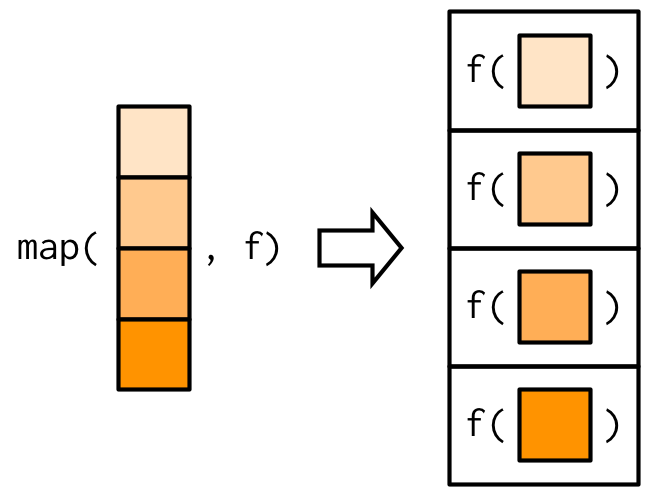
map family in purrr
map(vec,f) = [f(vec[1]),f(vec[2]),....]![Adv. R]()
map family in purrr
map(vec,f) = [f(vec[1]),f(vec[2]),....]![Adv. R]()
mapreturns alist, not avectorRfunctions do not have strict return types
map_*
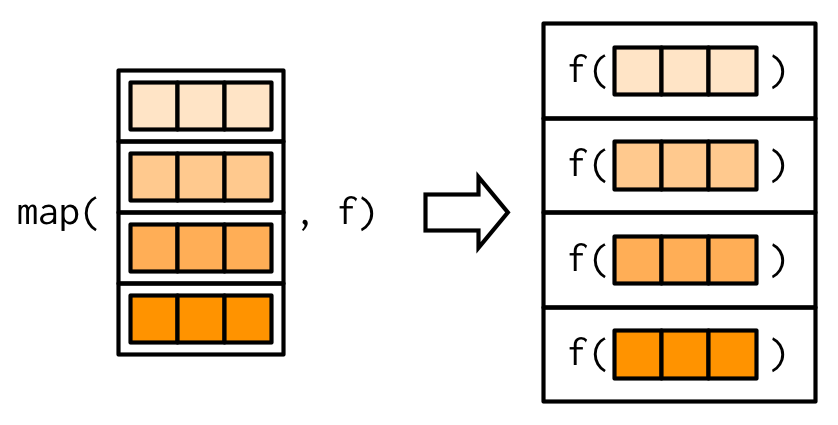
map_dbl,map_chr,map_lgl,map_int: assume data type and return vectors- Operate on data frames
![]()
- Imagine the data frame has been rotated so the “rows” correspond to columns
map_*
                   mpg cyl  disp  hp drat    wt  qsec vs am gear carb
Mazda RX4         21.0   6 160.0 110 3.90 2.620 16.46  0  1    4    4
Mazda RX4 Wag     21.0   6 160.0 110 3.90 2.875 17.02  0  1    4    4
Datsun 710        22.8   4 108.0  93 3.85 2.320 18.61  1  1    4    1
Hornet 4 Drive    21.4   6 258.0 110 3.08 3.215 19.44  1  0    3    1
Hornet Sportabout 18.7   8 360.0 175 3.15 3.440 17.02  0  0    3    2
Valiant           18.1   6 225.0 105 2.76 3.460 20.22  1  0    3    1
Duster 360        14.3   8 360.0 245 3.21 3.570 15.84  0  0    3    4
Merc 240D 24.4 4 146.7 62 3.69 3.190 20.00 1 0 4 2 mpg cyl disp hp drat wt qsec vs am gear carb
25 3 27 22 22 29 30 2 2 3 6 - Your function must return a single function of the same type as the
mapfunction
Where are the for loops?
forandwhileloops exist inR- They are discouraged in favor of tools like
map - Only use them when you must (such as when you need side effects)
while loop in action
Data Science in Context Presentation
Meetup Reflection/One Minute Paper
Please fill out the following google form after the meeting or watching the video: