# A tibble: 215 × 4,000
   `0.063915` `0.033242` `0.018484` `0.0086177` `0.035629` `0.037925` `0.028865`
        <dbl>      <dbl>      <dbl>       <dbl>      <dbl>      <dbl>      <dbl>
 1     0.0254     0.0511    0.0563      0.0217      0.0274     0.0149    0.0225
 2     0.0255     0.0361    0.0542      0.00974     0.0275     0.0523    0.0428
 3     0.0128     0.0297    0.0793      0.0507      0.0397     0.0577    0.0445
 4     0.0198    -0.0106   -0.00750     0.0190      0.0688     0.0618    0.0390
 5     0.0390     0.0394    0.00134     0.0262      0.0441     0.0440    0.0396
 6     0.0232     0.0538    0.0370      0.0216      0.0388     0.0389    0.0516
 7     0.0270     0.0101    0.0177      0.0112      0.0367     0.0160    0.00668
 8     0.0394     0.0389    0.0316      0.0196      0.0209     0.0300    0.0293
 9     0.0134     0.0165    0.0158      0.00492     0.0126     0.0322    0.0182
10     0.0337     0.0417    0.0326      0.0290      0.0285     0.0499    0.0502
# ℹ 205 more rows
# ℹ 3,993 more variables: `0.061731` <dbl>, `0.0631` <dbl>, `0.024787` <dbl>,
#   `0.034473` <dbl>, `0.033539` <dbl>, `0.01043` <dbl>, `0.018585` <dbl>,
#   `0.051385` <dbl>, `0.045839` <dbl>, `0.02908` <dbl>, `0.079736` <dbl>,
#   `0.089912` <dbl>, `0.06538` <dbl>, `0.048052` <dbl>, `0.017063` <dbl>,
#   `0.016695` <dbl>, `0.013443` <dbl>, `0.016502` <dbl>, `0.061453` <dbl>,
# `0.085336` <dbl>, `0.069497` <dbl>, `0.063938` <dbl>, `0.045307` <dbl>, …DATA 608 Meetup 10: Dimensionality Reduction
George I. Hagstrom
Week Summary
- Data Story 5 is Due this Sunday at Midnight
- Reading is Section 12.3 of Fundamentals of Data Visualization
- What to do when the data has too many variables to visualize?
Many variables?
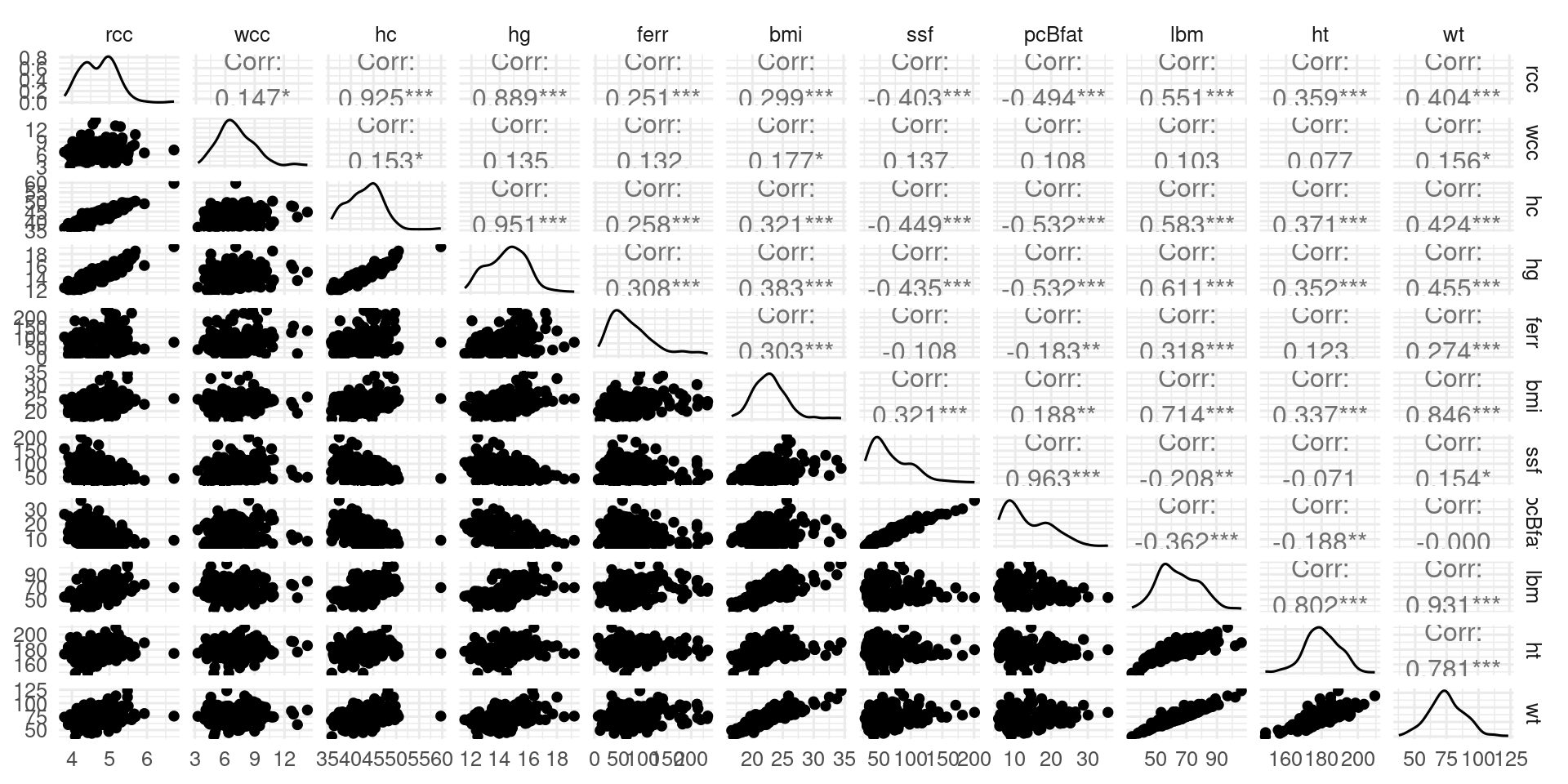
- Pair Plot?
Pair Plots are Limited
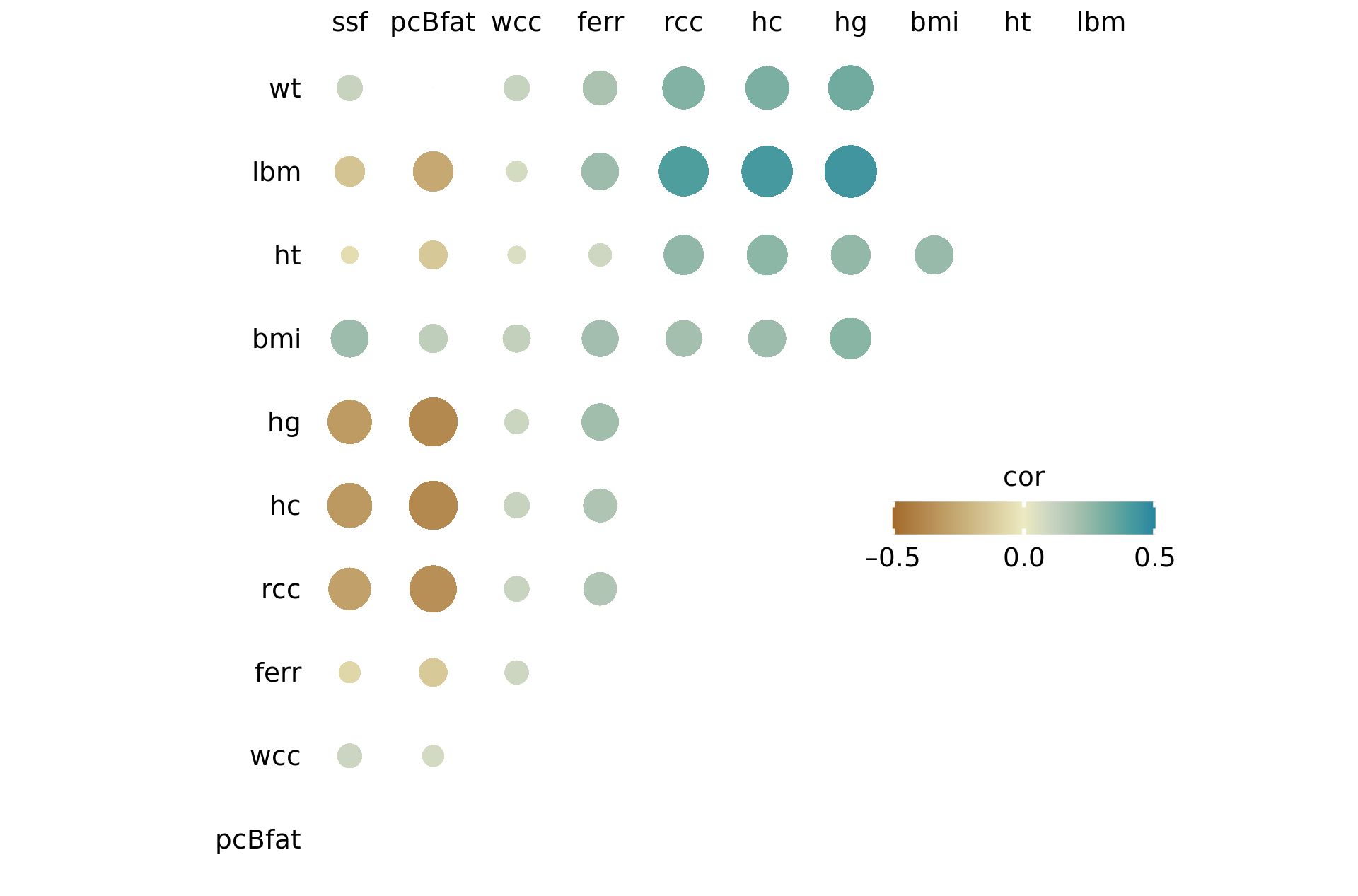
- Data is physiological properties of Australian Olympians
- Takes time to read
- Other options like correlograms also somewhat limited
- We could use an alternative even though these techniques are useful
Hopeless when data increases more
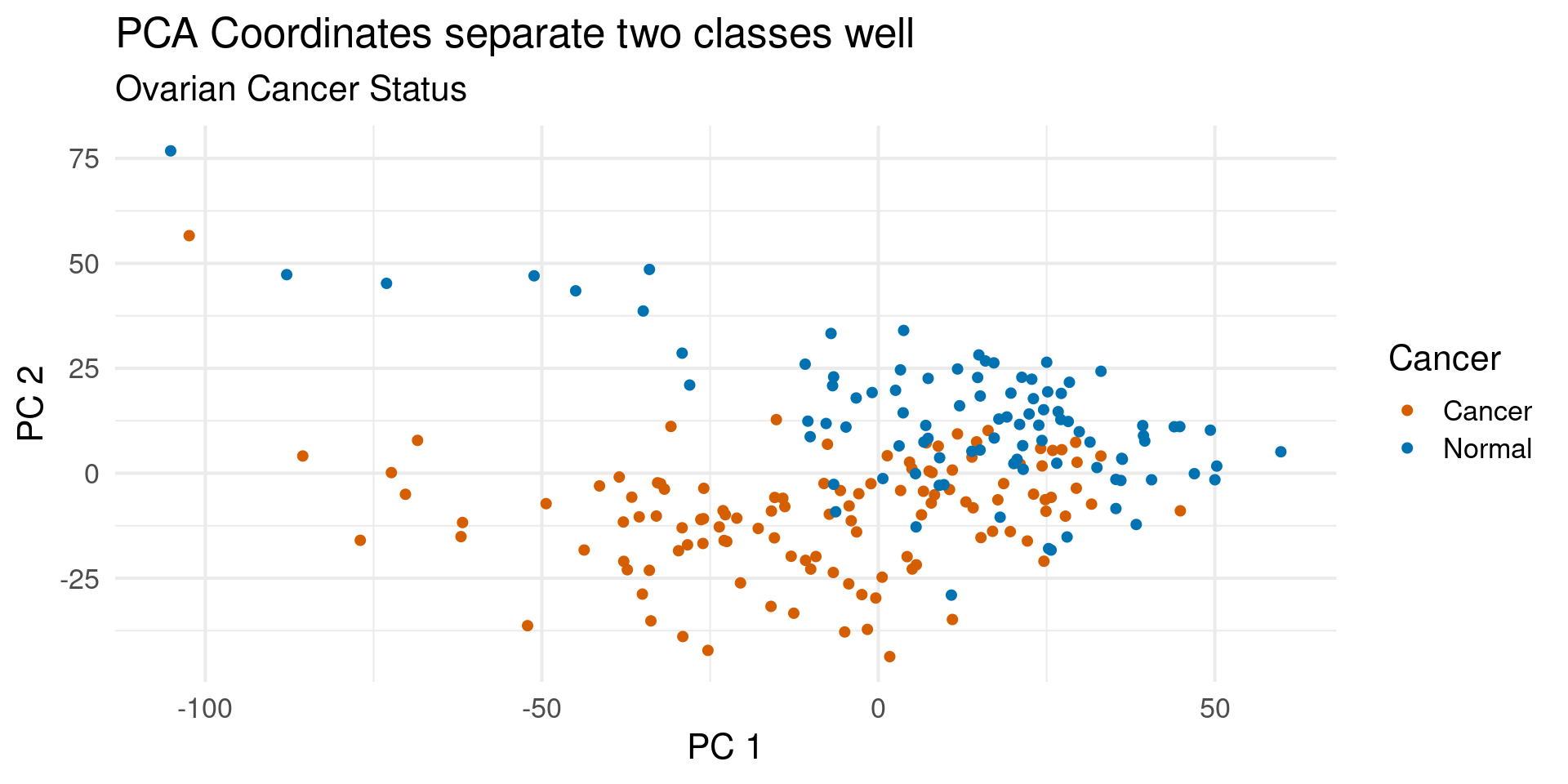
- Here is a dataset of biomarker measurements from both ovarian cancer patients and healthy controls
- There are 4000 variables
- There will be no pair-plots
Dimensionality Reduction
- Many datasets have a large number of variables
- We often have intuition that the data follows simpler patterns
- Otherwise we couldn’t understand it
- This motivates a search for simpler representations, which can be powerful visualization tools
Low-D Representation
- Using a tool called Principal Component Analysis, can separate the groups neatly
3D Representation
- 3D Neatly separates them
Principal Component Analysis (PCA)
- PCA finds a new coordinate system
- New directions called
Principal Components - Each PC is a combination/rotation of other ones
- PCs ordered based variability of the data
Simple PCA example
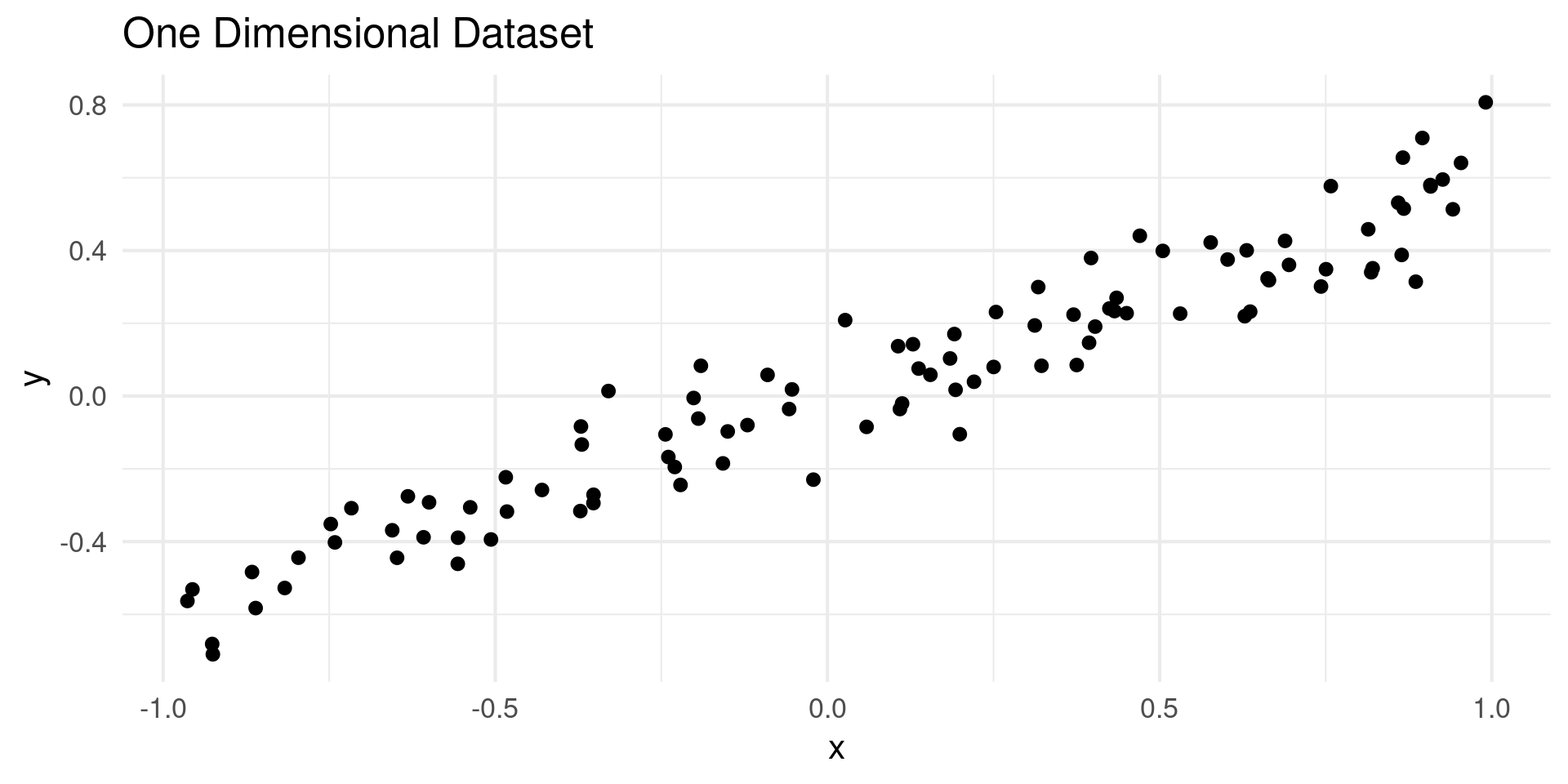
- Make a “1D” dataset in two dimensions
- Data lies along a straight line with some noise
Simple PCA Example
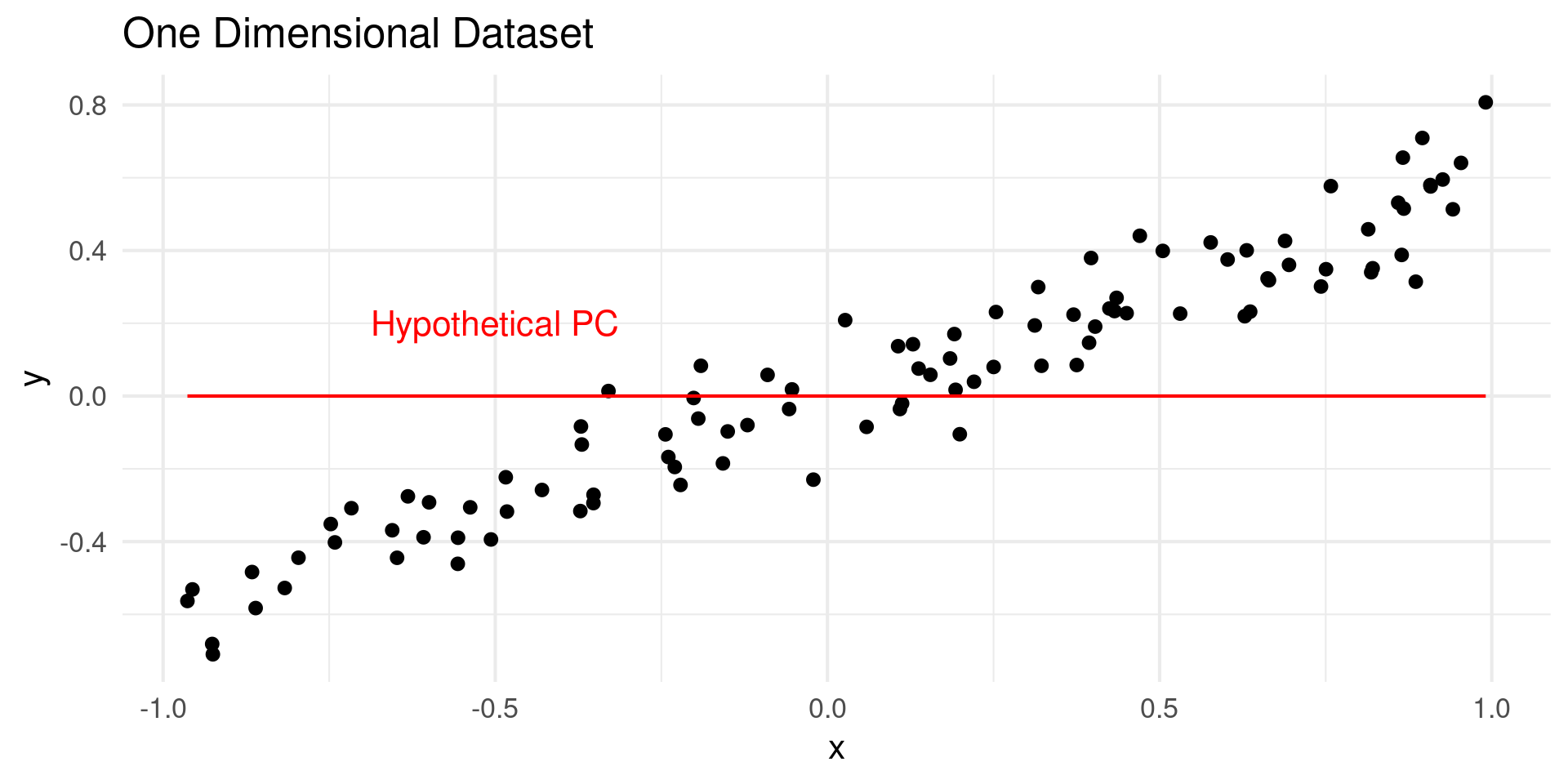
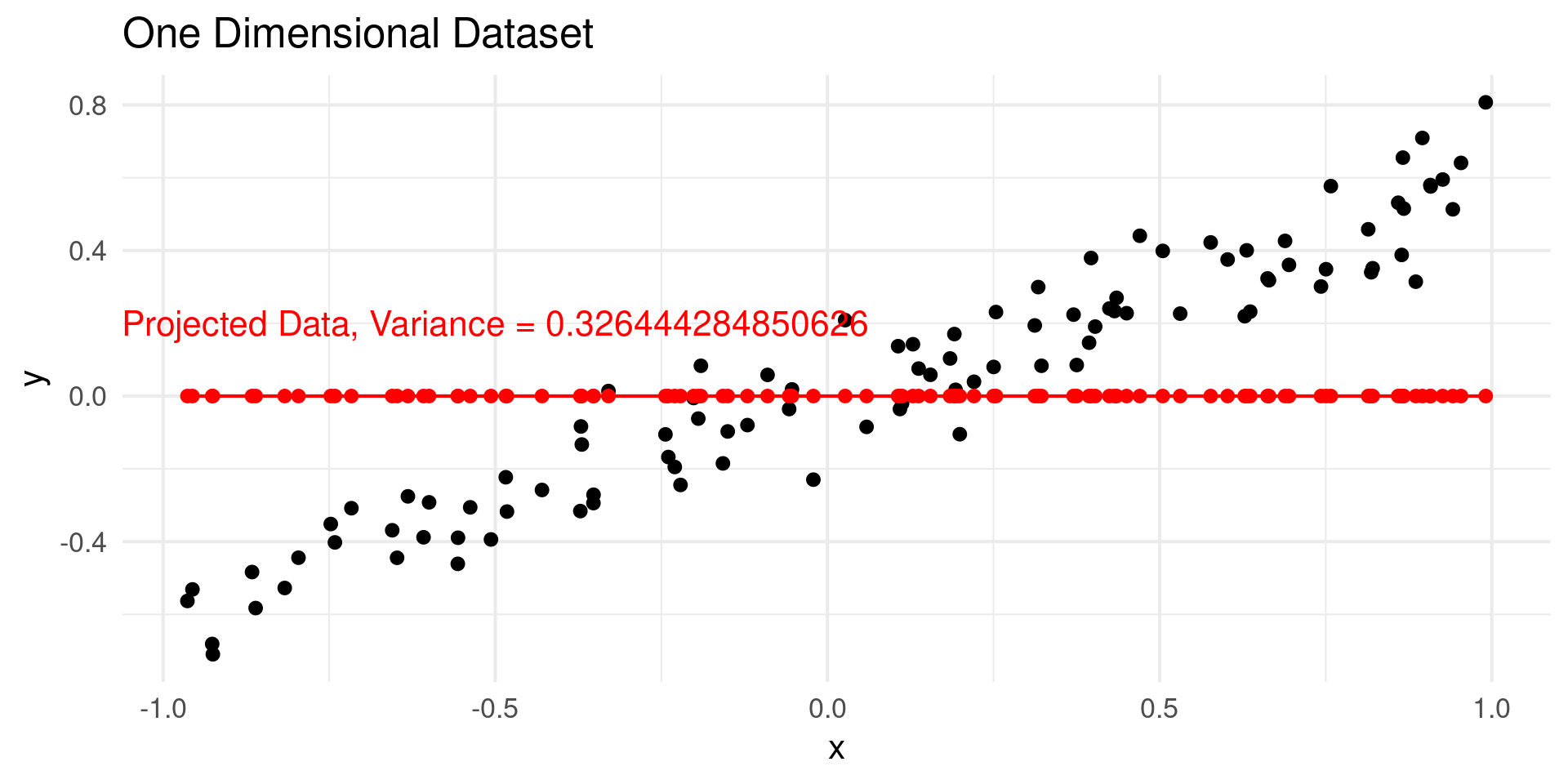
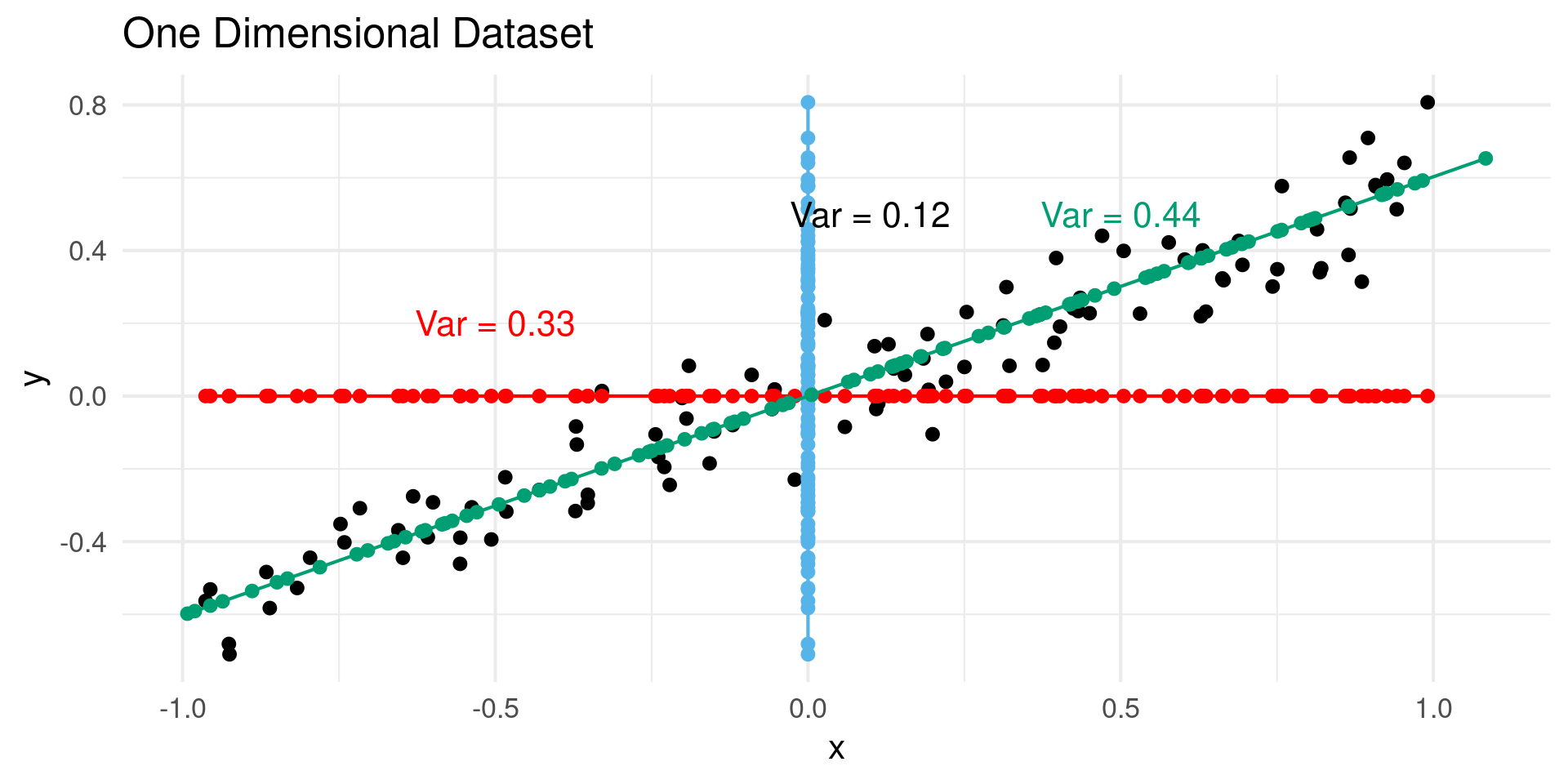
- PCA looks for vectors along which the “variance” is maximized
Simple PCA Example
- Project data points onto component
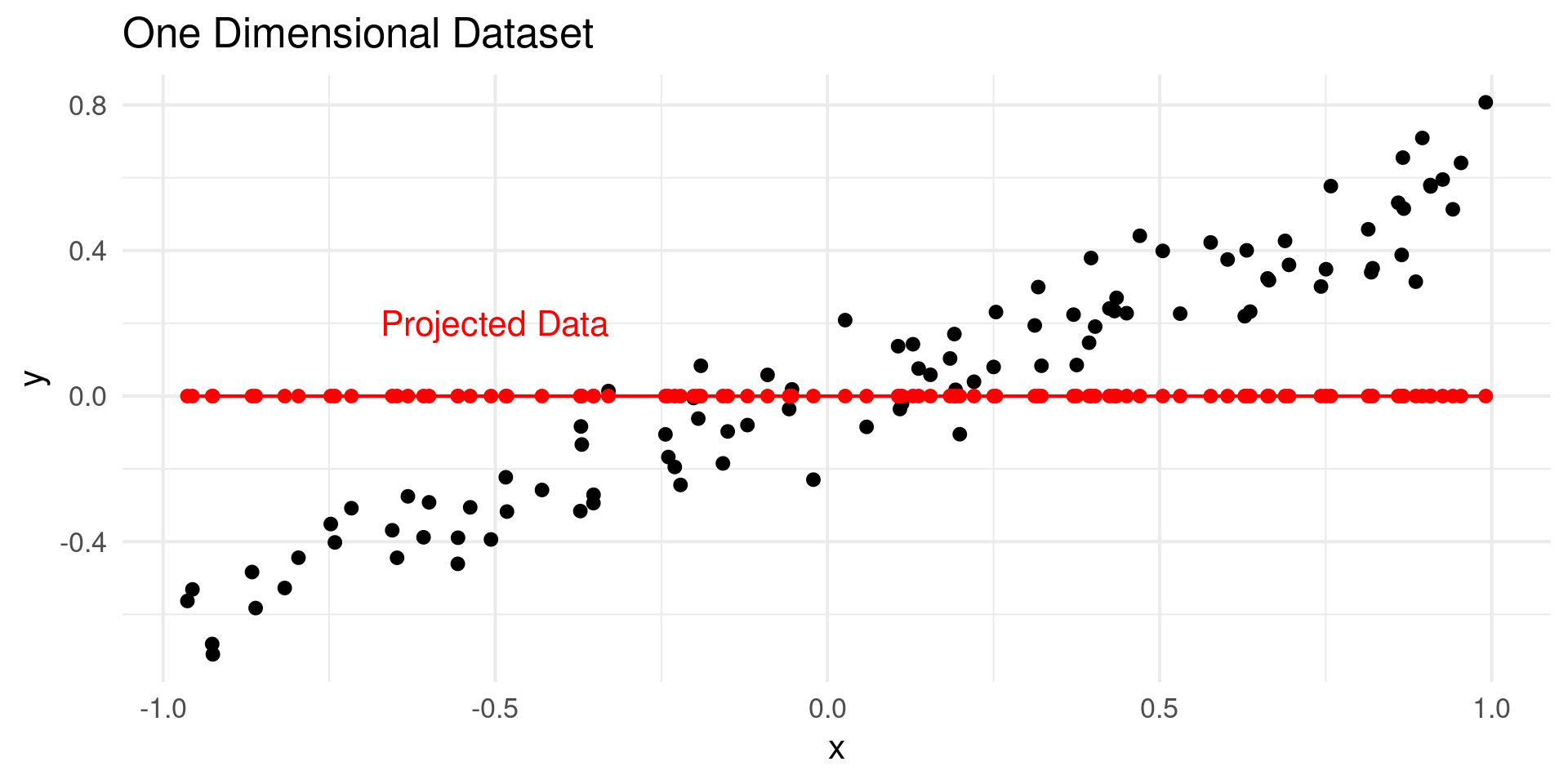
Find the Variance
- Project data points onto component
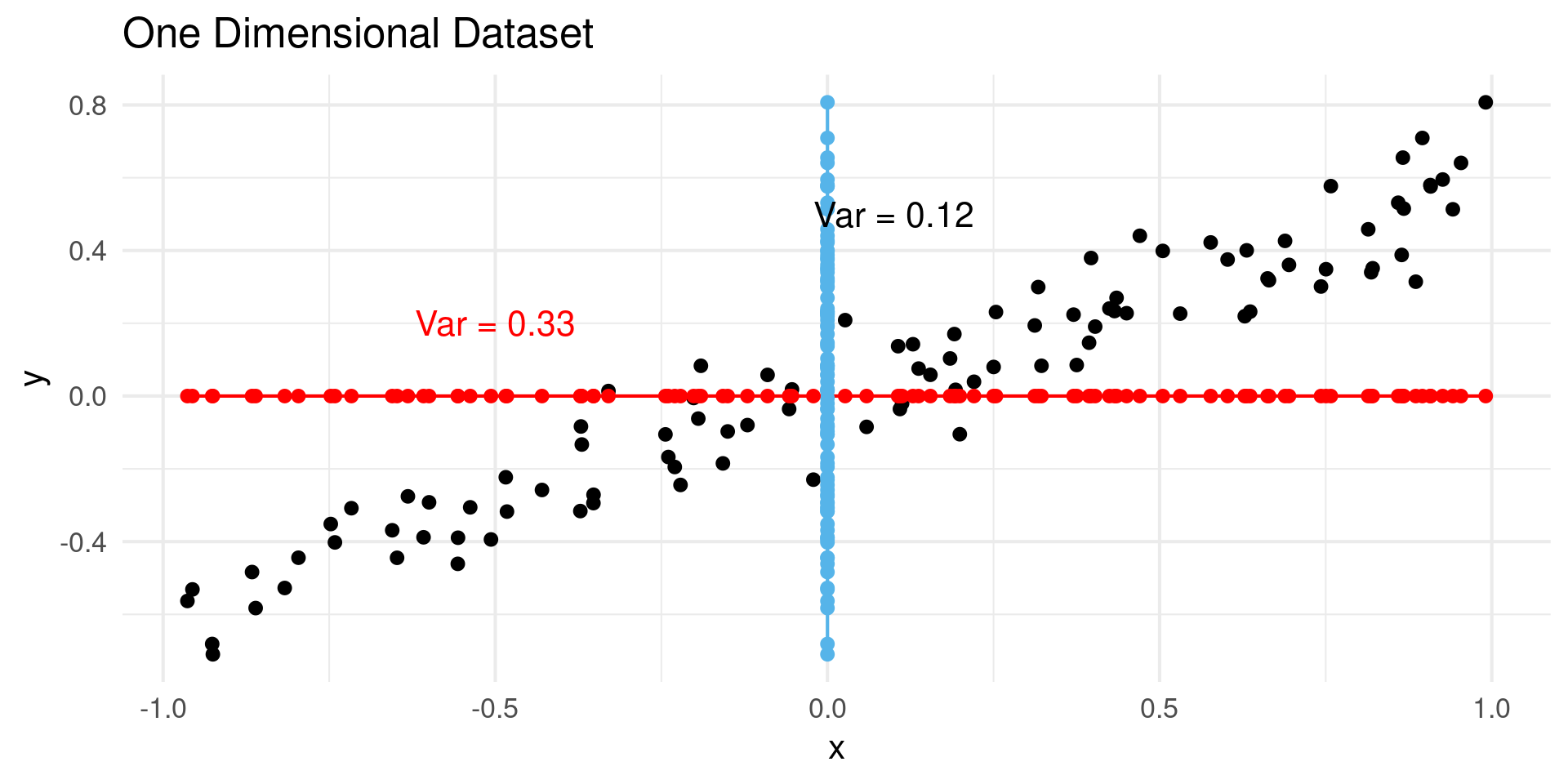
Looking at Multiple Projections
- Any projection is possible
First Principal Component
- PC1 maximizes variance
Subsequent Projections Repeat Process
- PC1 is the direction with the most variance
- PC2 is perpendicular to PC1, most variance
- PC3 is perpendicular to PC1 and PC2, most variance
- \(N\) dimensional dataset has \(N\) PCs
Why is it Dim. Reduction?
- Each PC is a variable
- You can discard low variance PCs
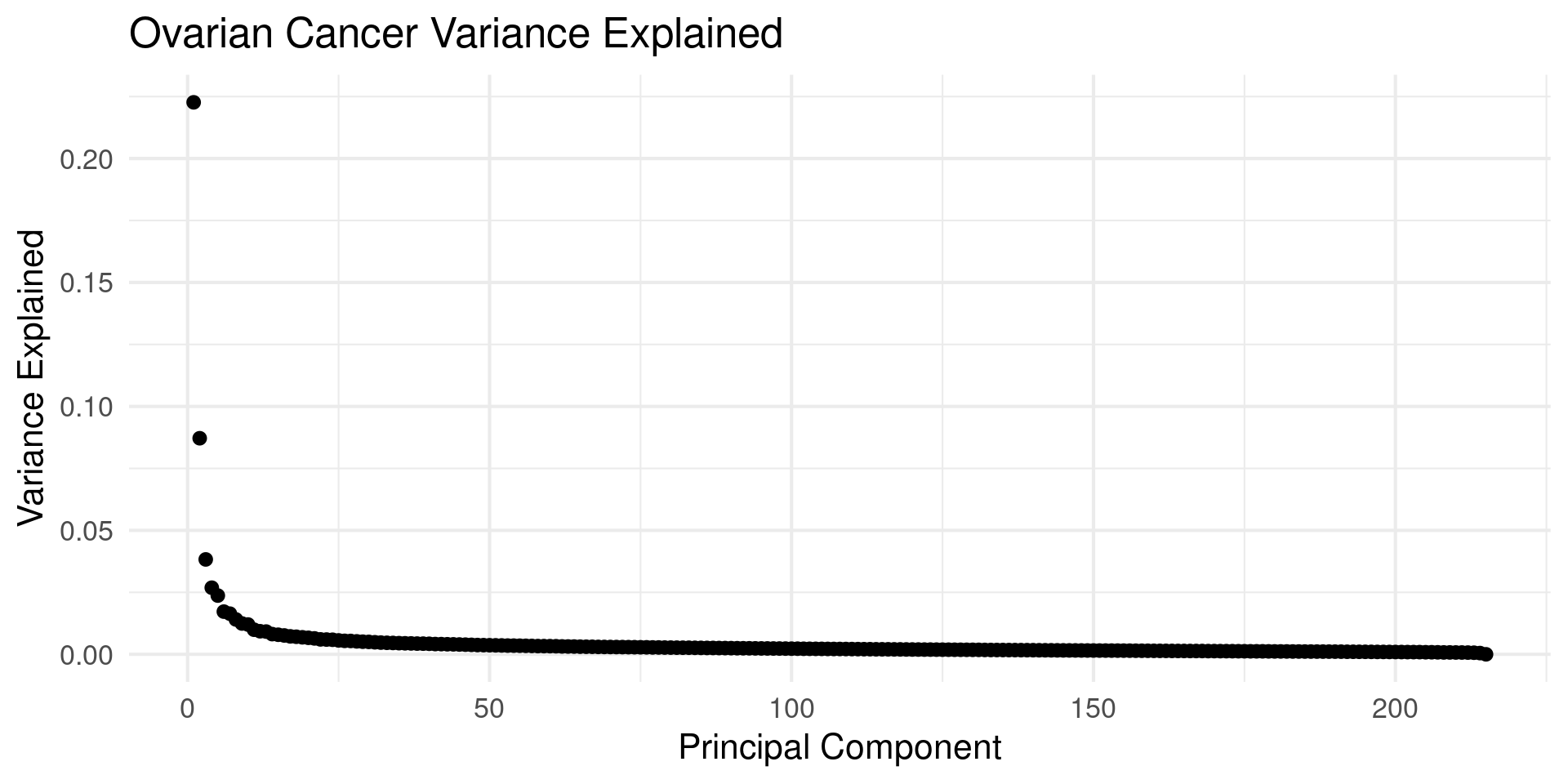
Picking a Dimension
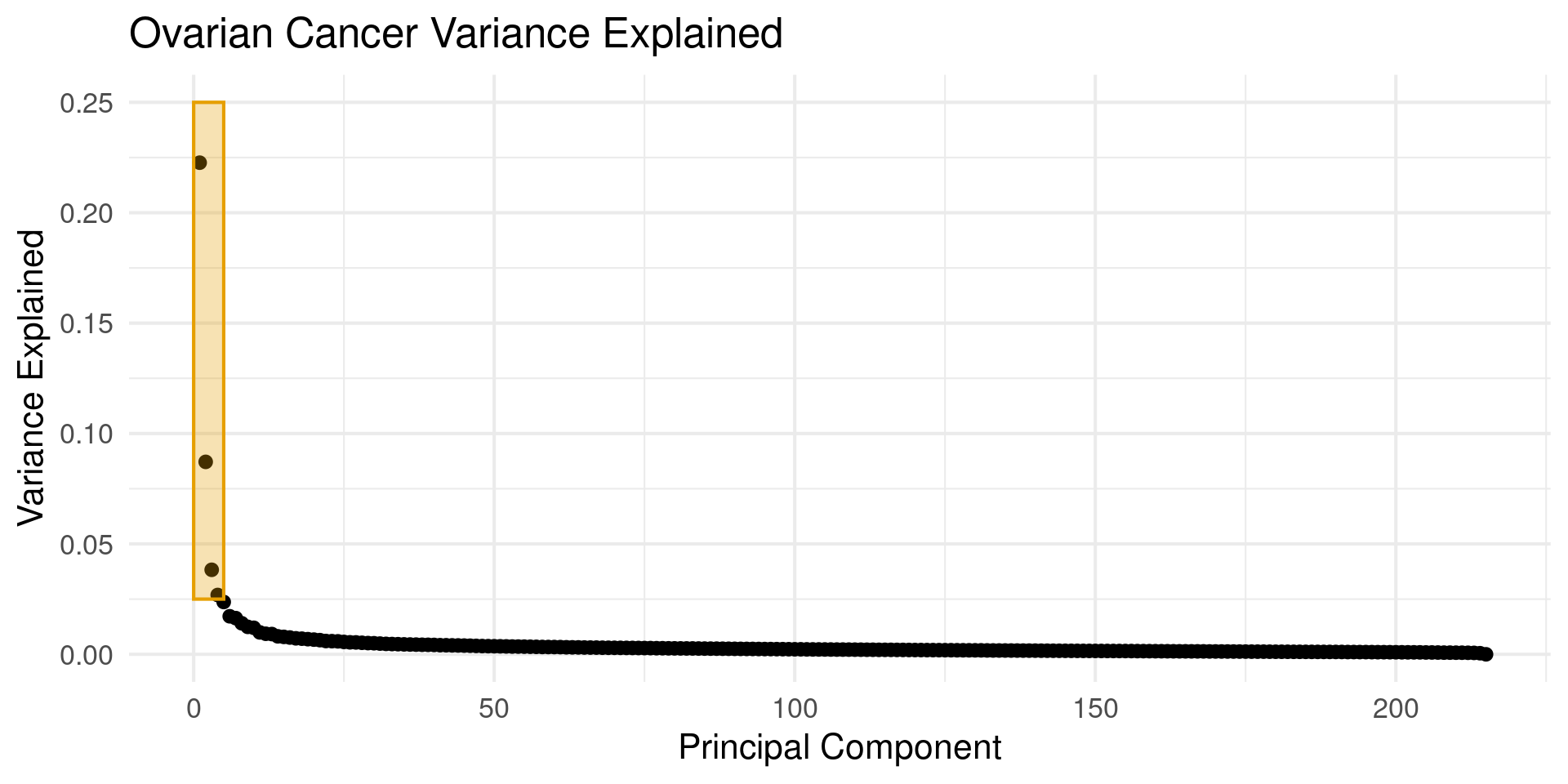
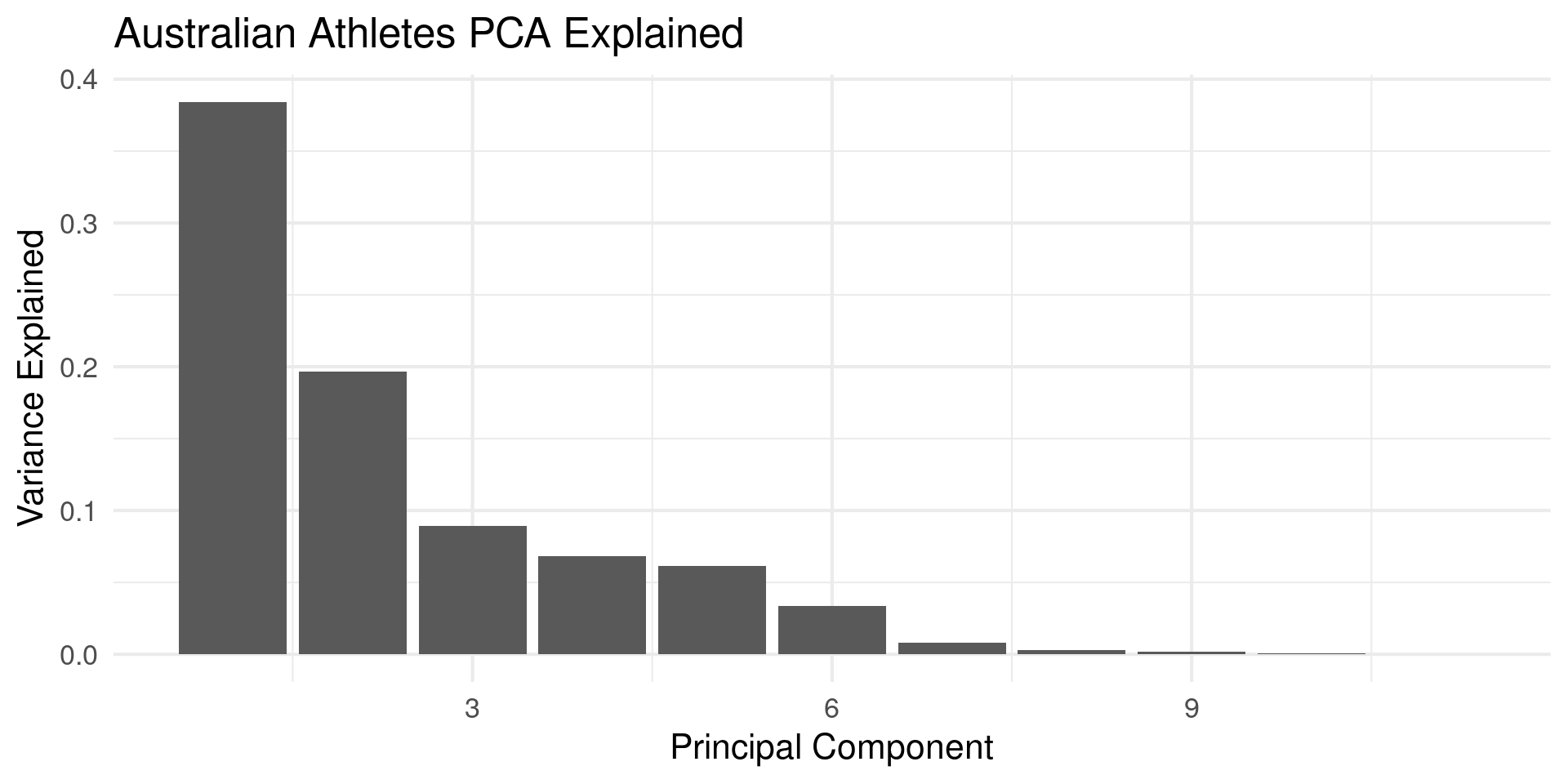
- You can discard low variance PCs
- Use “Elbow” of plot to pick cutoff
Australian Atheletes Example
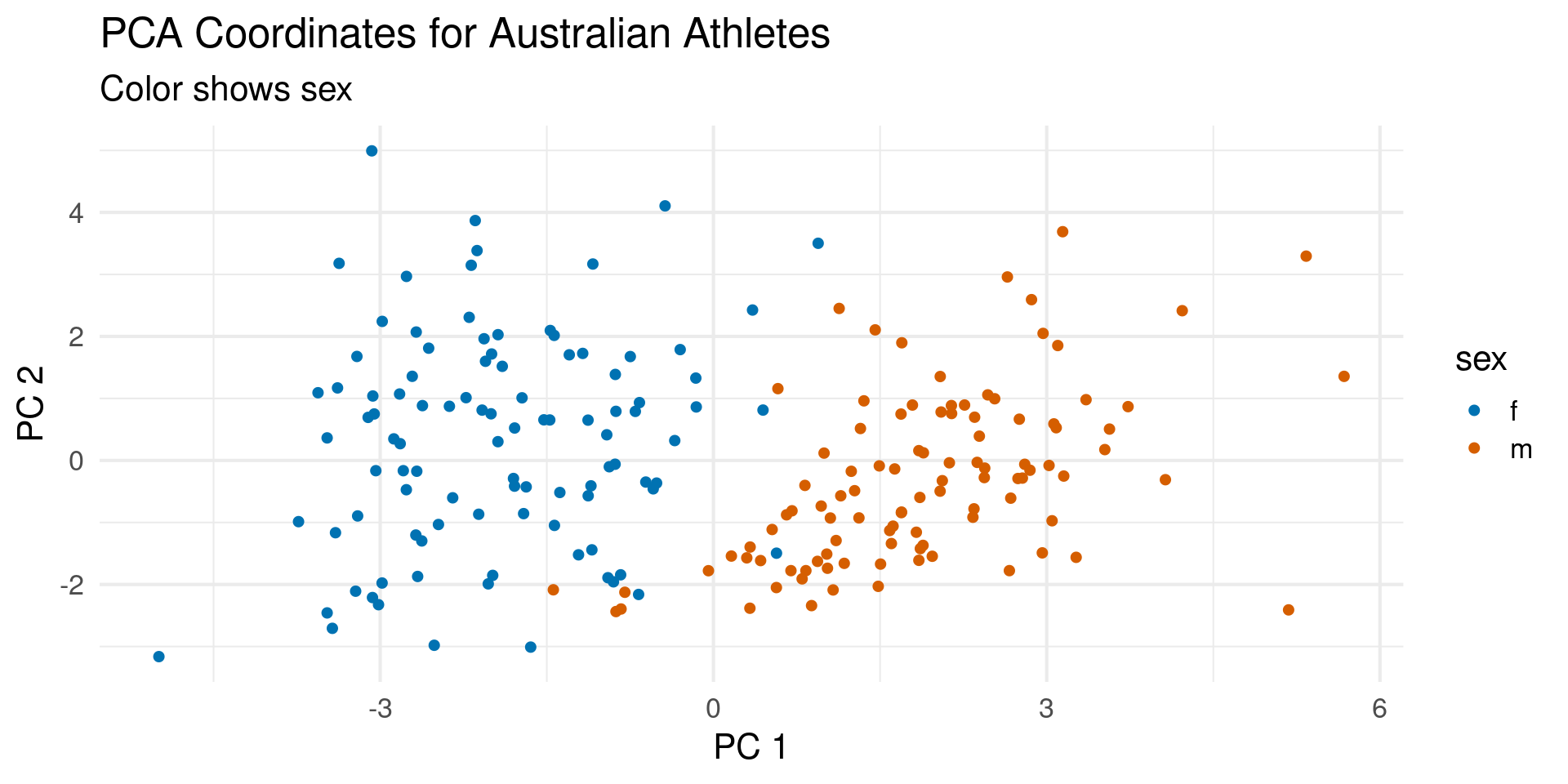
Athletes PCs
PCA Clusters
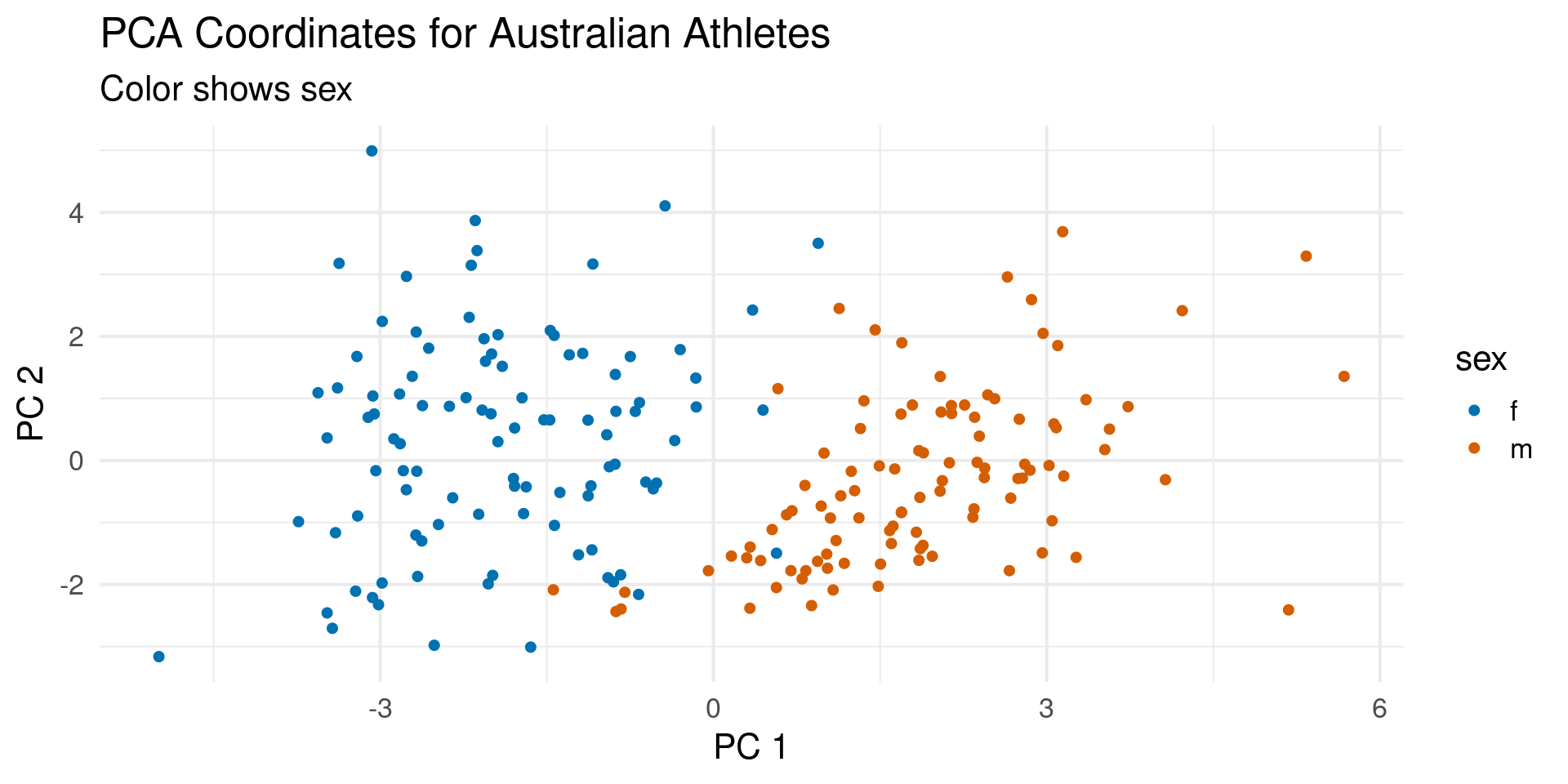
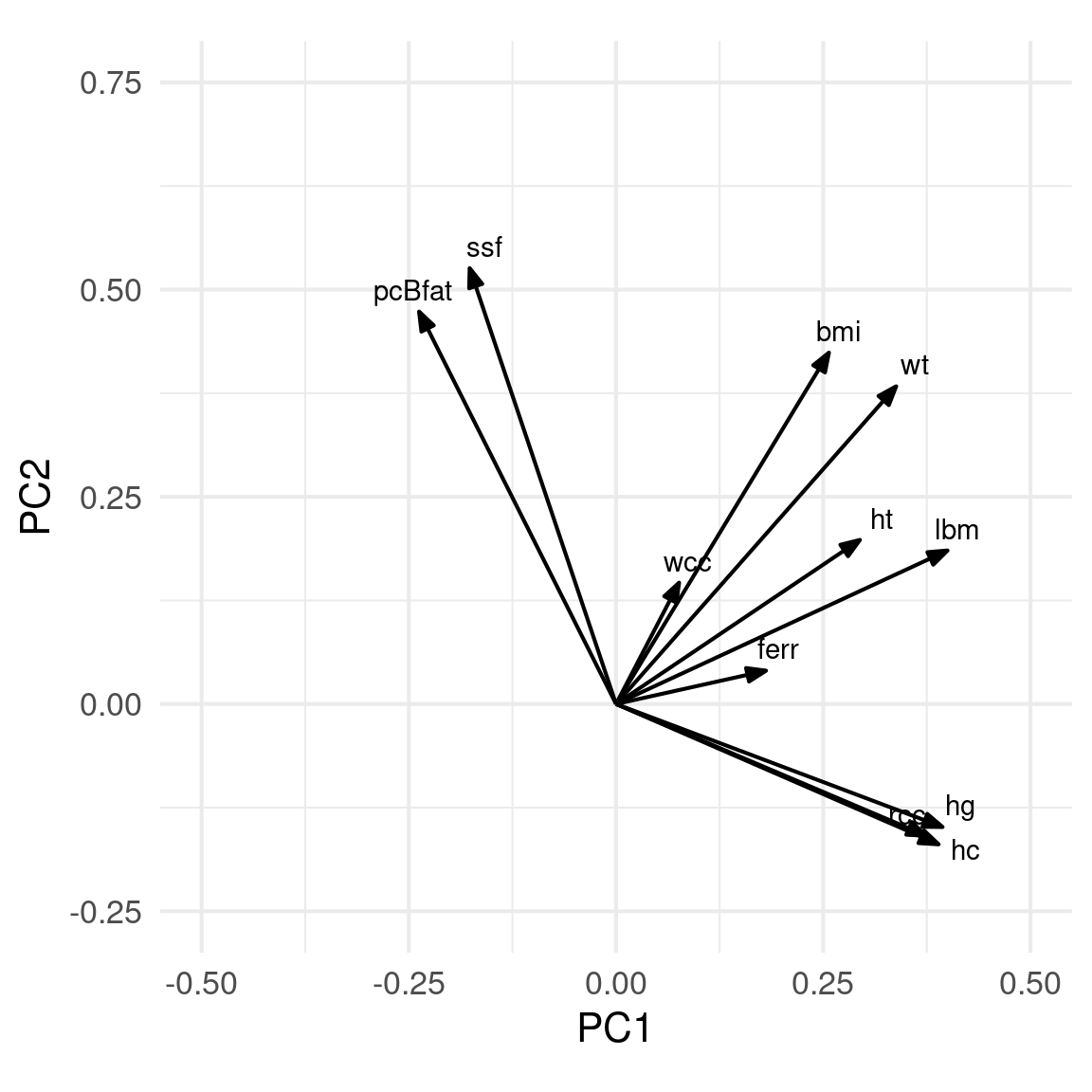
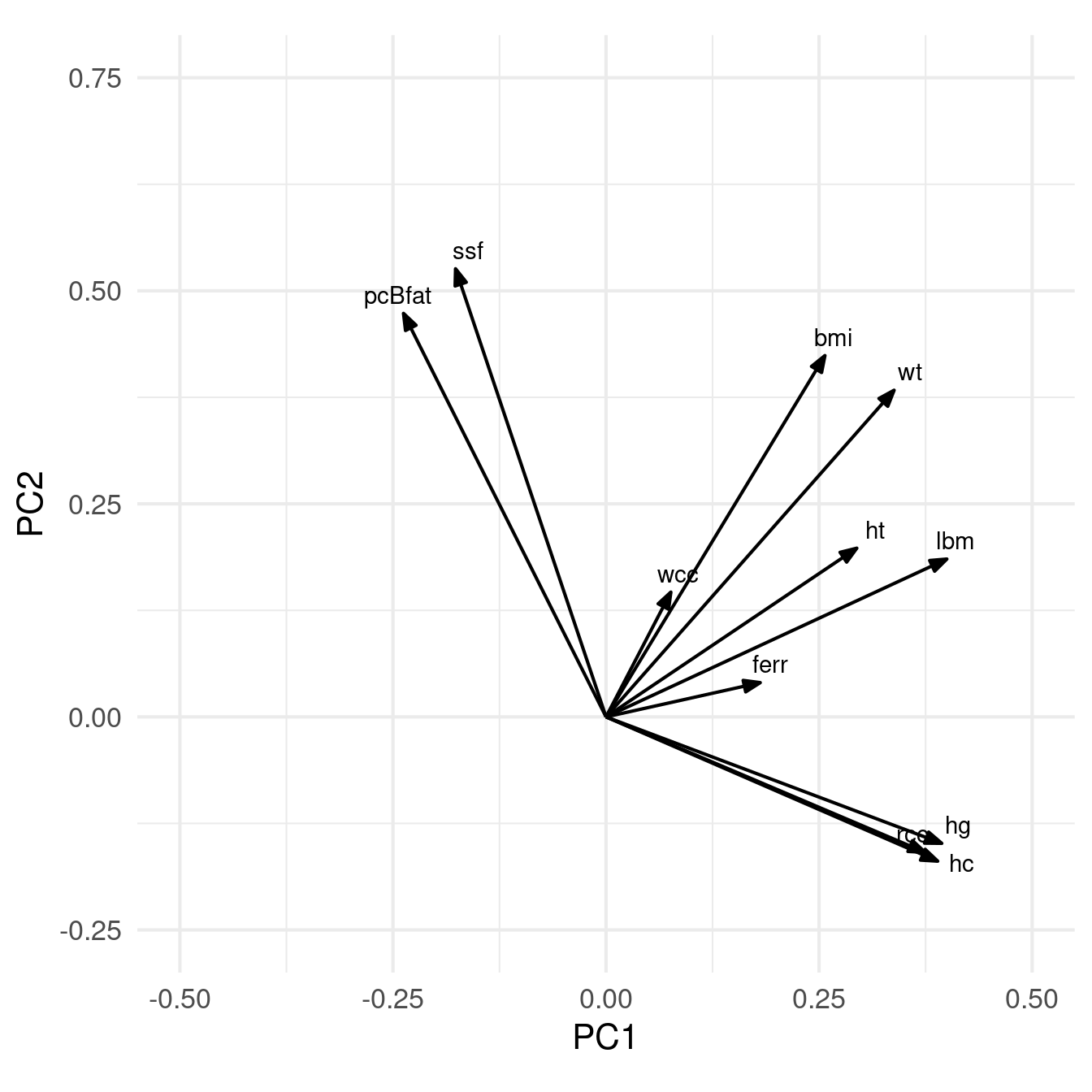
PC Clusters
- PC1: +Size, -Leanness (Sex)
- PC2: +Size, -Red Blood Cells
Sports
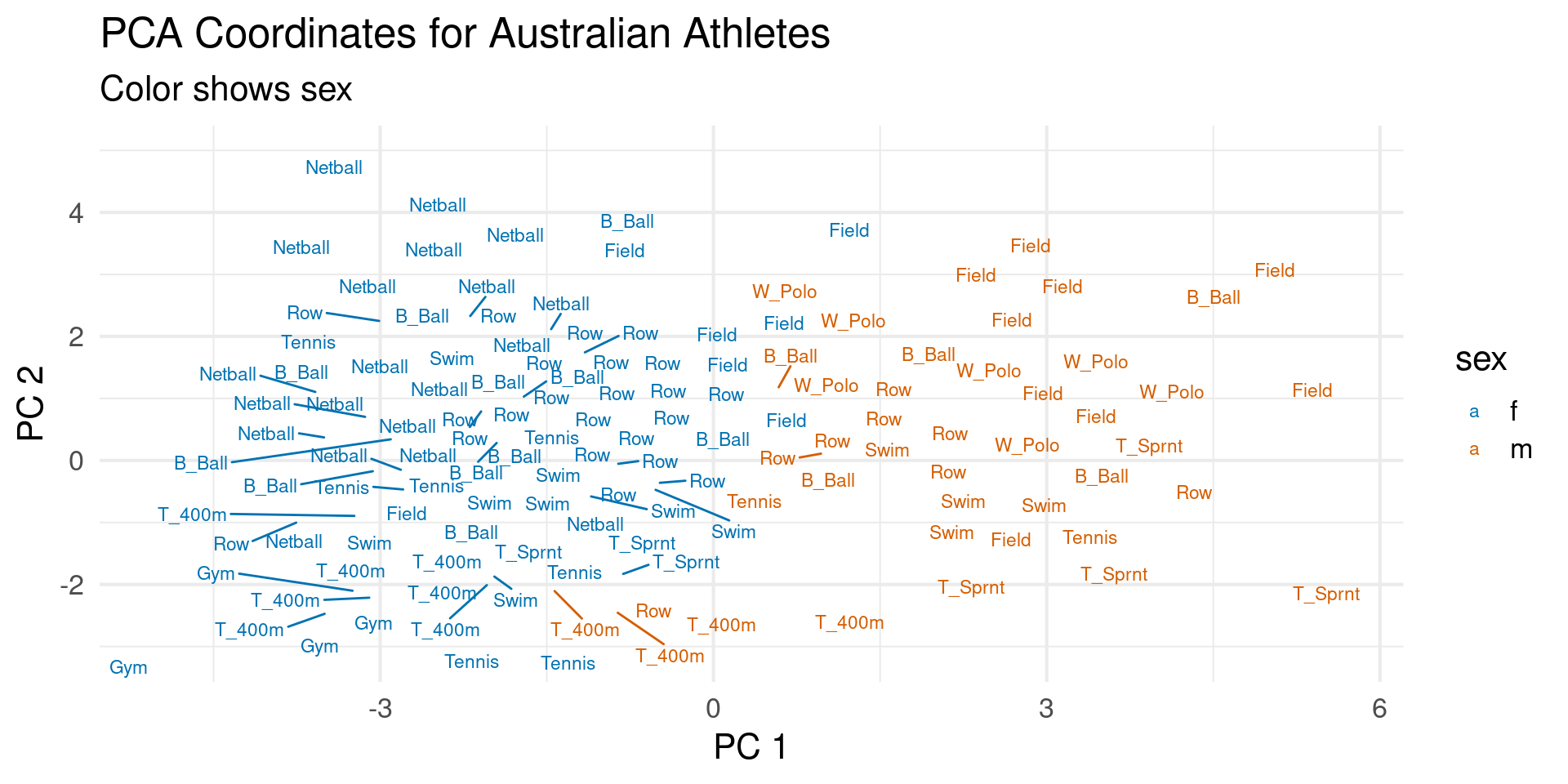
Sports Clusters
- 400m, gymnasts, tennis players have low PC2
- Netball, Field have high PC2
- Rowers, Sprinters, Swimmers, Water Polo in the middle
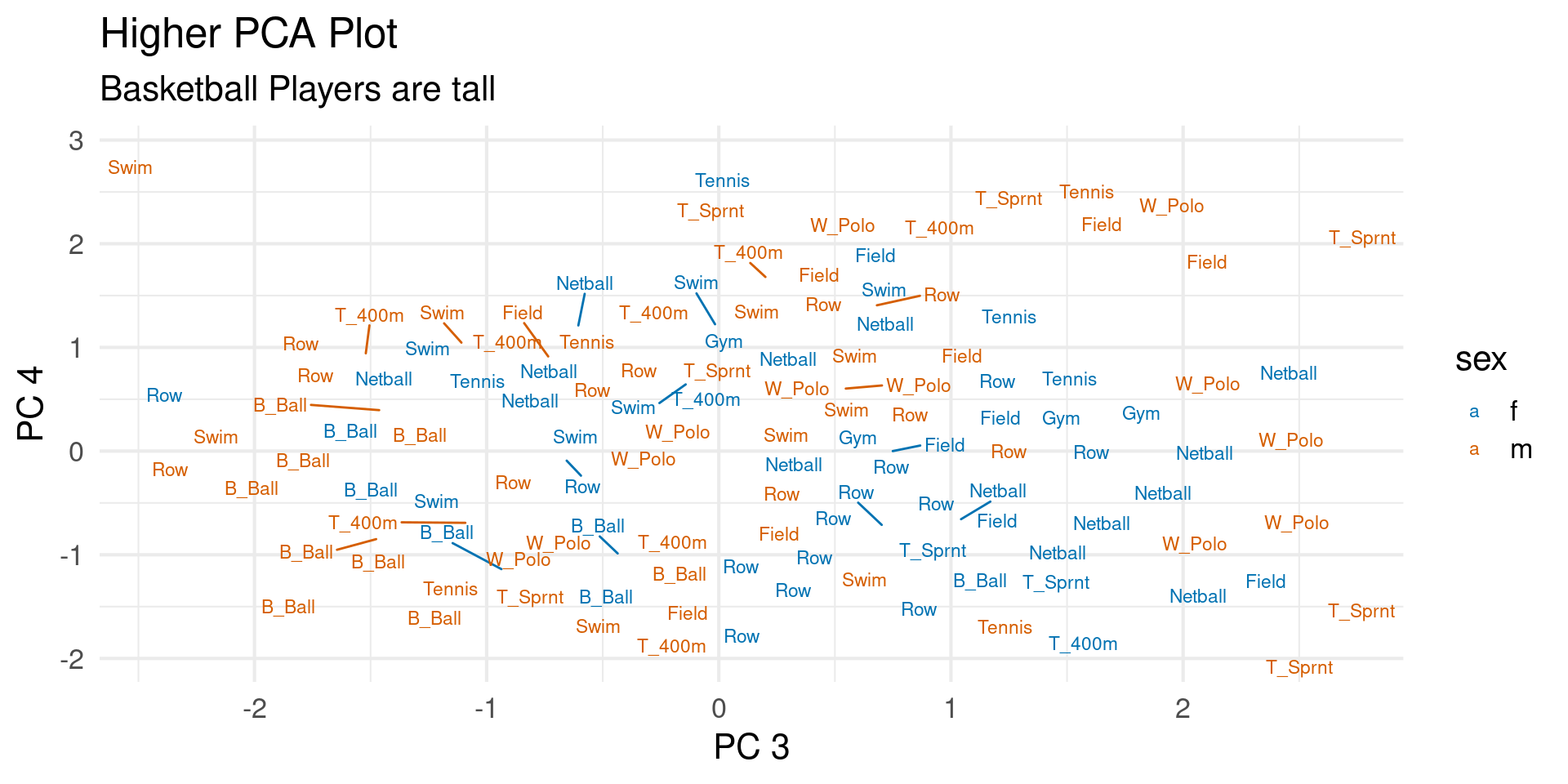
Higher PCs Contrast
- PC3: +Body Fat, RBCs, -Height
- PC4: +Height, Fat, RBCs, -BMI
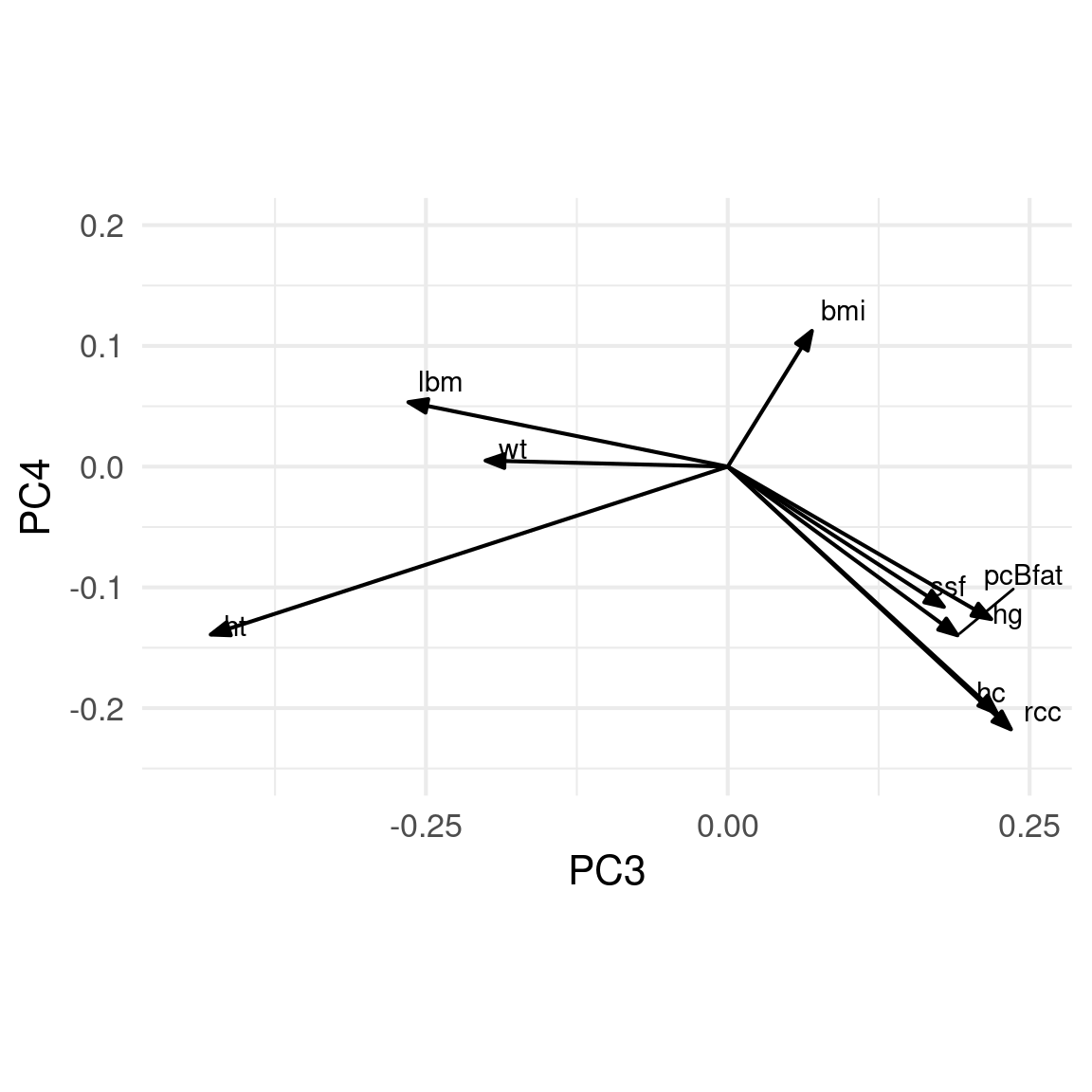
Sport Clusters 2
How to make these plots in R
prcompandscaleretxkeyword calcualtes embeddings
Contents of fit object
Standard deviations (1, .., p=11):
 [1] 2.23404856 1.59923950 1.07582851 0.94294793 0.89180307 0.65872338
 [7] 0.32428594 0.20232605 0.15228831 0.07279582 0.03293771

Rotation (n x k) = (11 x 11):
               PC1         PC2         PC3          PC4         PC5         PC6
rcc     0.37449926 -0.15896859  0.23456267 -0.217592671  0.23113528  0.24042584
wcc     0.07607989  0.14643132  0.63731981 -0.193874709 -0.71219980 -0.14657450
hc      0.38921924 -0.16930334  0.22299174 -0.204335027  0.21329896  0.14848437
hg      0.39398646 -0.14839419  0.21826369 -0.126293900  0.24631047  0.04743775
ferr    0.18096941  0.04022641  0.27331307  0.888524055 -0.03510540  0.31464529
bmi     0.25688861  0.42398703  0.06970089  0.112465801  0.25980634 -0.56325123
ssf    -0.17658747  0.52587398  0.17904388 -0.116159628  0.22401028  0.28597833
pcBfat -0.23764689  0.47350512  0.19029580 -0.139708577  0.22171662  0.28202541
lbm     0.39995499  0.18525045 -0.26453397  0.053428020 -0.13093113 -0.18218609
ht      0.29428652  0.19800646 -0.42823892 -0.139098319 -0.38179742  0.52599617
wt      0.33804701  0.38333328 -0.20061209  0.005007978 -0.04690227 -0.09473171
                 PC7          PC8          PC9          PC10          PC11
rcc    -0.7566898361 -0.199201778 -0.092406080  9.108309e-03 -0.0015062443
wcc     0.0008324697 -0.016739036 -0.002971962 -1.514497e-03  0.0010625852
hc      0.2464133051  0.745988263  0.208183403 -1.621396e-02 -0.0011660217
hg      0.5886349450 -0.574708220 -0.139182502 -8.034653e-03  0.0053383594
ferr   -0.0064610391  0.030403090 -0.016020513  9.893463e-05 -0.0002621549
bmi    -0.0741855614  0.068435637 -0.076440484  5.747325e-01  0.0750846540
ssf     0.0166623190 -0.193117005  0.689708155 -1.666579e-02  0.0348216670
pcBfat  0.0712499174  0.171474610 -0.652105583 -1.868302e-01  0.2006538802
lbm    -0.0507006292 -0.021952556  0.107081317 -4.884631e-01  0.6553134316
ht      0.0791128182 -0.008239715 -0.077125160  4.837802e-01  0.0518888717
wt     -0.0219172451  0.019877608 -0.065472528 -4.018049e-01 -0.7216136734
Contents of fit object
List of 5
 $ sdev    : num [1:11] 2.234 1.599 1.076 0.943 0.892 ...
 $ rotation: num [1:11, 1:11] 0.3745 0.0761 0.3892 0.394 0.181 ...
  ..- attr(*, "dimnames")=List of 2
  .. ..$ : chr [1:11] "rcc" "wcc" "hc" "hg" ...
  .. ..$ : chr [1:11] "PC1" "PC2" "PC3" "PC4" ...
 $ center  : Named num [1:11] -3.77e-16 -5.22e-17 3.53e-17 -3.40e-16 -5.74e-17 ...
  ..- attr(*, "names")= chr [1:11] "rcc" "wcc" "hc" "hg" ...
 $ scale   : Named num [1:11] 1 1 1 1 1 1 1 1 1 1 ...
  ..- attr(*, "names")= chr [1:11] "rcc" "wcc" "hc" "hg" ...
 $ x       : num [1:202, 1:11] -2.07 -1.9 -3.38 -2.68 -1.8 ...
  ..- attr(*, "dimnames")=List of 2
  .. ..$ : NULL
  .. ..$ : chr [1:11] "PC1" "PC2" "PC3" "PC4" ...
 - attr(*, "class")= chr "prcomp"
Meaning of Components
sdevis “standard deviation” of components- square to get “variance”,
- divide by number of variables to convert to percentage
rotationis matrix where rows are Principal Componentsxis matrix that contains embeddings of each data point
Tidy PCA
- Use
augmentfrombroomto make objects tidy
# A tibble: 202 × 25
.rownames rcc wcc hc hg ferr bmi ssf pcBfat lbm ht wt
<chr> <dbl> <dbl> <dbl> <dbl> <dbl> <dbl> <dbl> <dbl> <dbl> <dbl> <dbl>
1 1 3.96 7.5 37.5 12.3 60 20.6 109. 19.8 63.3 196. 78.9
2 2 4.41 8.3 38.2 12.7 68 20.7 103. 21.3 58.6 190. 74.4
3 3 4.14 5 36.4 11.6 21 21.9 105. 19.9 55.4 178. 69.1
4 4 4.11 5.3 37.3 12.6 69 21.9 126. 23.7 57.2 185 74.9
5 5 4.45 6.8 41.5 14 29 19.0 80.3 17.6 53.2 185. 64.6
6 6 4.1 4.4 37.4 12.5 42 21.0 75.2 15.6 53.8 174 63.7
7 7 4.31 5.3 39.6 12.8 73 21.7 87.2 20.0 60.2 186. 75.2
8 8 4.42 5.7 39.9 13.2 44 20.6 97.9 22.4 48.3 174. 62.3
9 9 4.3 8.9 41.1 13.5 41 22.6 75.1 18.0 54.6 171. 66.5
10 10 4.51 4.4 41.6 12.7 44 19.4 65.1 15.1 53.4 180. 62.9
# ℹ 192 more rows
# ℹ 13 more variables: sex <fct>, sport <fct>, .fittedPC1 <dbl>,
# .fittedPC2 <dbl>, .fittedPC3 <dbl>, .fittedPC4 <dbl>, .fittedPC5 <dbl>,
# .fittedPC6 <dbl>, .fittedPC7 <dbl>, .fittedPC8 <dbl>, .fittedPC9 <dbl>,
# .fittedPC10 <dbl>, .fittedPC11 <dbl>Plotting Embeddings
aus_fit  |>
augment(aus_athletes) %>%
ggplot(aes(.fittedPC1, .fittedPC2,color=sex)) +
geom_point(size = 1.5) +
scale_color_manual(
values = c(m = "#D55E00", f = "#0072B2")
) +
theme_minimal(base_size=16) +
labs(title="PCA Coordinates for Australian Athletes",
x = "PC 1", y= "PC 2",subtitle = "Color shows sex")Plotting Embeddings
Drawing Clusters
Drawing Clusters
arrow_style <- arrow(
  angle = 20, length = grid::unit(8, "pt"),
  ends = "first", type = "closed"
)
aus_fit %>%
  tidy(matrix = "rotation")  |>
  pivot_wider(
    names_from = "PC", values_from = "value",
    names_prefix = "PC"
  )  |>
  ggplot(aes(PC1, PC2)) +
  geom_segment(
    xend = 0, yend = 0,
    arrow = arrow_style
  ) +
  geom_text_repel(aes(label = column), hjust = 1,vjust=1) +
  xlim(-0.5, 0.5) + ylim(-0.25, 0.75) +
  coord_fixed() +
  theme_minimal(base_size =16)
3D Plot Using Plotly
library(plotly)

fig = pca_fit |>
 augment(oc_data)  |>
  bind_cols(oc_group) |> plot_ly(
    x=~.fittedPC1, y=~.fittedPC2, z=~.fittedPC3, color = ~Cancer, colors = c("#D55E00", "#0072B2"),size=2)
fig <- fig |>  add_markers()
fig <- fig |> layout(scene = list(xaxis = list(title = "PC1"),
                     yaxis = list(title = 'PC2'),
                     zaxis = list(title = 'PC3'))
                     )

fig
3D Plot Using Plotly
Downsides of PCA
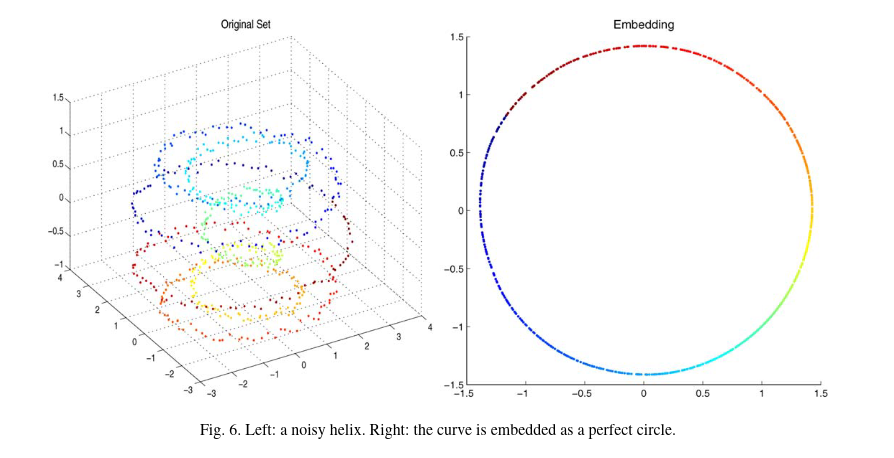
- PCA learns a linear representation
- Tons of other methods exist for nonlinear structures
![Coifman et al]()
- Tons of other methods exist for nonlinear structures
Downsides of PCA
- Prone to overinterpretation
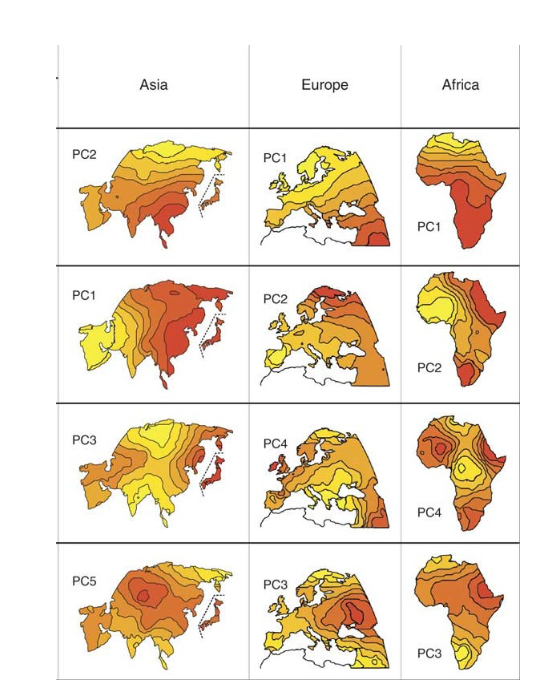
Shalizi/November
Downsides of PCA
- Prone to overinterpretation
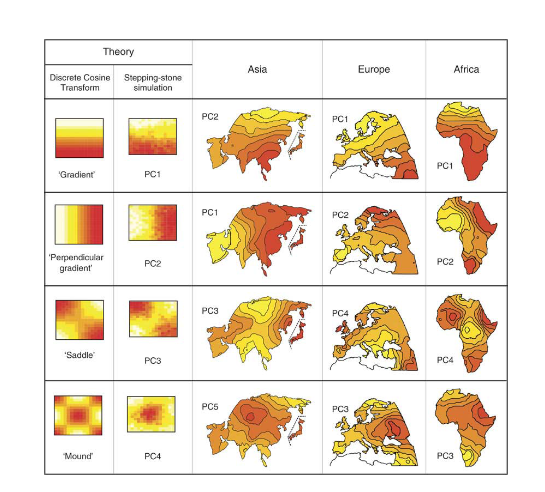
Shalizi/November
Downsides of PCA
- Sensitive to outliers
- If your measurement process is not robust….
- Using PCA could be very misleading!
- There is an algorithm called robust PCA which is great these cases