DATA 608 Meetup 4: Visualizing Associations and Time Series

George Hagstrom

Week 4 Summary

  • Data Story 2 due this Sunday
  • This week is all about associations
    • Two variables
    • Time Series
    • Several to Many Variables

Reading

  1. Fundamentals of Data Visualization (Wilke)
  • Chapter 12 and 13
  • Skip dimensionality reduction, we will return to it later

Event Reminder!

HW 1 Review

  • Corrected Figures: Return by Sunday Midnight
  • If you need an extension please ask right away

HW 1 Review

  1. Stories left some meat on the bone:
  • Migration data/displacement
  • Outliers in Rust Belt/Economically Depressed Areas
  • Sensitivity to years chosen

HW 1 Review

  1. More thought into what data is being used
  • Articles specific that permits lead rents
  • Choice of years for everything matters

Scatterplots

  • Shows how two variables are associated
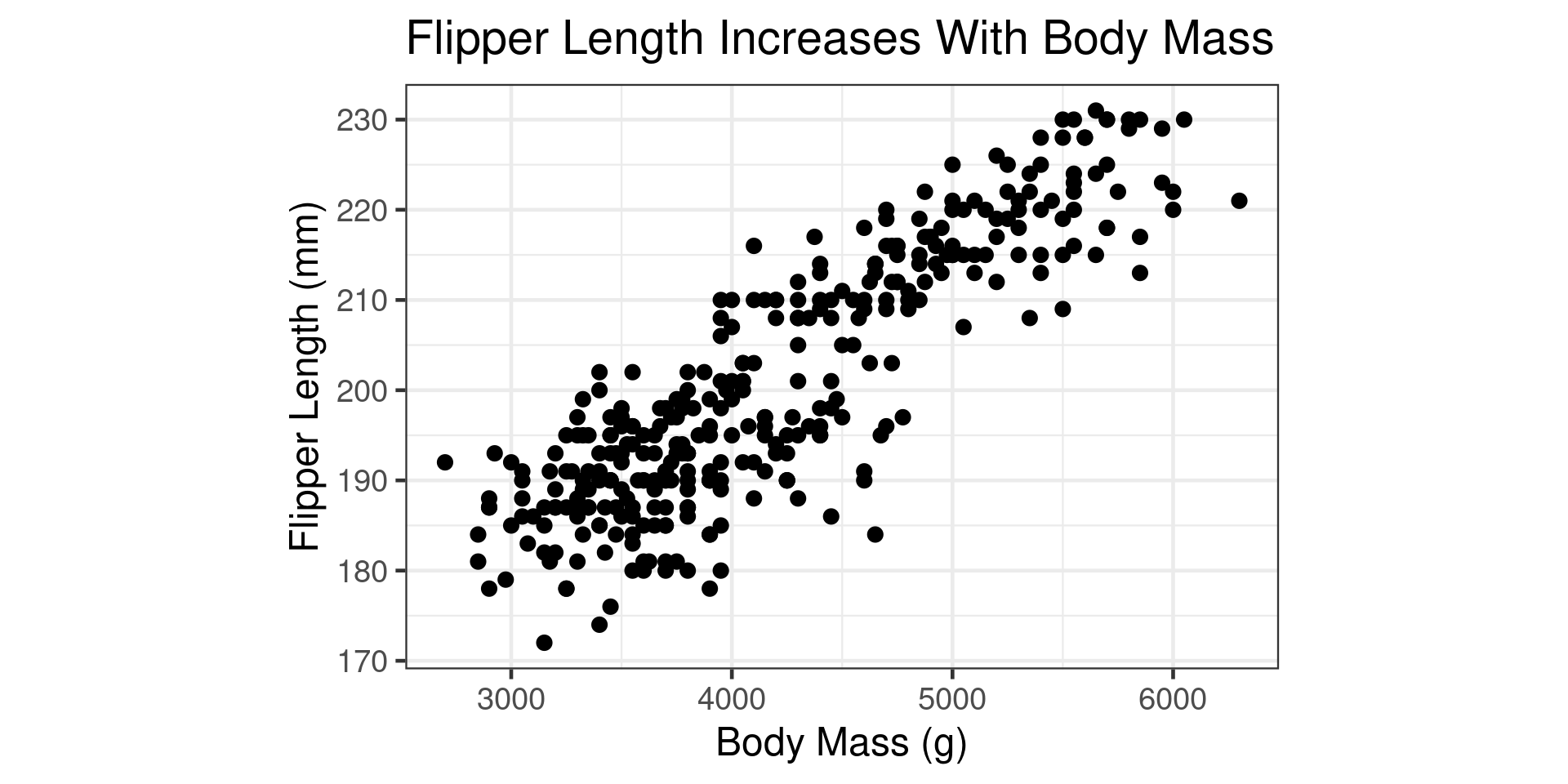
Scatterplots

  • Shows how two variables are associated
library(tidyverse)
library(palmerpenguins)
library(ggplot2)

penguins |> ggplot(aes(x=body_mass_g,y=flipper_length_mm)) +
  geom_point() +
  theme_bw(base_size = 18) +
  theme(aspect.ratio=0.67) +
  labs( title = "Flipper Length Increases With Body Mass") +
  xlab("Body Mass (g)") +
  ylab("Flipper Length (mm)")

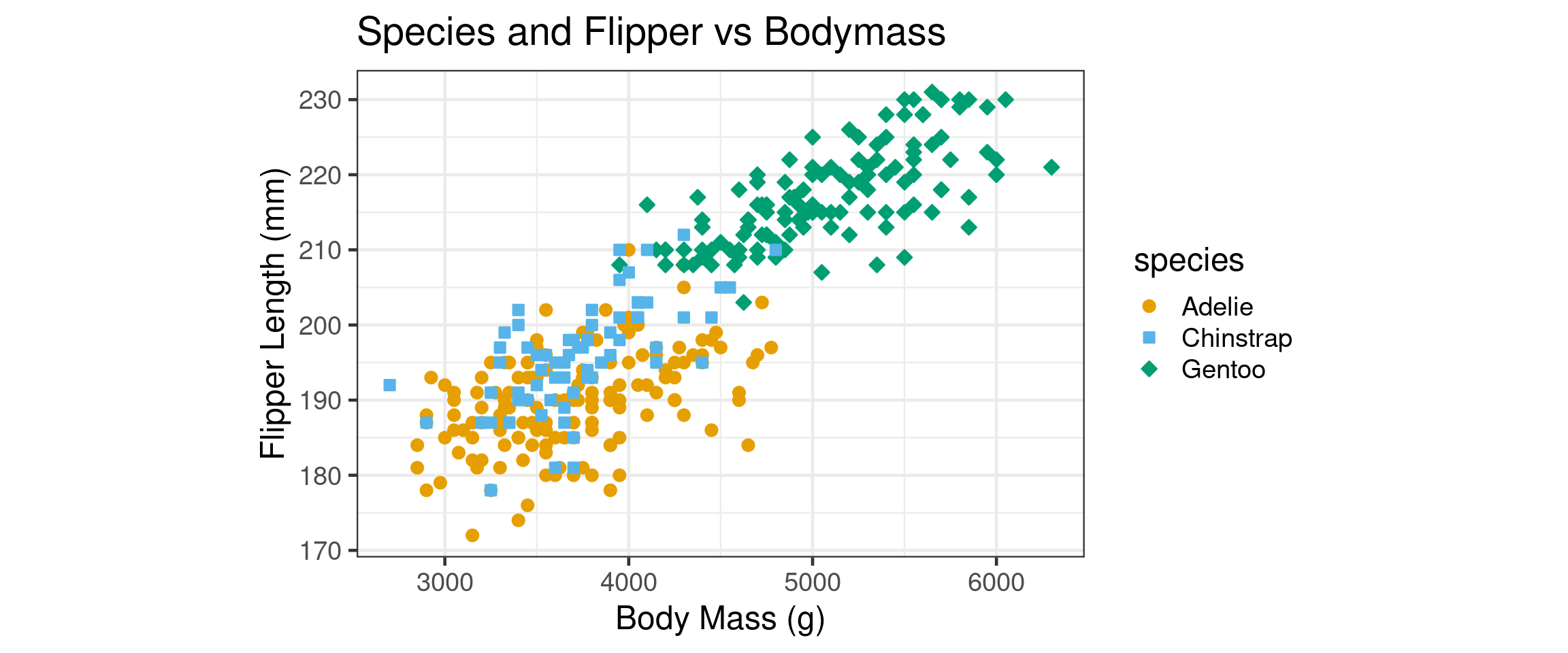
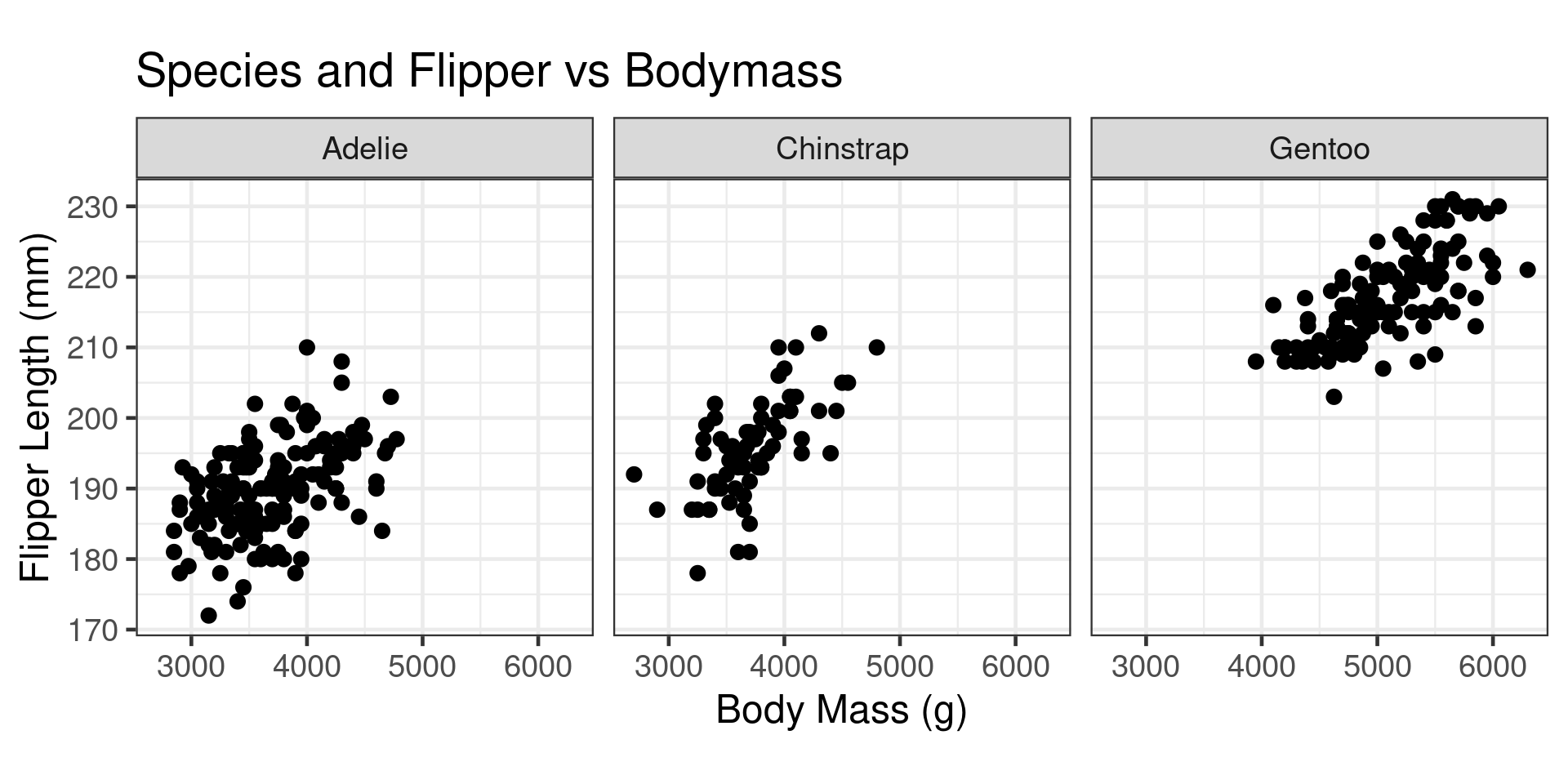
Multiple Types of Penguins

  • Can add categorical information several ways:
    • Color/Shape (Same Graph)
    • Facets (Different Graphs)

Multiple Types of Penguins

  • Can add categorical information several ways:
    • Color/Shape (Same Graph)
    • Facets (Different Graphs)

Redundant Coding
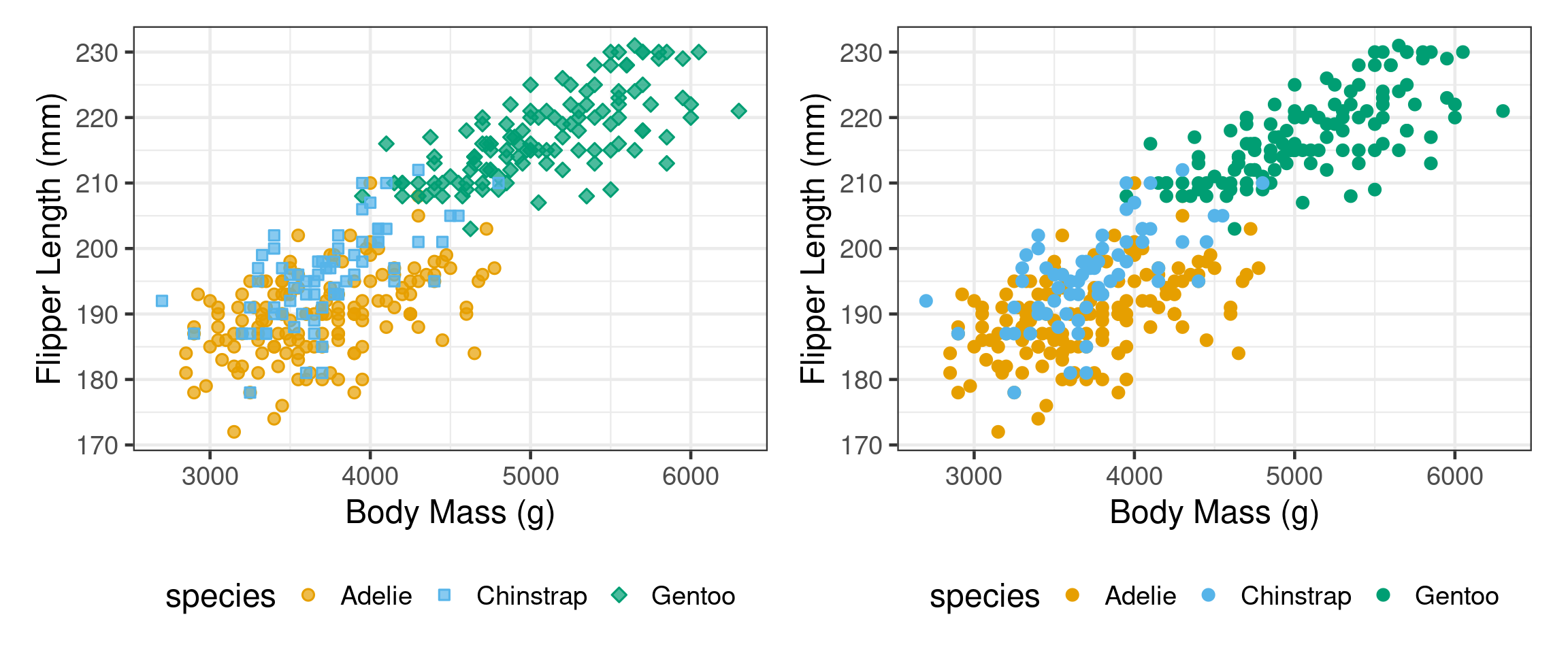
  • Some people can differentiate better when the additional variable is coded multiple times

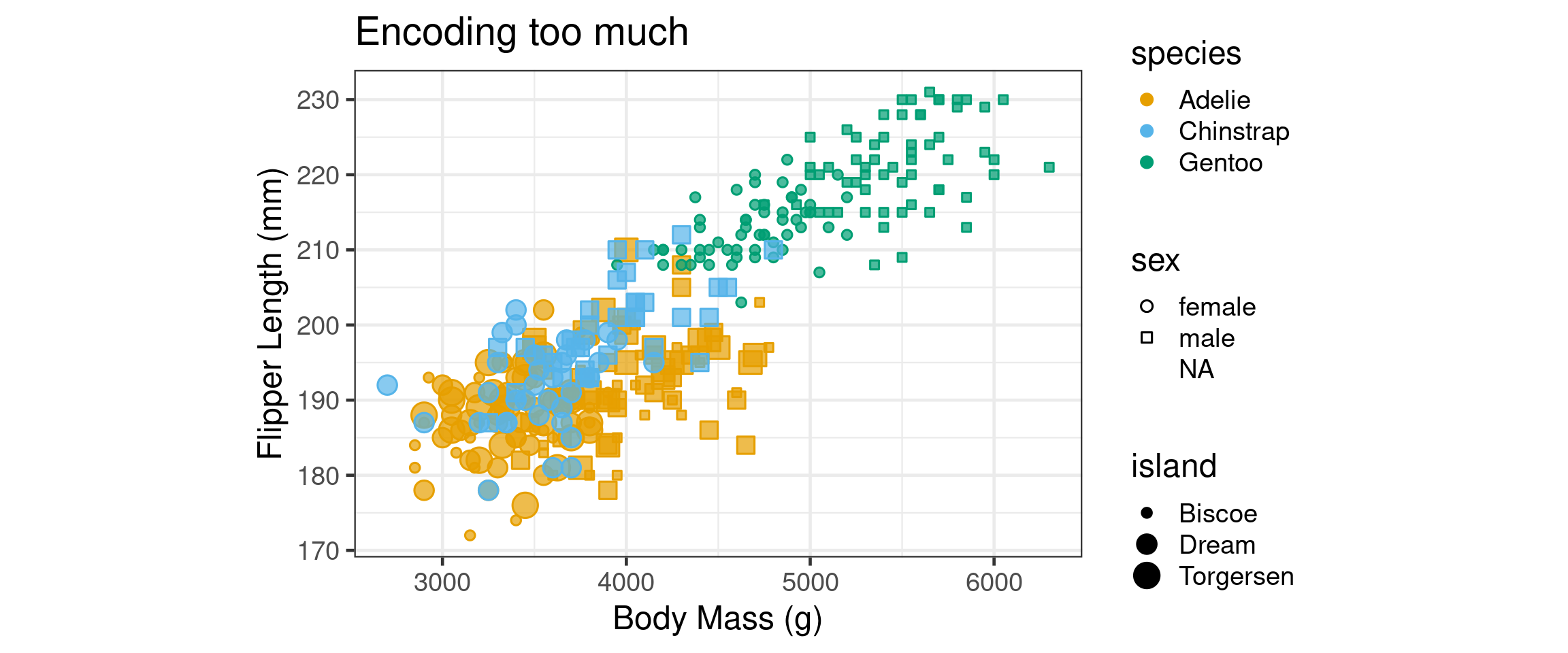
Limits on Channels

  • Using multiple “channels” for different variables overloads the brain
  • Practical limit is 1 categorical variable redundantly coded
Facets

  • Facet Grid and Facet wrap allow more annotations
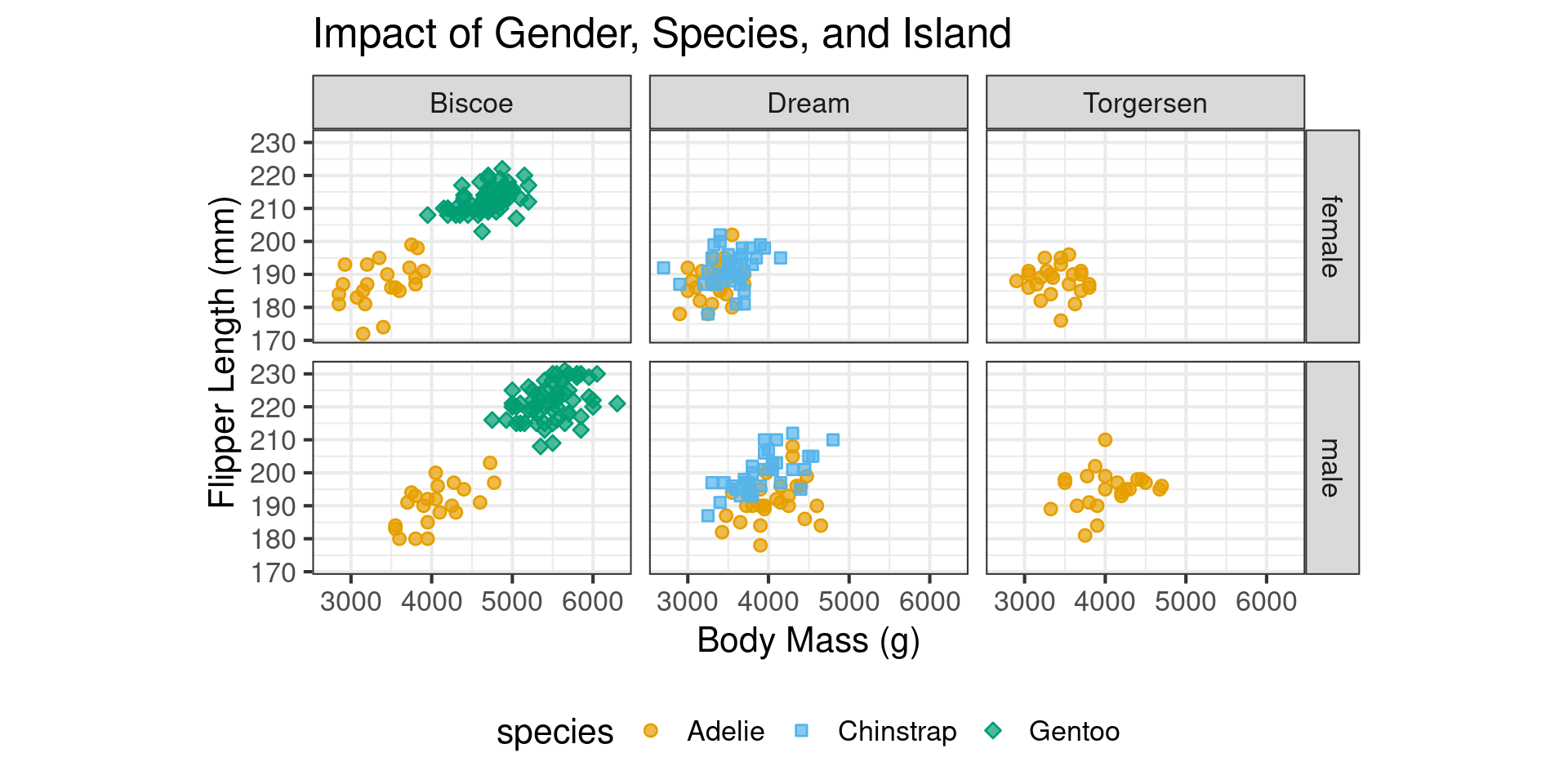
When to use Facets?

  • Showing on the same plot is better because of direct comparisons unless:
    • You want to show several categories
    • Too many elements in category (6?)

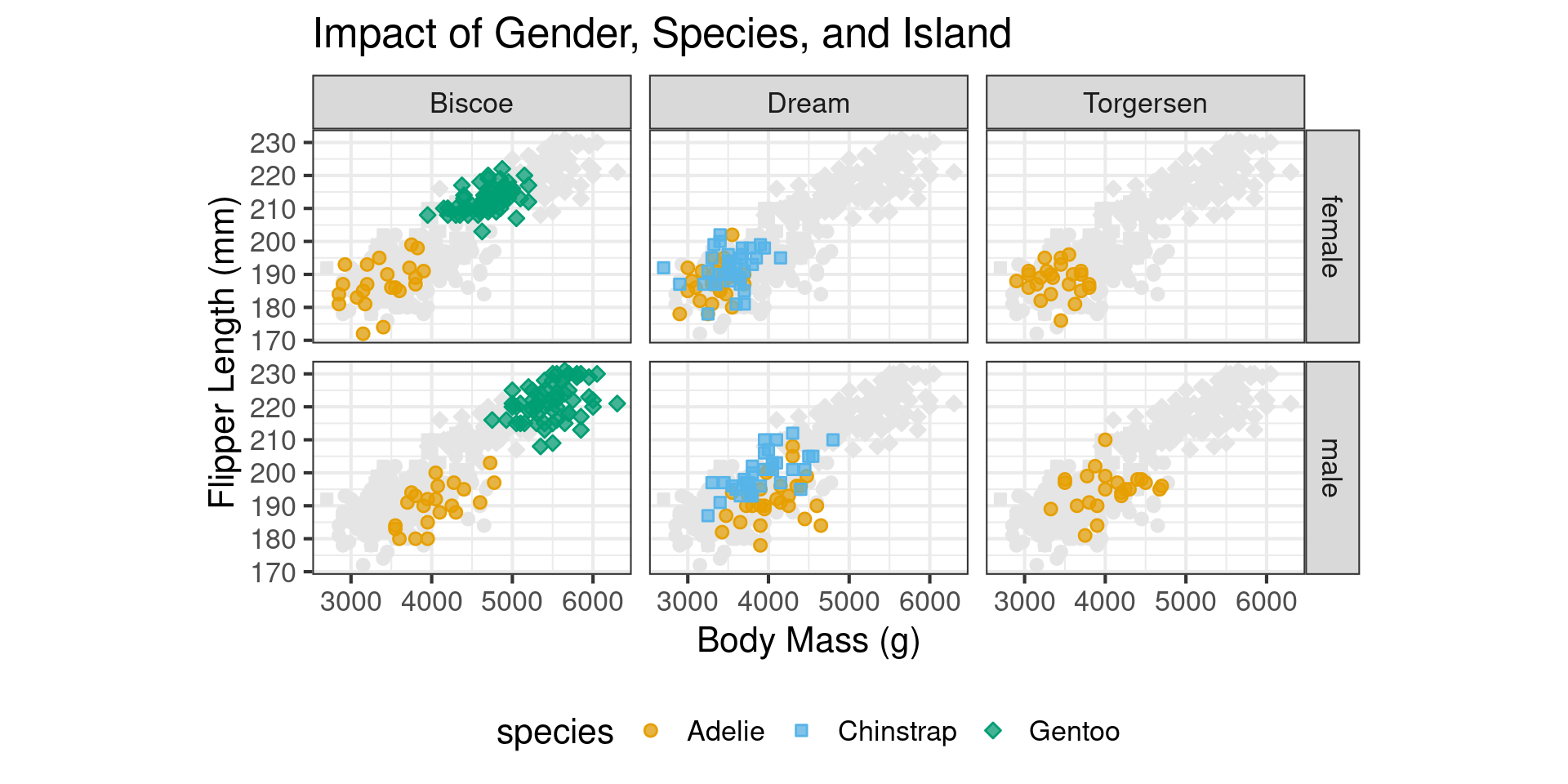
Facilitating Comparisons with Facets

  • Show all points on each facet

Facilitating Comparisons with Facets

penguins |> filter(sex %in% c("male","female")) |> 
        ggplot(aes(x=body_mass_g,
                   y=flipper_length_mm,
                   color=species,shape = species, 
                   fill = species)) +
  geom_point(data = transform(penguins, 
                              sex = NULL, 
                              island = NULL), 
             color = "grey90",
             fill="grey90") +  
    facet_grid(sex ~ island) + ... other
  • Add to old plot another geom_point
  • NULL the facet categories
  • Force a light color

Scatterplot Annotations

  • Reduce cognitive load by labeling directly
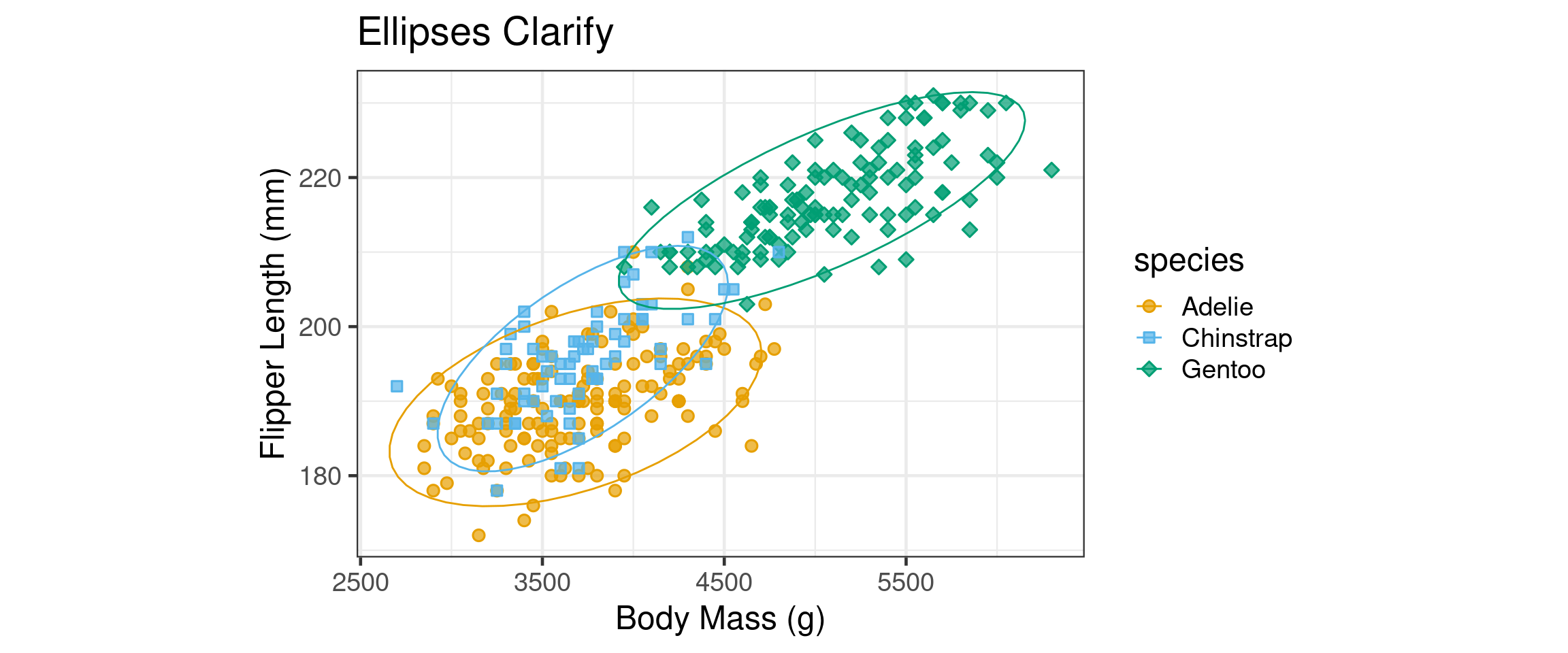
  • stat_ellipse draws ellipses around groups

Scatterplot Annotations
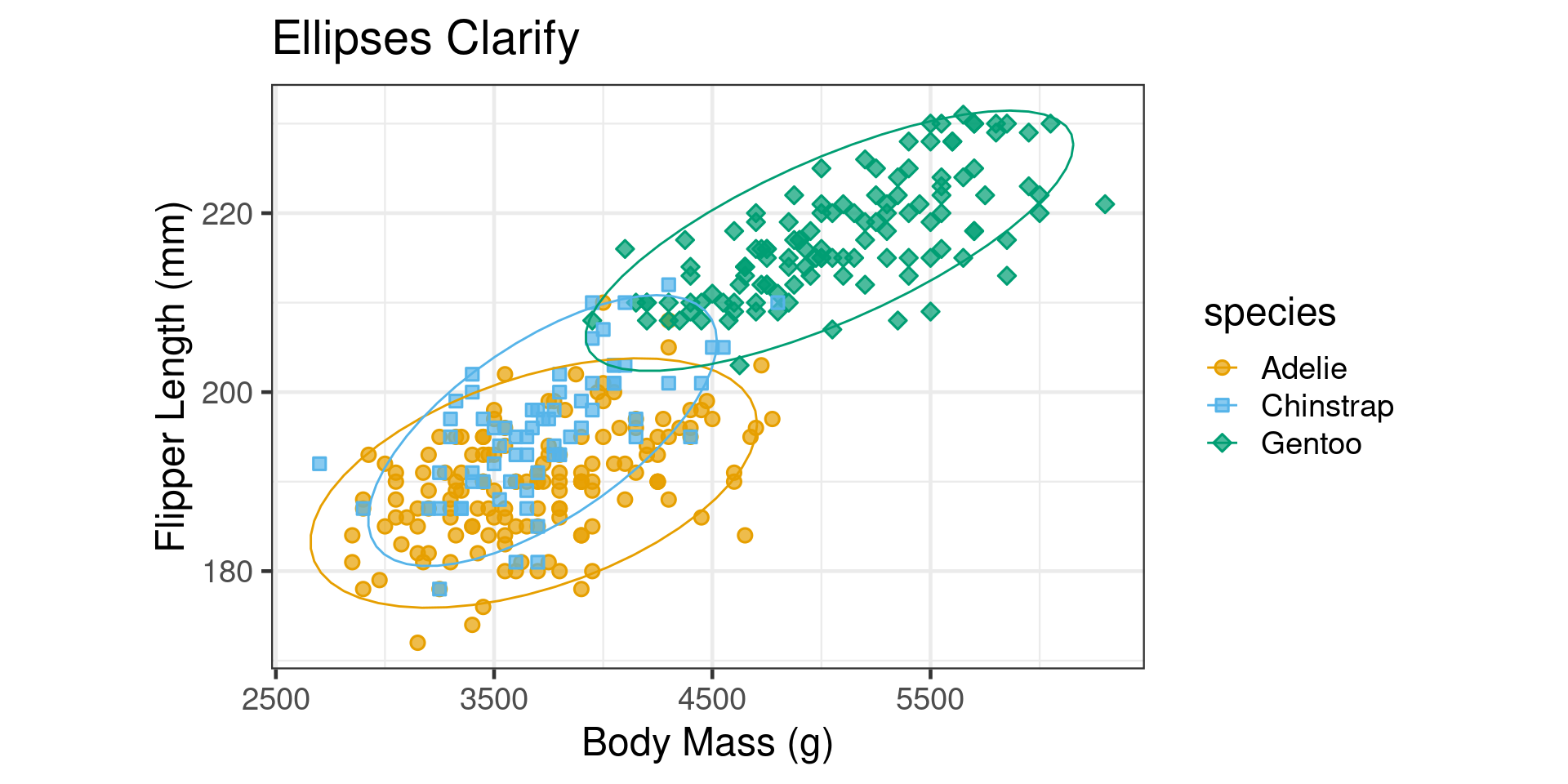
penguins |> ggplot(aes(x=body_mass_g,y=flipper_length_mm,color=species,shape = species, fill = species)) +
  geom_point() +
  stat_ellipse(size=0.5) +
  other_commands(...)

Labeling Ellipses

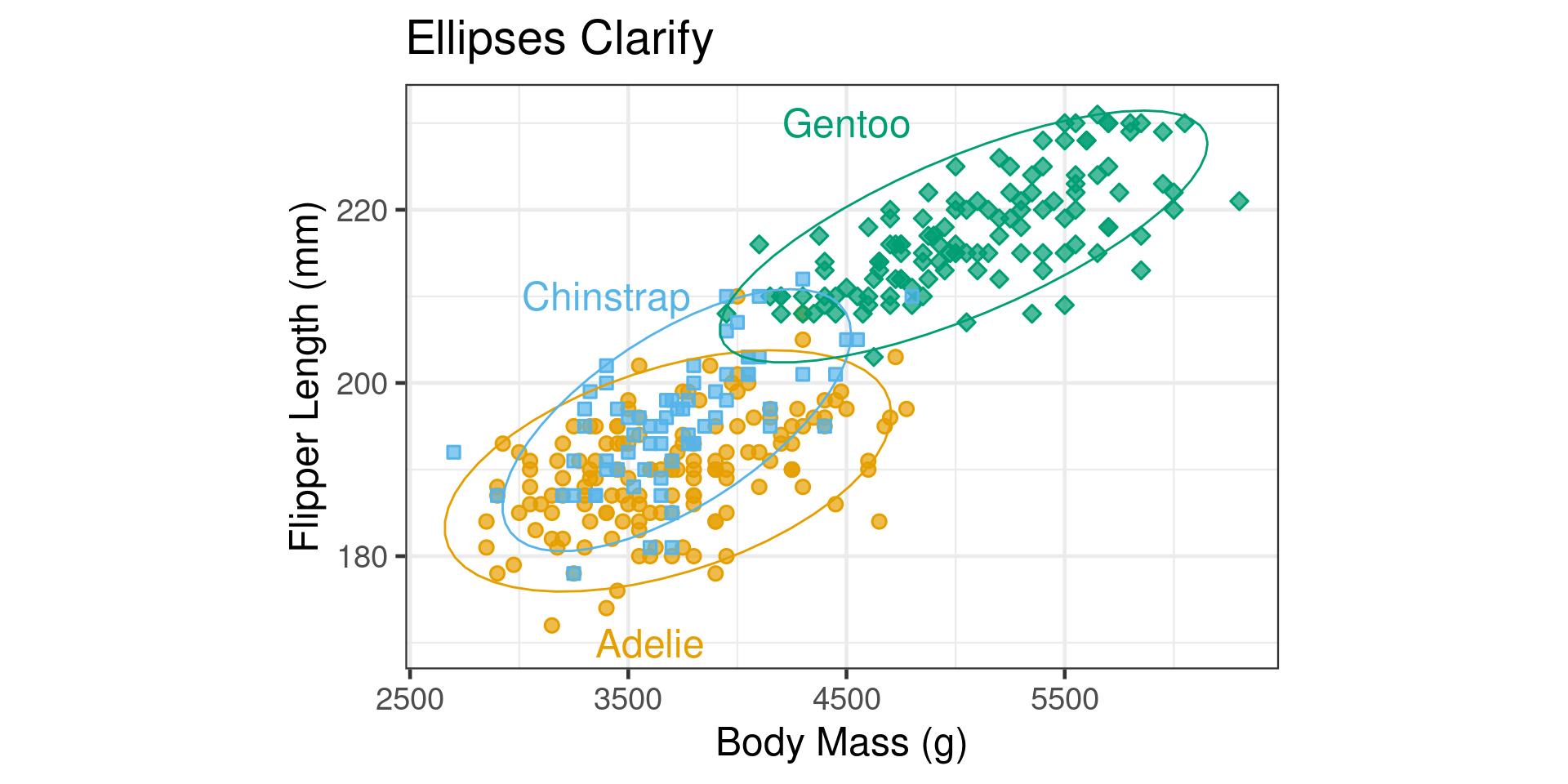
  • Can use geom_text to label ellipses
  • Create a new data-frame for the labels
penguin_labels =  tibble(
  species = c("Adelie", "Chinstrap", "Gentoo"),
  body_mass_g = c(3600, 3400, 4500),
  flipper_length_mm = c(170, 210, 230),
  hjust = c(0, 0.5, 0),
  vjust = c(0, 0.5, 1)
)

Labelling Ellipses

p1 +
  geom_text(data = penguin_labels,
            label = penguin_labels$species,
            size = 18/.pt) +
  theme(legend.position = "none")

Unique Elements

  • When the category elements are unique makes sense to label them with points
log scale
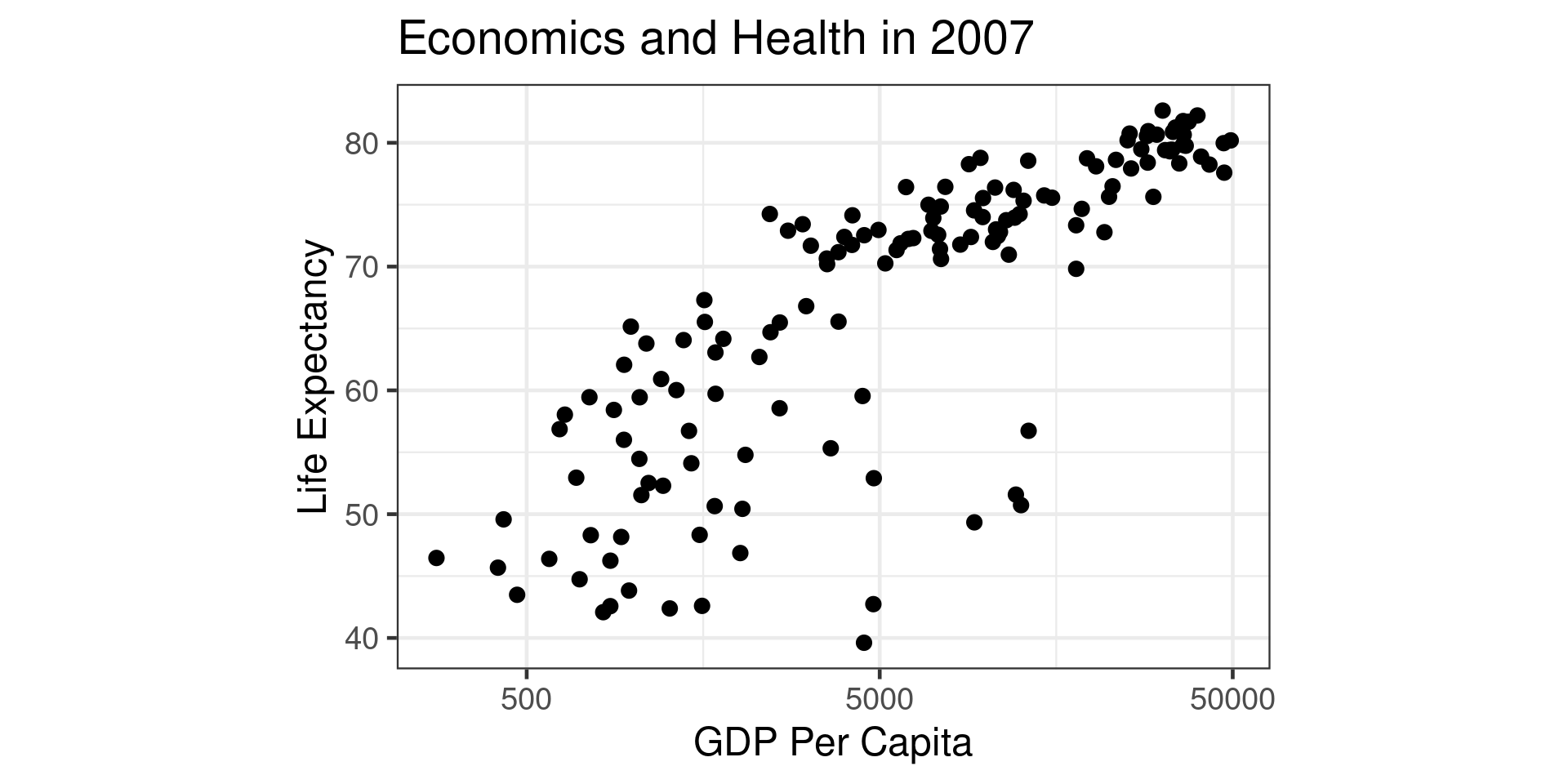
log scale

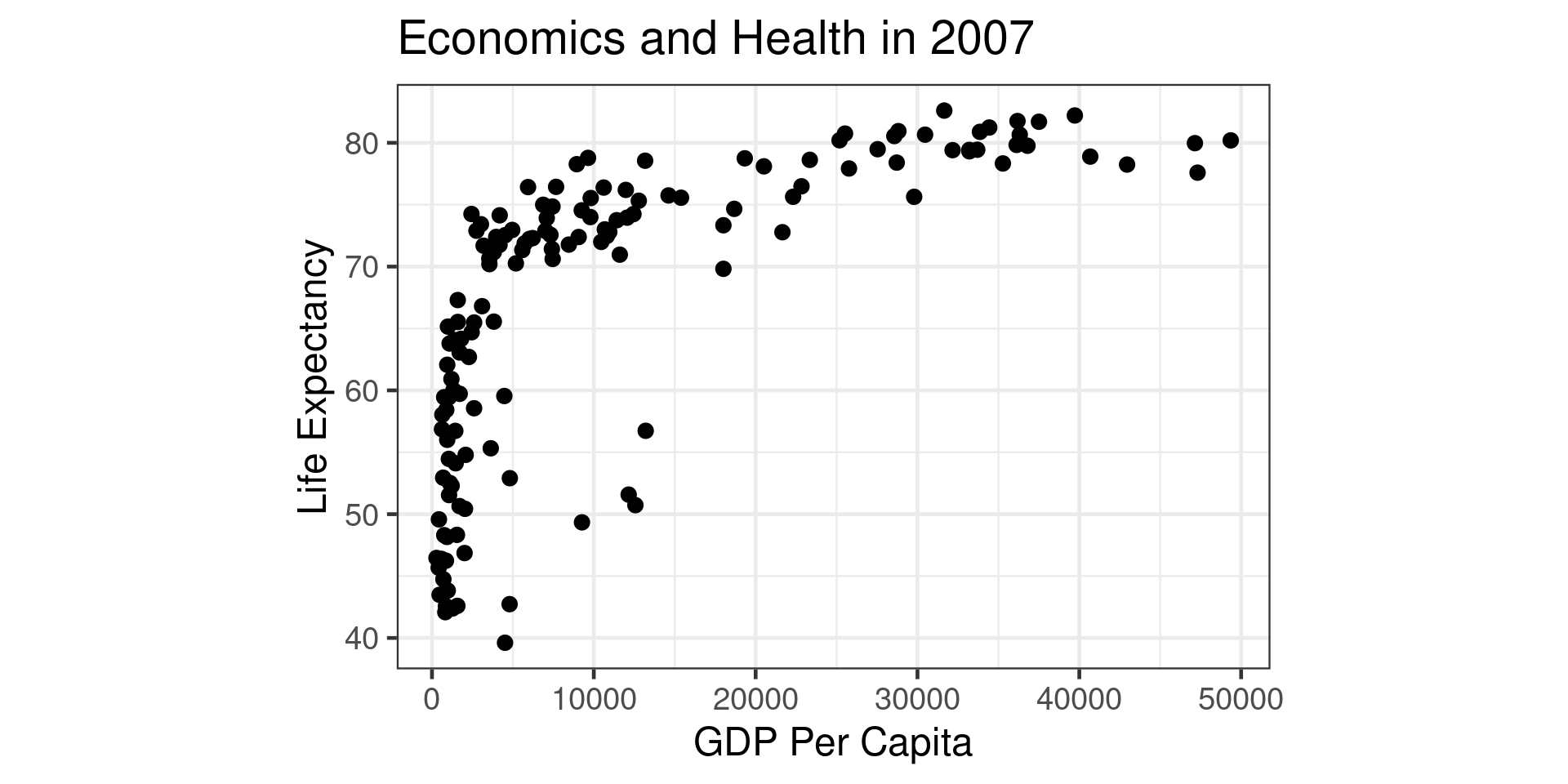
gapminder |> filter(year == 2007) |> ggplot(aes(x=gdpPercap,y=lifeExp))+
  geom_point() +
  theme_bw(base_size = 18) +
  theme(aspect.ratio=0.67) +
  xlab("GDP Per Capita") +
  ylab("Life Expectancy") +
  labs(title = "Economics and Health in 2007") +
  scale_x_log10(breaks = c(500, 5000, 50000))
  • log is useful when data is positive and spans a large range
  • scale_x_log10 and scale_y_log10 can be useed

Adding labels

  • Can use geom_text instead of geom_point

Adding Labels

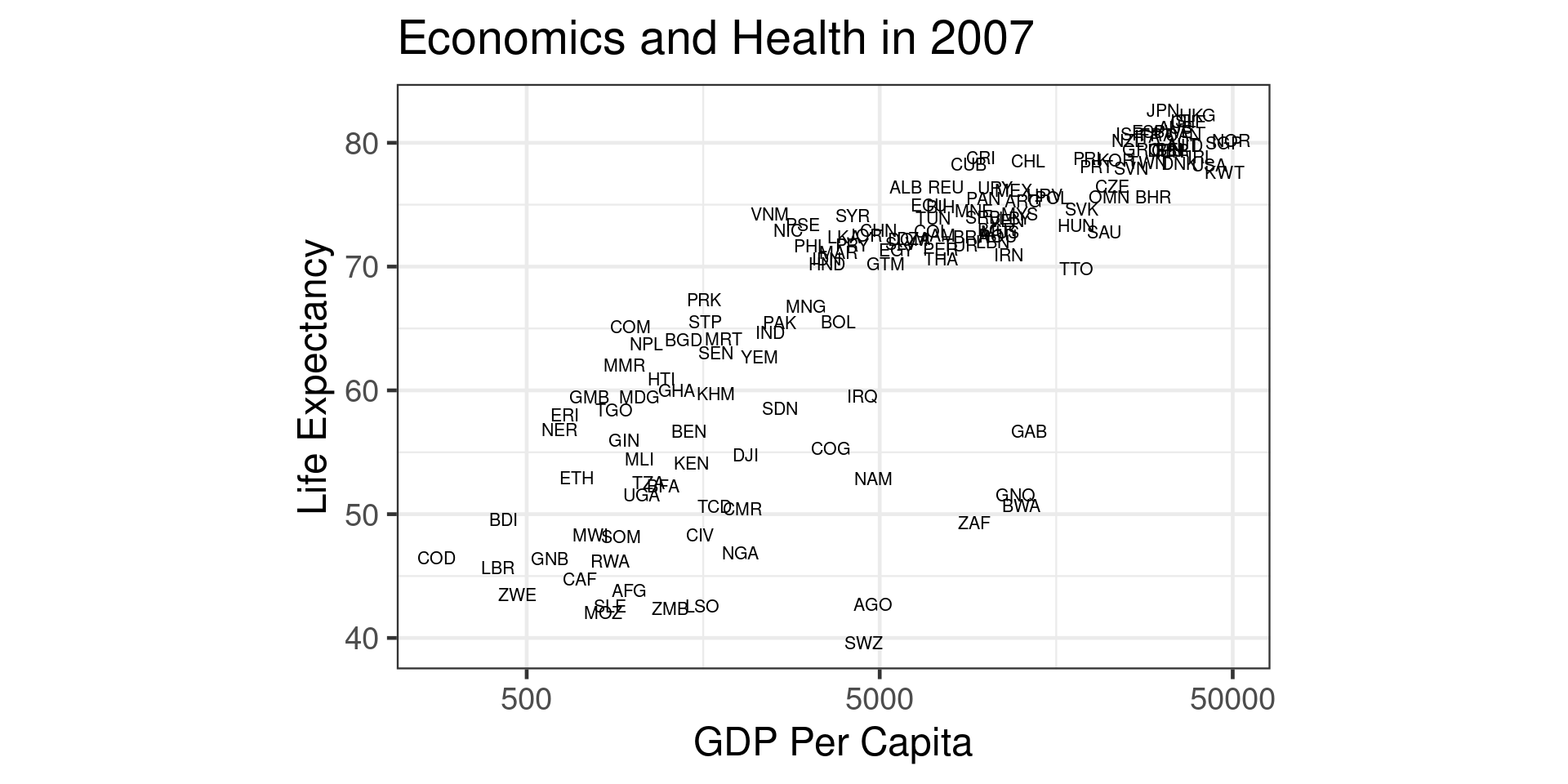
gapminder |> left_join(country_codes) |> 
  filter(year == 2007) |> ggplot(aes(x=gdpPercap,y=lifeExp))+
  geom_text(aes(label = iso_alpha),size=8/.pt) +
  theme_bw(base_size = 18) +
  theme(aspect.ratio=0.67) +
  xlab("GDP Per Capita") +
  ylab("Life Expectancy") +
  labs(title = "Economics and Health in 2007") +
  scale_x_log10(breaks = c(500, 5000, 50000))

geom_text removing overlaps

geom_text removing overlaps

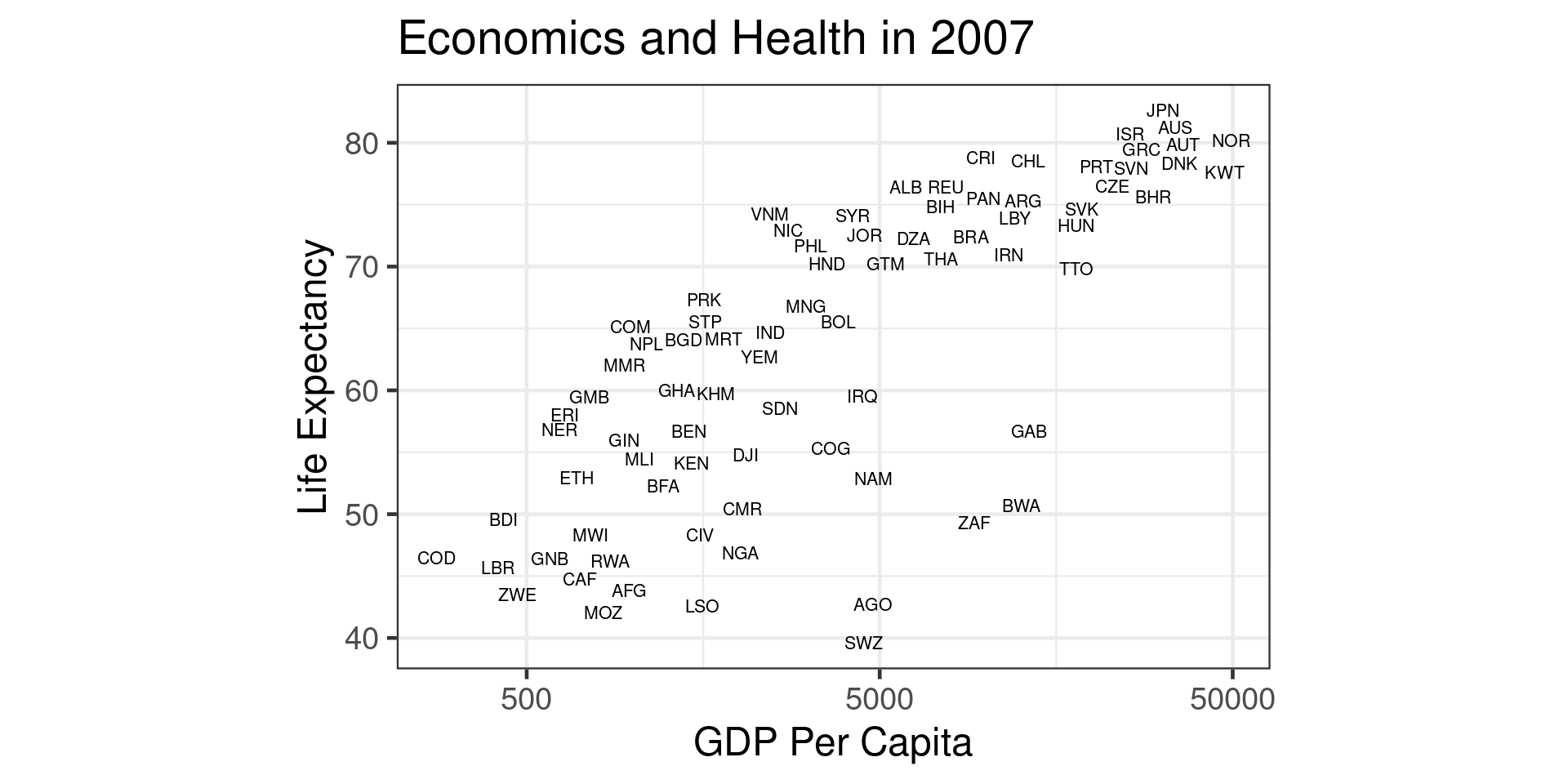
gapminder |> 
  left_join(country_codes) |> 
  filter(year == 2007) |> 
  ggplot(aes(x=gdpPercap,y=lifeExp))+
  geom_text(aes(label = iso_alpha),
            size=8/.pt,
            check_overlap = TRUE) +
  theme_bw(base_size = 18) +
  theme(aspect.ratio=0.67) +
  xlab("GDP Per Capita") +
  ylab("Life Expectancy") +
  labs(title = "Economics and Health in 2007") +
  scale_x_log10(breaks = c(500, 5000, 50000))
  • But throws away data randomly

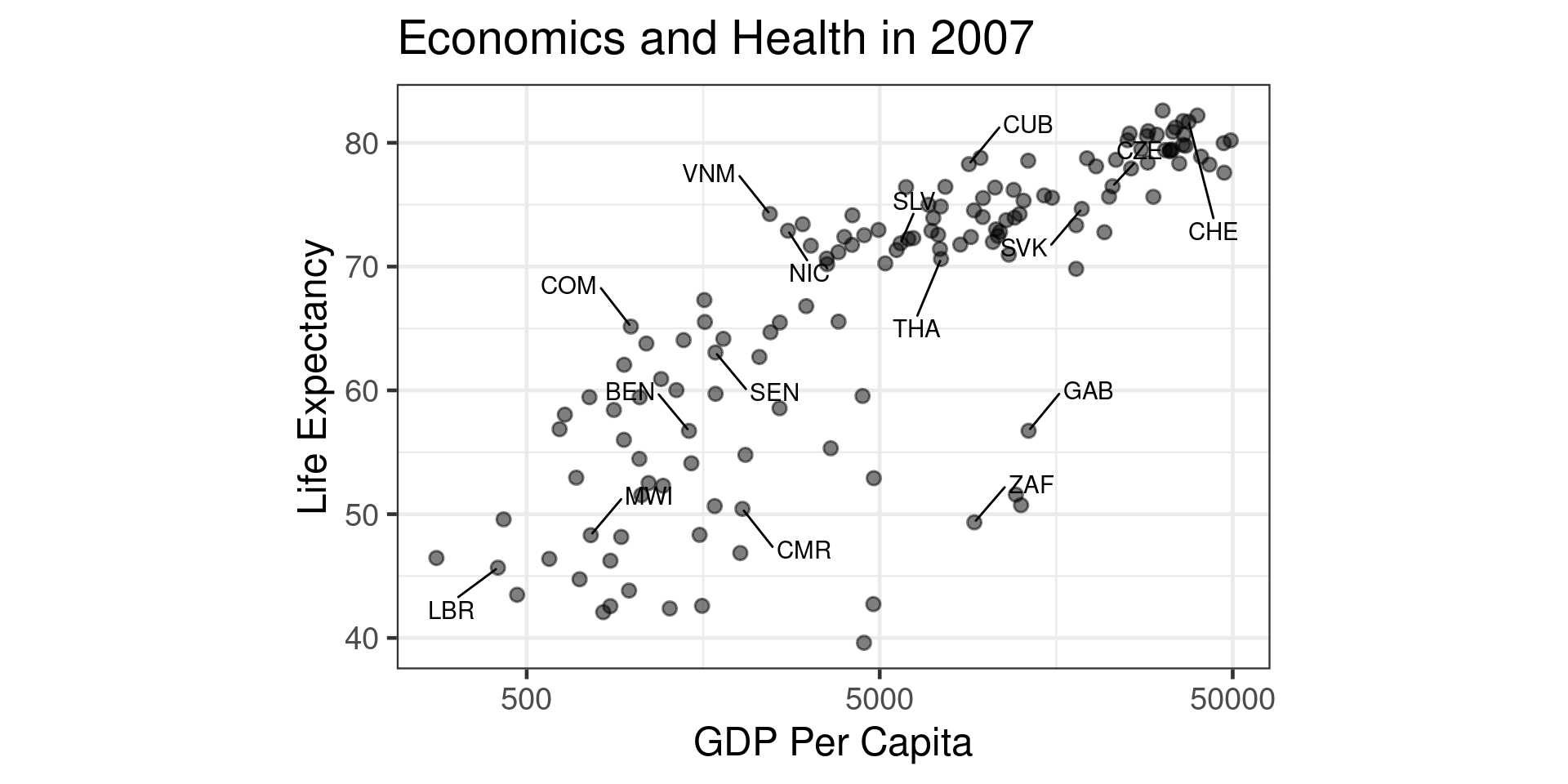
Label a subset

Label a subset

library(ggrepel)

set.seed(1000)
label_list = country_codes |> slice_sample(n=20) |> pull(iso_alpha)
gapminder_2 = gapminder |> left_join(country_codes) |> 
  mutate(iso_alpha = if_else(iso_alpha %in% label_list,iso_alpha, NA))

gapminder2 |> 
  filter(year == 2007) |> 
  ggplot(aes(x=gdpPercap,y=lifeExp))+
  geom_point(alpha=0.5) +
  geom_text_repel(aes(x=gdpPercap,
                      y=lifeExp,
                      label = iso_alpha),
                  max.overlaps=Inf,
                min.segment.length = 0.0,
              box.padding = 1) + ...

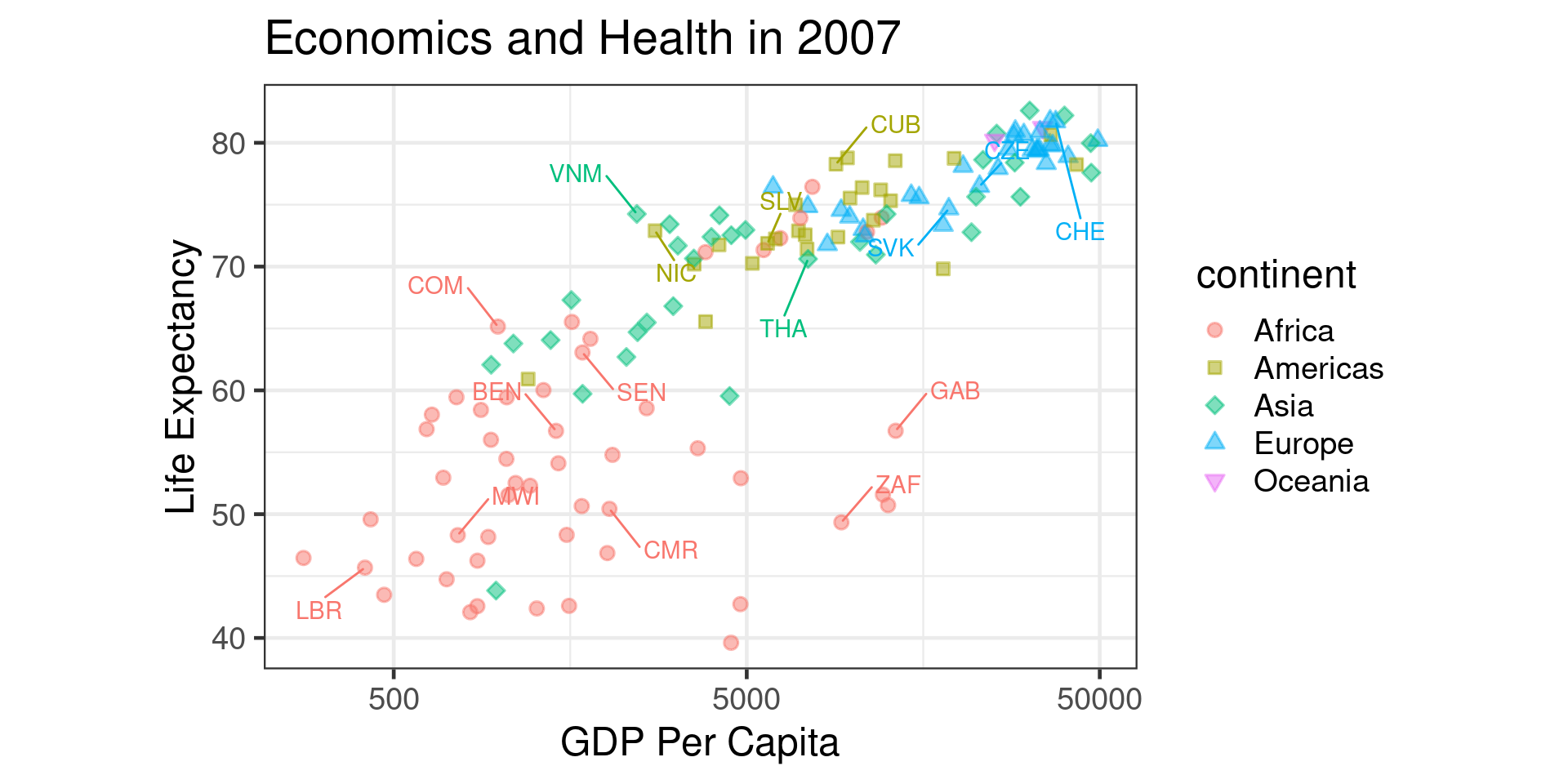
Add a category

Color/Bubble Plots

  • With 3 quantitative variables you can use size or color
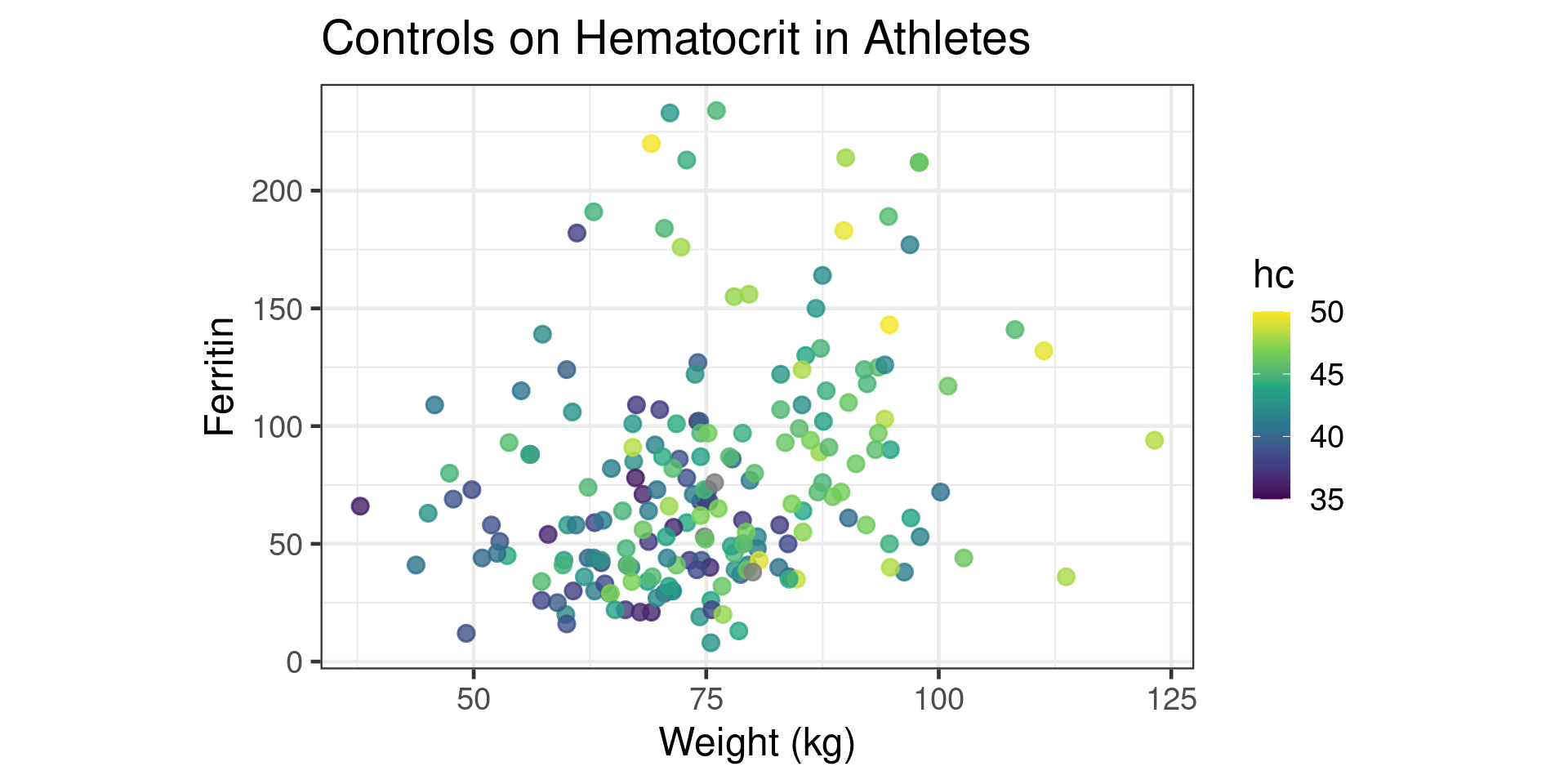
Color/Bubble Plots

  • With 3 quantitative variables you can use size or color
library(ggridges)
Aus_athletes |> ggplot(aes(x=weight,y=ferr,color=hc)) +
  geom_point(size=3,alpha=0.8) +
  scale_color_viridis_c(limits=c(35,50)) +  
  theme_bw(base_size = 18) +
  theme(aspect.ratio = 0.67) +
  ylab("Ferritin") +
  xlab("Weight (kg)") +
  labs(title = "Controls on Hematocrit in Athletes")

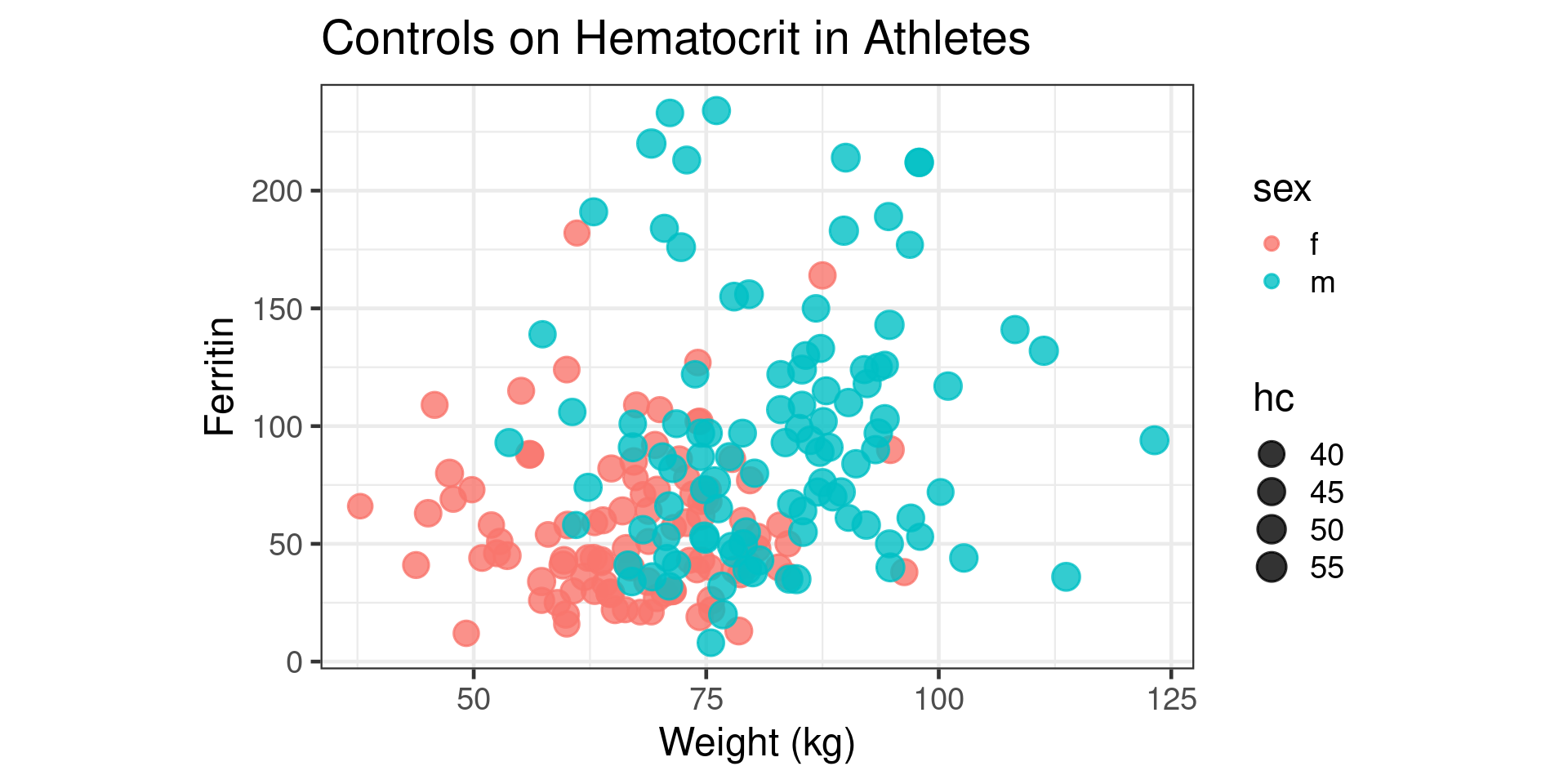
Bubble Plot

  • The Bubble plot uses size instead

Bubble Plot

  • The Bubble plot uses size instead
library(ggridges)
Aus_athletes |> ggplot(aes(x=weight,y=ferr,size=hc,color=sex,fill=sex)) +
  geom_point(alpha=0.8) +
  scale_size_area() + 
  theme_bw(base_size = 18) +
  theme(aspect.ratio = 0.67) +
  ylab("Ferritin") +
  xlab("Weight (kg)") +
  labs(title = "Controls on Hematocrit in Athletes")

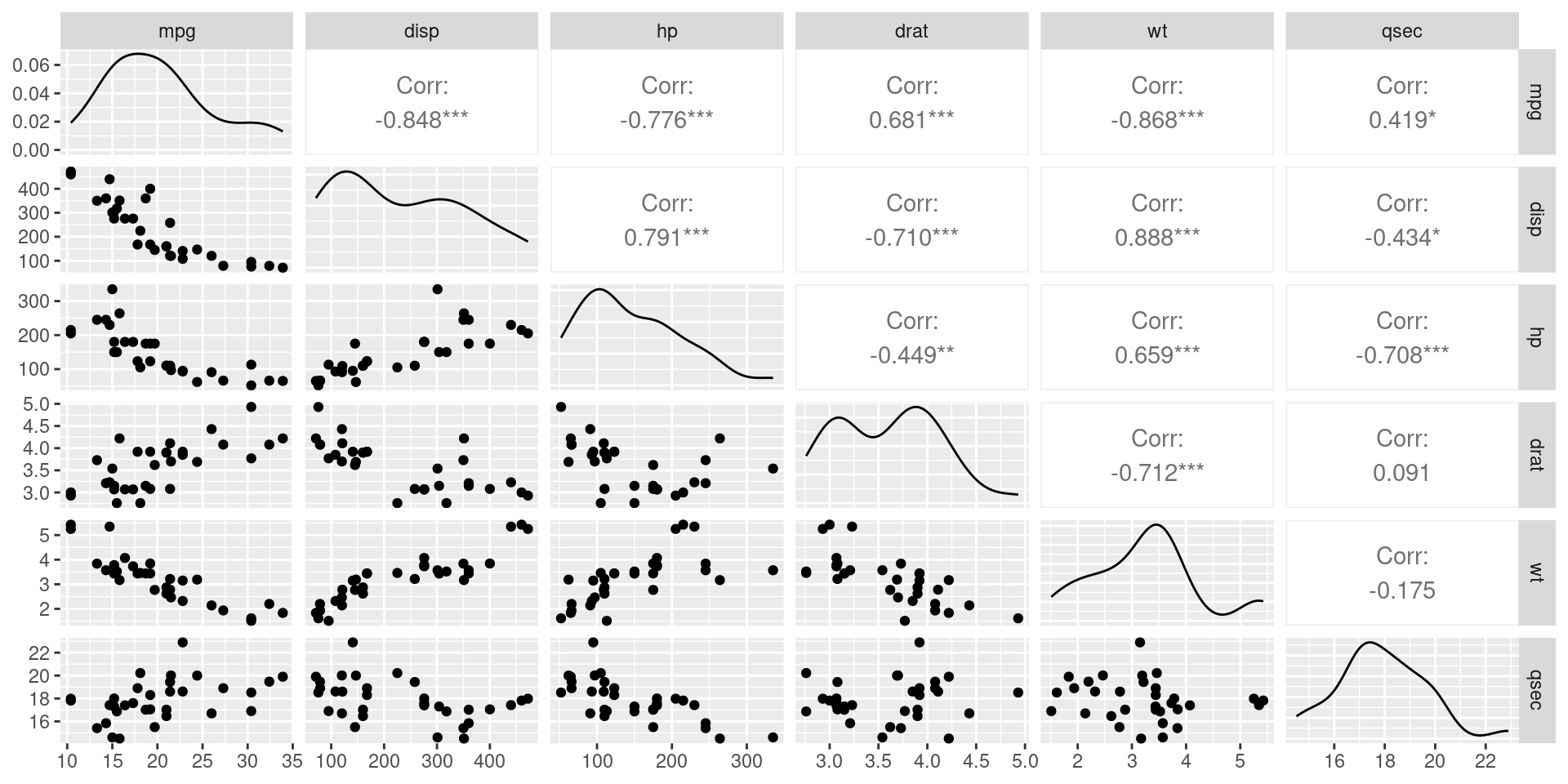
Many Variables: Pair-Plots

Many Variables: Pair-Plots

library(GGally)

mtcars |> select(mpg,disp,hp,drat,wt,qsec) |> ggpairs()

Disadvantages of Pair-Plots

  • When the number of variables is high, false discovery rate
  • Can be challenging to look at
  • Later in semester we will discuss dimensional reduction

Time Series

  • Time series are like a scatterplot
  • Time variable gives additional structure
  • Commonly use line plots instead of points
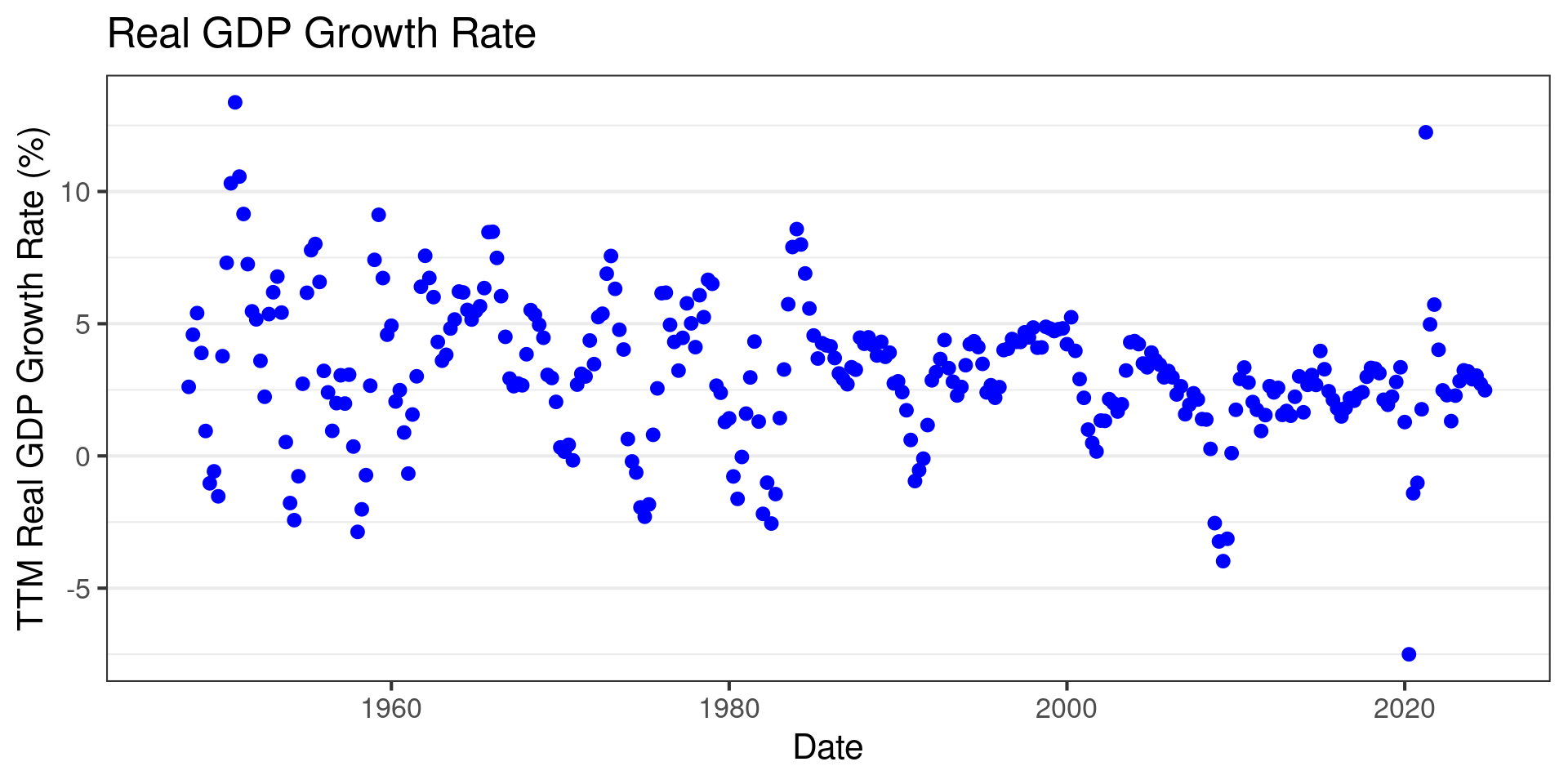
Time Series

  • Time series are like a scatterplot
  • Time variable gives additional structure
  • Commonly use line plots instead of points
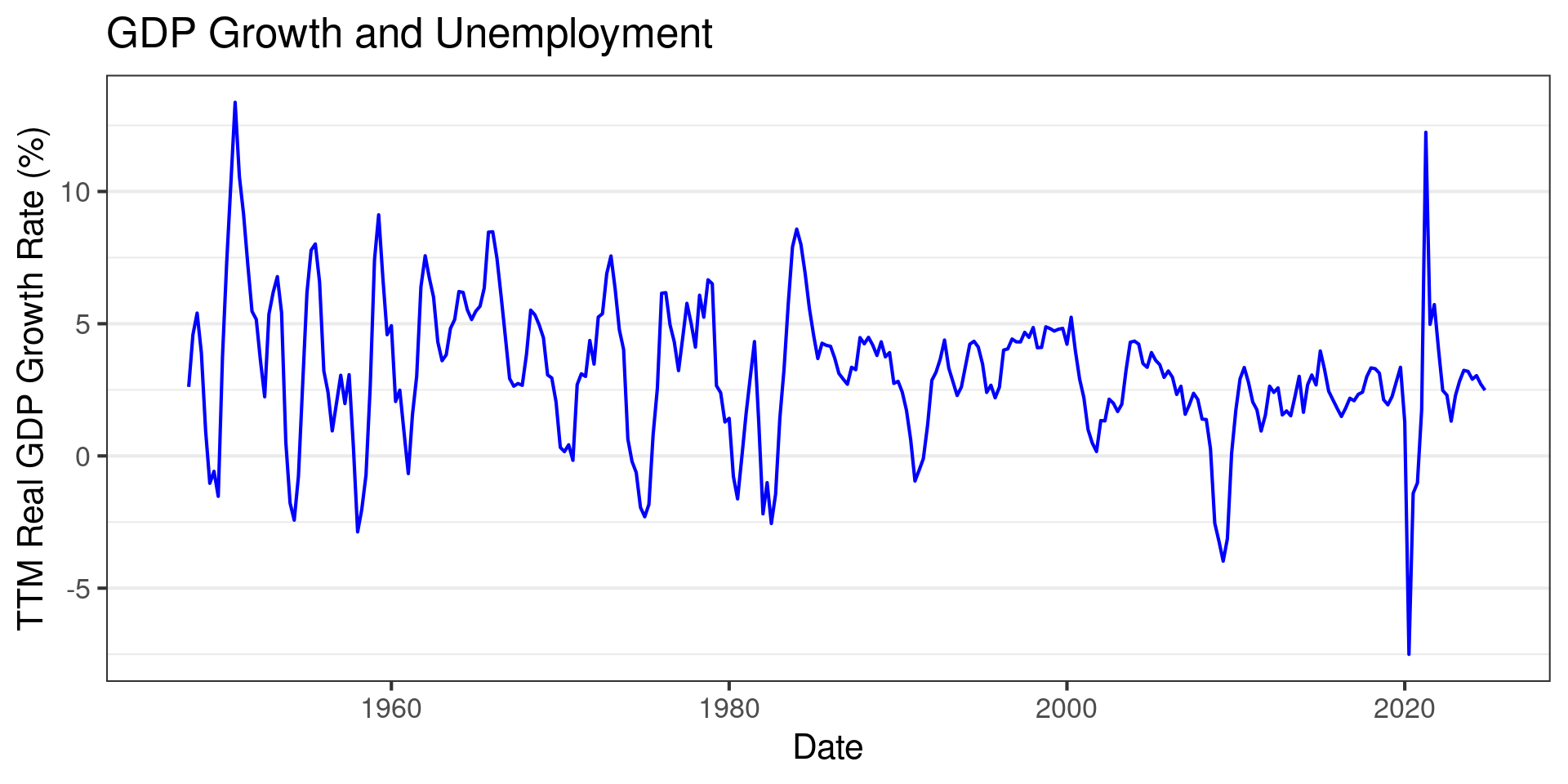
Time Series

  • Time series are like a scatterplot
  • Time variable gives additional structure
  • Commonly use line plots instead of points
library(TTR)
gdp = read_csv("GDPC1.csv")
gdp = gdp |> mutate(growth = 100*(GDPC1/lag(GDPC1,4)-1)) 

gdp |> ggplot(aes(x=observation_date,y=growth)) +
  geom_line(color="blue") +
  theme_bw(base_size=16) +
  theme(panel.grid.minor.x = element_blank(),
          panel.grid.major.x = element_blank() )+
  labs(title="Real GDP Growth Rate") +
  xlab("Date") +
  ylab("TTM Real GDP Growth Rate (%)")

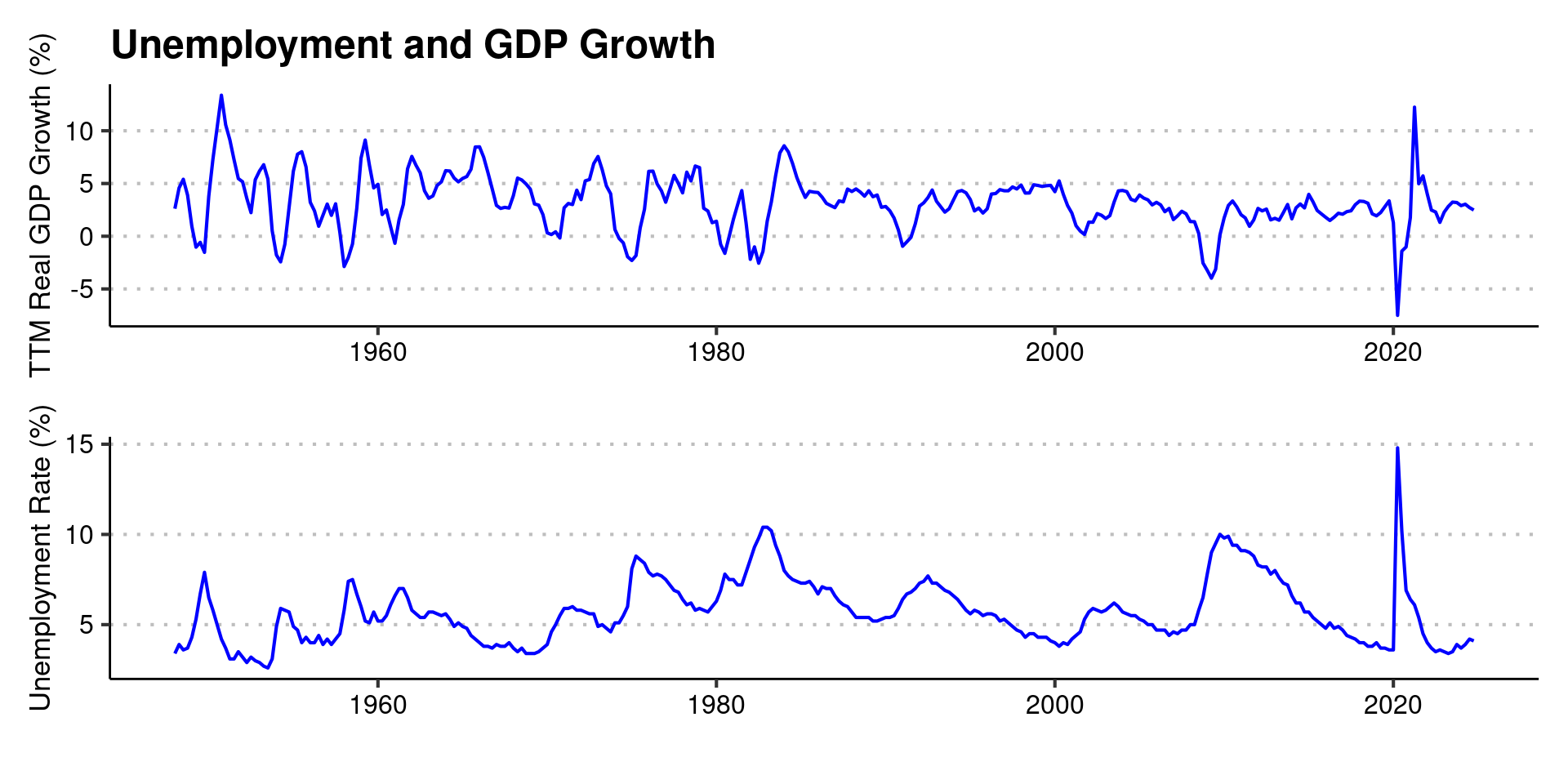
Multiple Time Series

  • Unless units are the same, use multiple plots
  • I like to use the patchwork package

Multiple Time Series

  • Unless units are the same, use multiple plots
  • I like to use the patchwork package
library(patchwork)
unemp = read_csv("UNRATE.csv")
p1 = gdp |> ggplot(aes(x=observation_date,y=growth)) +
  geom_line(color="blue") +
  theme_clean(base_size=16) +
  theme(panel.grid.minor.x = element_blank(),
          panel.grid.major.x = element_blank(),
        plot.background = element_rect(color = NA)
        ) +
  labs(title = "Unemployment and GDP Growth")+
  xlab("") +
  ylab("TTM Real GDP Growth (%)")

p2 = unemp |> ggplot(aes(x=observation_date,y=UNRATE)) +
  geom_line(color="blue") +
  theme_clean(base_size=16) +
  theme(panel.grid.minor.x = element_blank(),
          panel.grid.major.x = element_blank(),
            plot.background = element_rect(color = NA)
        )+
  ylab("Unemployment Rate (%)")+
  xlab("")

p1/p2

How to Annotate

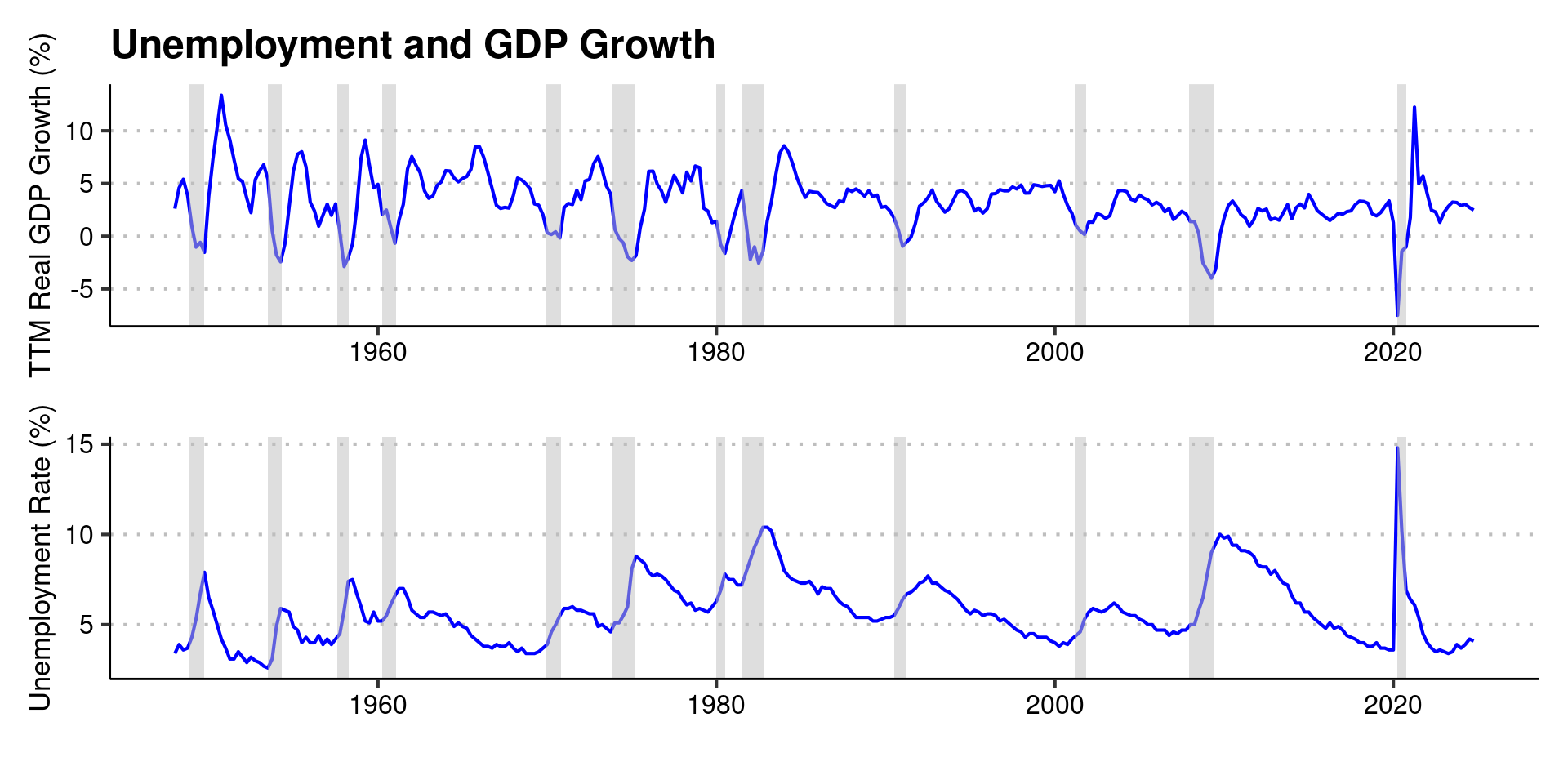
  • Identify recessions with shaded rectangles
  • annotate function takes geom as argument
  • Here we identified recessions using FRED data
How to Annotate

  • Identify recessions with shaded rectangles
  • annotate function takes geom as argument
  • Here we identified recessions using FRED data
recessions = read_csv("recessions.csv")
recessions = recessions |> filter(Peak>"1948-01-01")

p1_shade = p1 +
  annotate("rect",xmin=recessions$Peak,xmax=recessions$Trough,ymin=-Inf,ymax=+Inf,alpha=0.5,fill='grey')

p2_shade = p2 + annotate("rect",xmin=recessions$Peak,xmax=recessions$Trough,ymin=-Inf,ymax=+Inf,alpha=0.5,fill='grey')
p1_shade/p2_shade

Avoiding the Legend

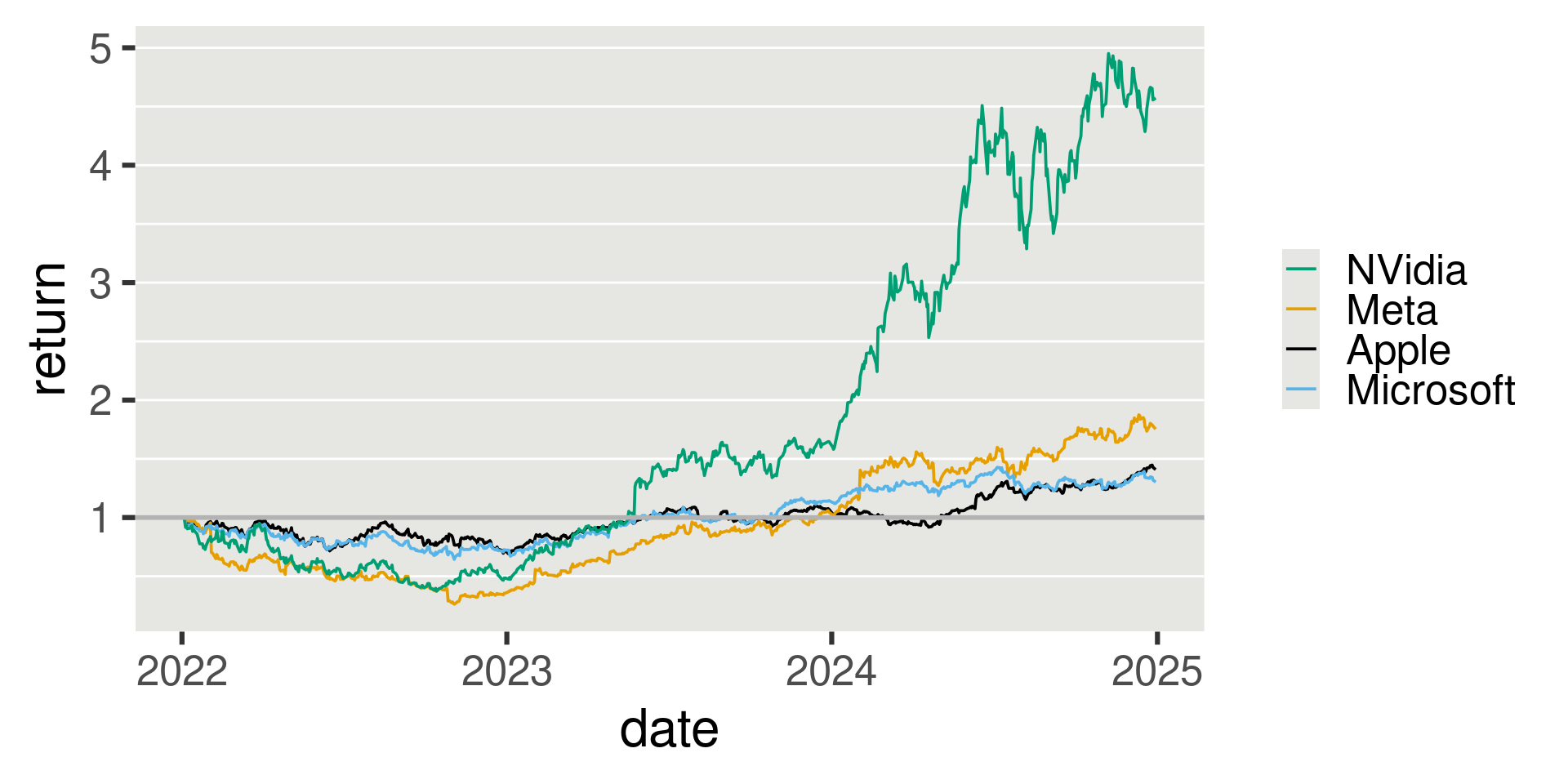
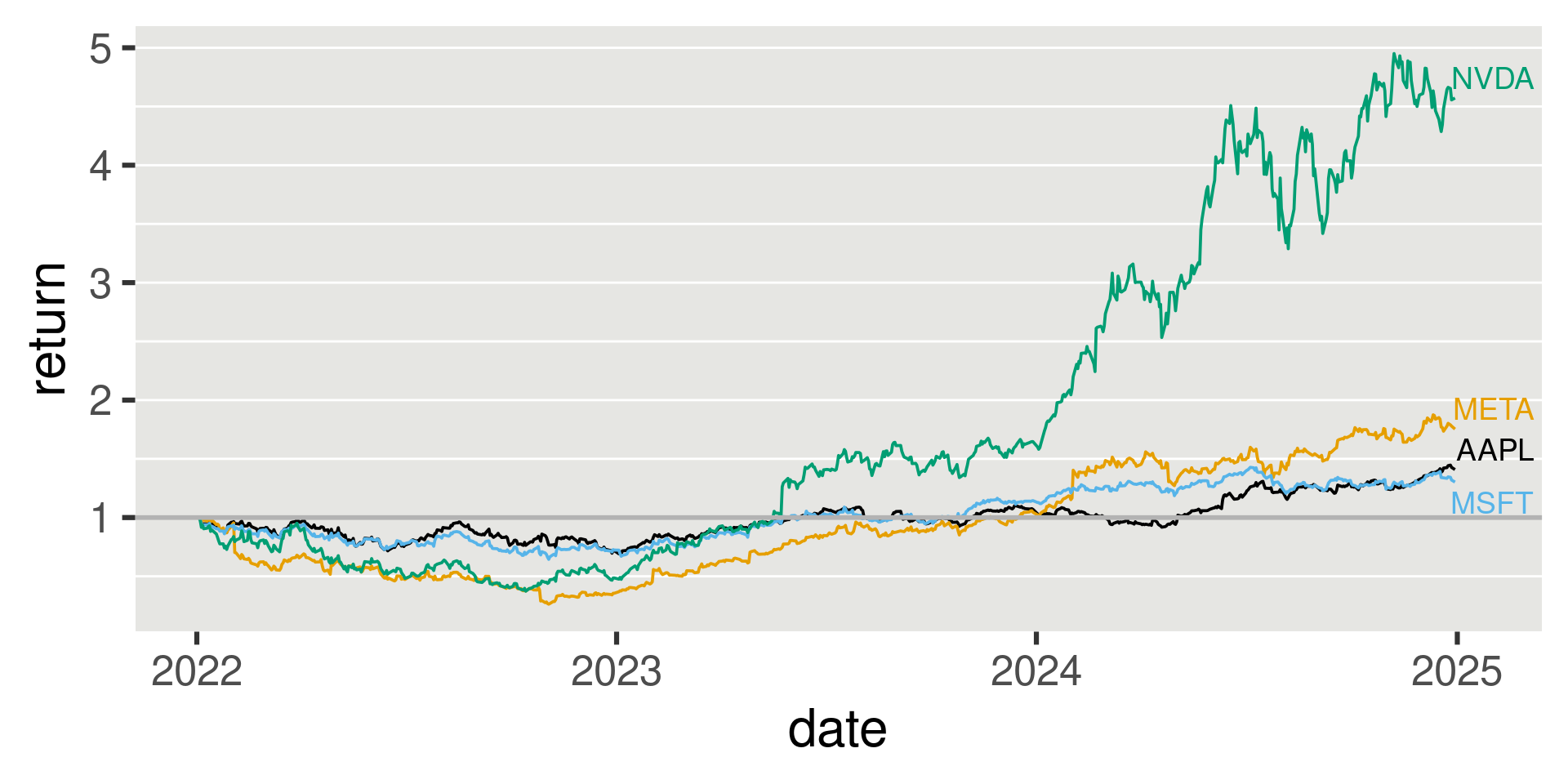
  • Create second data-frame with the last values
  • Add additional “axis” on right hand side
Avoiding the Legend

  • Create second data-frame with the last values
  • Add additional “axis” on right hand side
tech_stocks = read_csv("tech_stocks.csv")

p = tech_stocks |>
  ggplot(aes(x=date,y=return,group=Company,color=Company)) + geom_line(size=0.66,na.rm=TRUE,show.legend = FALSE) +
  geom_hline(yintercept = 1, size = 1.0, color="grey70") +
  theme_gray(base_size = 24) +
  scale_color_manual(
    values = c( "#009E73","#E69F00","#000000", "#56B4E9"),
    name = NULL,
    breaks = c("NVDA", "META", "AAPL", "MSFT"),
    labels = c("NVidia", "Meta", "Apple", "Microsoft"))  +
  theme(
    strip.background  = element_blank(),
          panel.background = element_rect(fill = "#E6E6E3",
                                          linewidth =0),
          panel.grid.minor.y = element_line(color="white",linewidth = 0.5),
          panel.grid.major.y = element_line(color="white",linewidth = 0.5),
          panel.grid.minor.x = element_blank(),
          panel.grid.major.x = element_blank(),
  )

Avoiding the Legend

  • Create second data-frame with the last values

Avoiding the Legend

  • Create second data-frame with the last values
tech_stocks_final = tech_stocks |> filter(date == max(date))
p + geom_text_repel(data=tech_stocks_final,aes(x=date,y=return,label=Company),nudge_x = 20,size=14/.pt) +  
  guides(color = "none",size="none") 
  • Another technique involves creating a secondary axis with breaks at the final returns

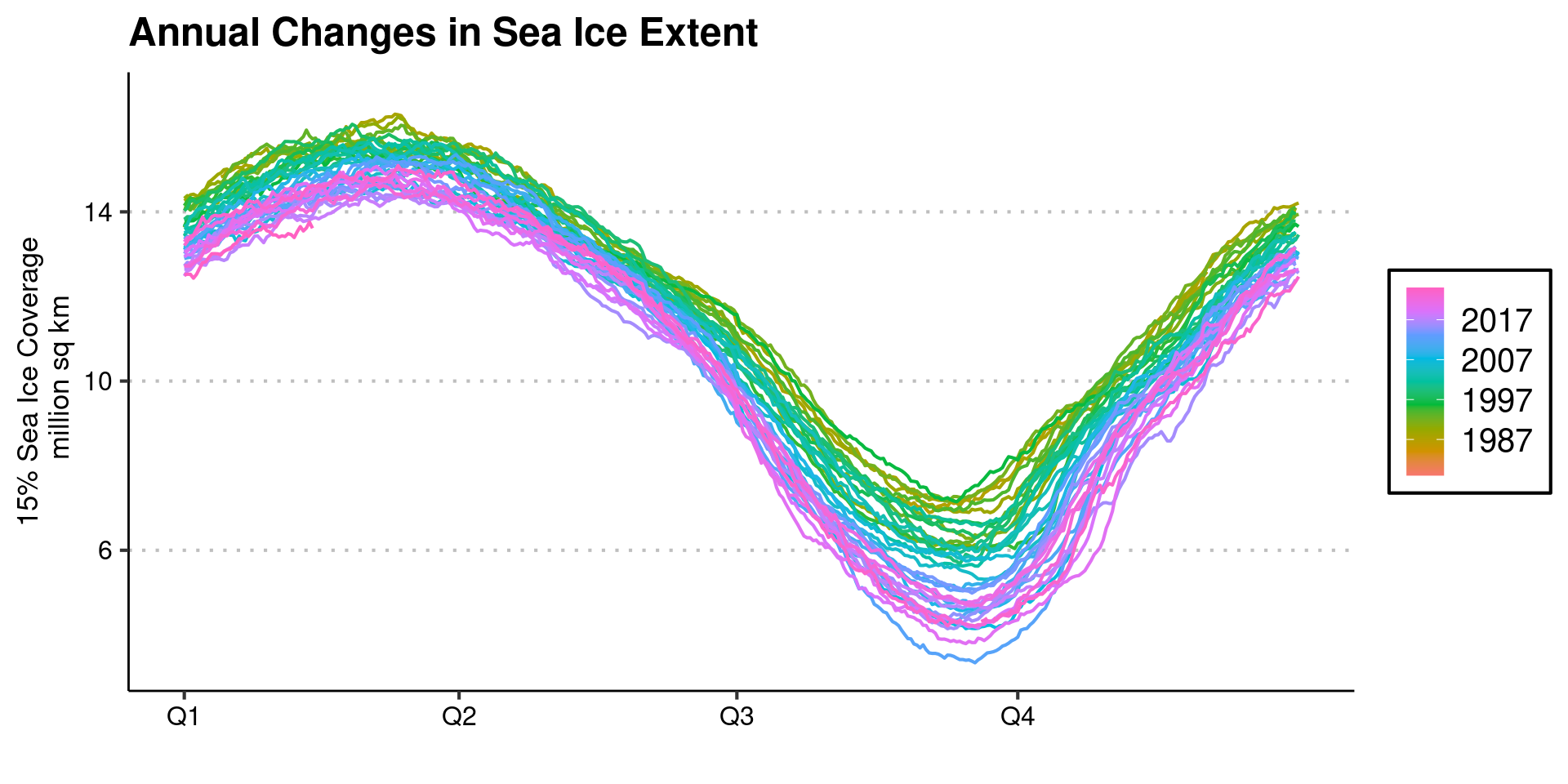
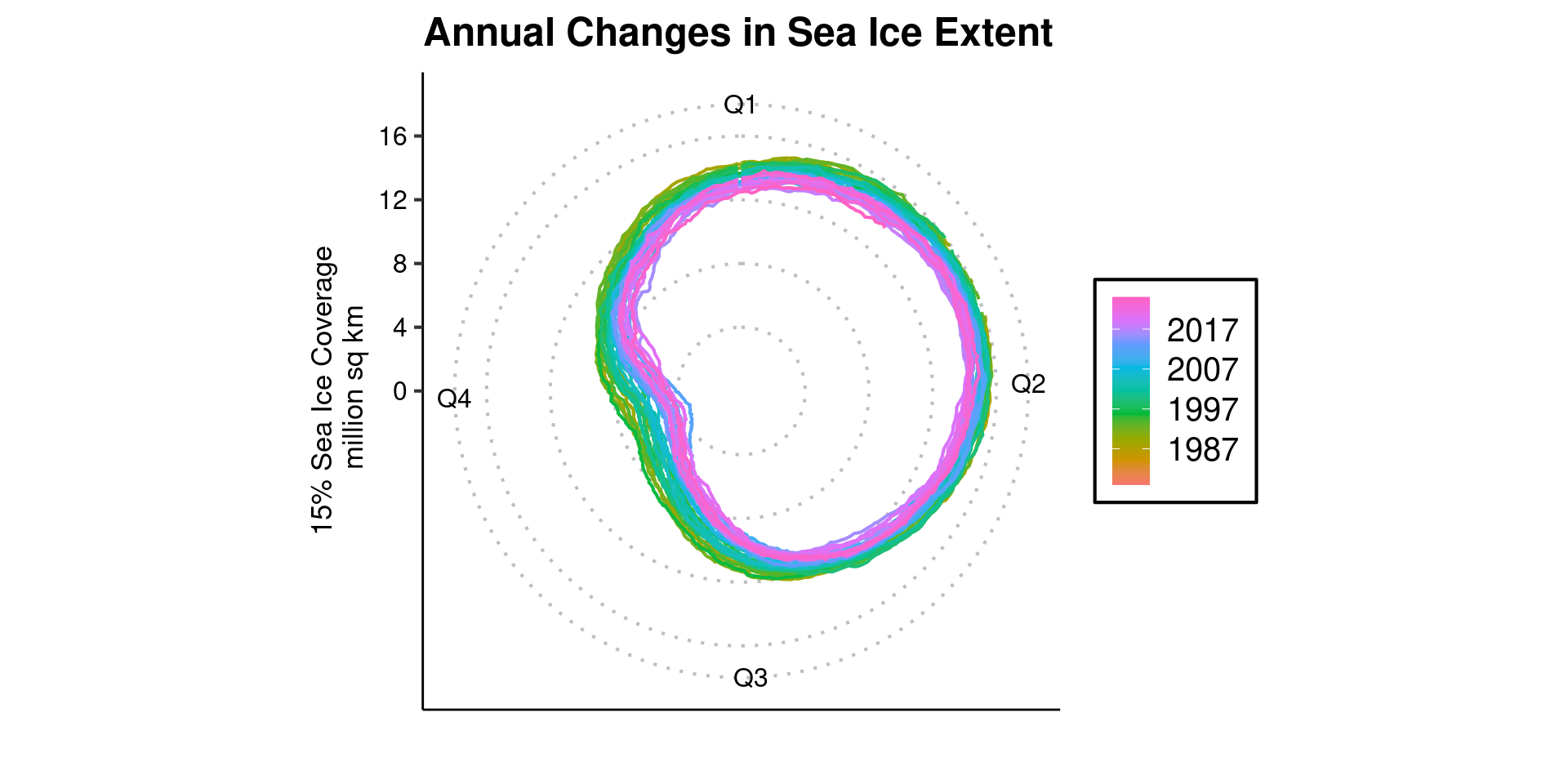
Seasonal and Polar Plots

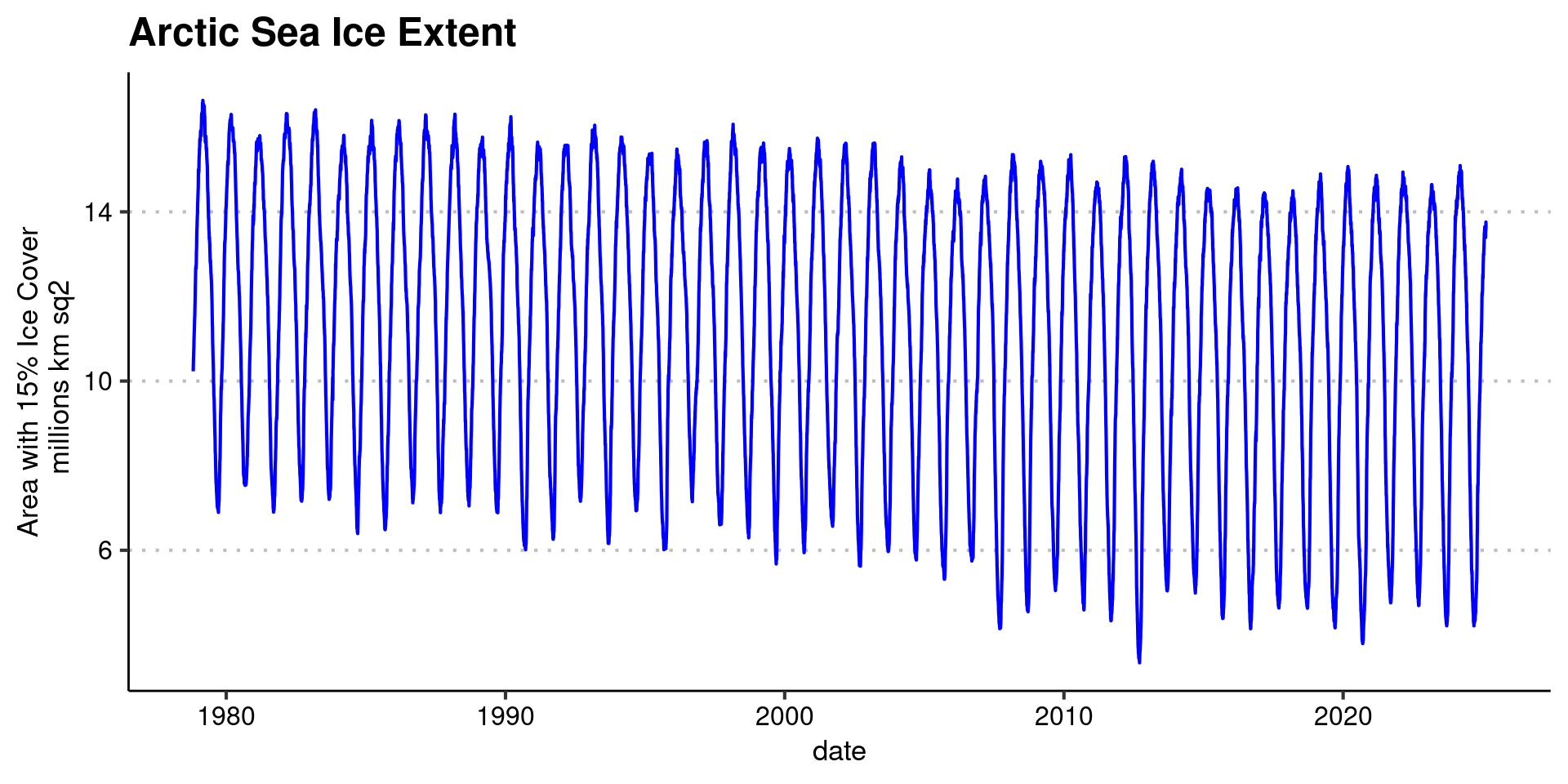
  • Lots of time series data show annual or daily patterns
  • Plot against just month/day or in polar coordinates
Seasonal and Polar Plots

  • use feasts package

Seasonal and Polar Plots

  • use feasts package
library(feasts)
sea_ice |> 
  as_tsibble() |> 
  tsibble::fill_gaps() |> 
  gg_season(Extent) +
  theme_clean(base_size=16) +
    theme( plot.background = element_rect(color = NA)) +
  labs(title = "Annual Changes in Sea Ice Extent") +
  xlab("")+
  ylab("15% Sea Ice Coverage\n million sq km")

Seasonal and Polar Plots

  • use feasts package
library(feasts)
sea_ice |> 
  as_tsibble() |> 
  tsibble::fill_gaps() |> 
  gg_season(Extent) +
  theme_clean(base_size=16) +
    theme( plot.background = element_rect(color = NA)) +
  labs(title = "Annual Changes in Sea Ice Extent") +
  xlab("")+
  ylab("15% Sea Ice Coverage\n million sq km")

Seasonal and Polar Plots

  • use feasts package

Seasonal and Polar Plots

  • use feasts package
library(feasts)
sea_ice |> 
  as_tsibble() |> 
  tsibble::fill_gaps() |> 
  gg_season(Extent, polar=TRUE) +
  theme_clean(base_size=16) +
    theme( plot.background = element_rect(color = NA)) +
  labs(title = "Annual Changes in Sea Ice Extent") +
  scale_y_continuous(limits = c(0,16)) +
  xlab("")+
  ylab("15% Sea Ice Coverage\n million sq km")

Connected Scatterplot

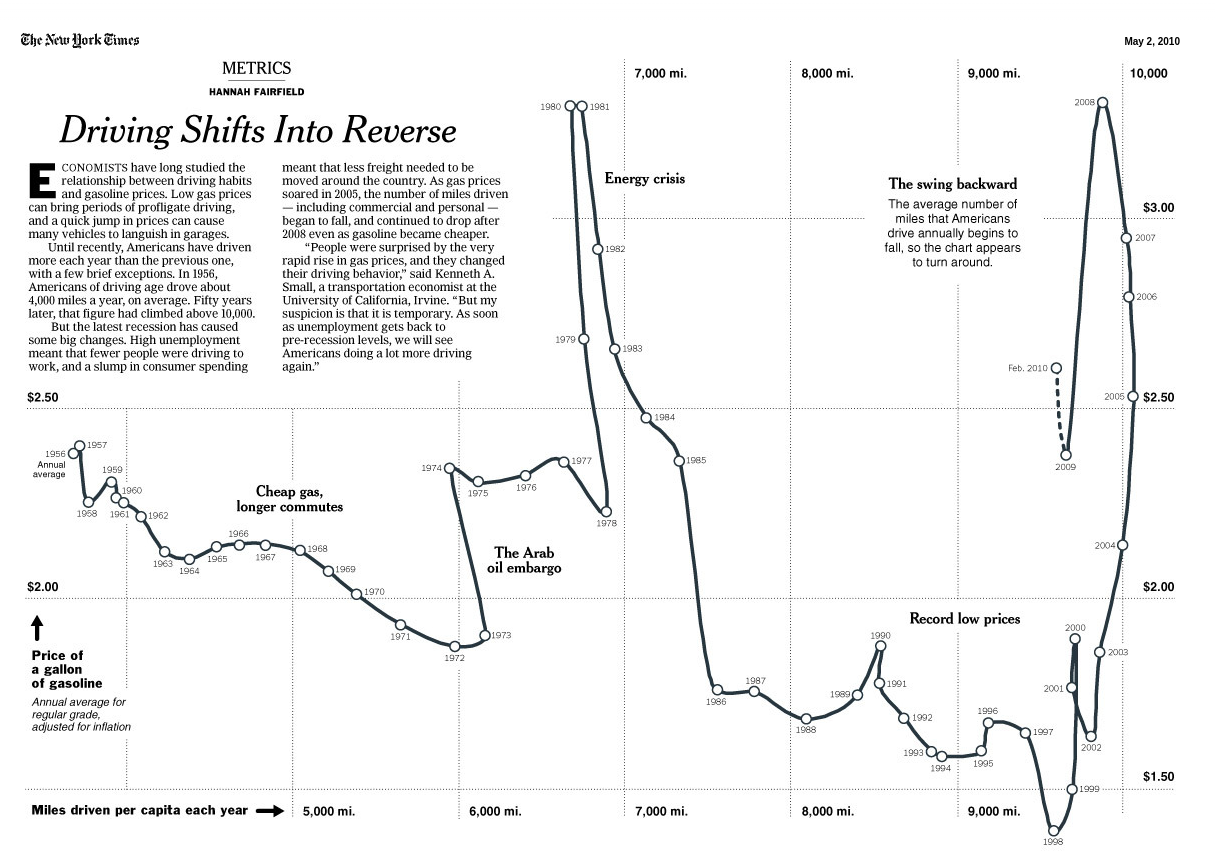
  • Alternative way to show two time series together
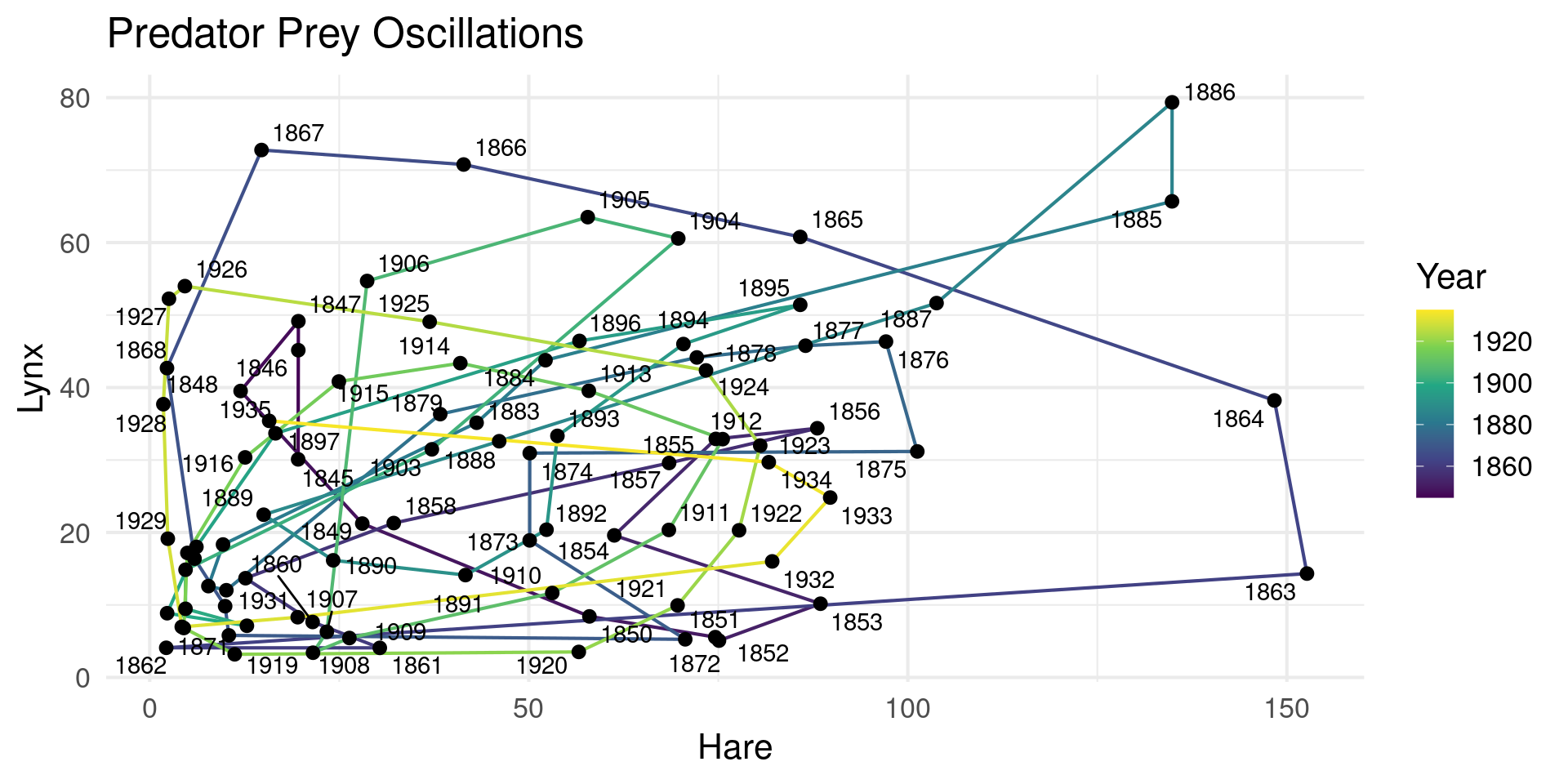
  • Inspired by “phase-portrait” in physics
  • geom_path

Connected Scatterplot

  • Alternative way to show two time series together

Connected Scatterplot
  • Alternative way to show two time series together
hare_lynx |> ggplot(aes(x=Hare,y=Lynx)) +
  geom_path(aes(color=Year)) +
  geom_point() +
  geom_text_repel(aes(label = Year, x = Hare, y = Lynx)) +
  scale_color_viridis_c() +
  theme_minimal(base_size = 16) +
  theme( plot.background = element_rect(color = NA)) +
  labs(title="Predator Prey Oscillations") +
  xlab("Hare") +
  ylab("Lynx")

Connected Scatterplot

NY Times 2010

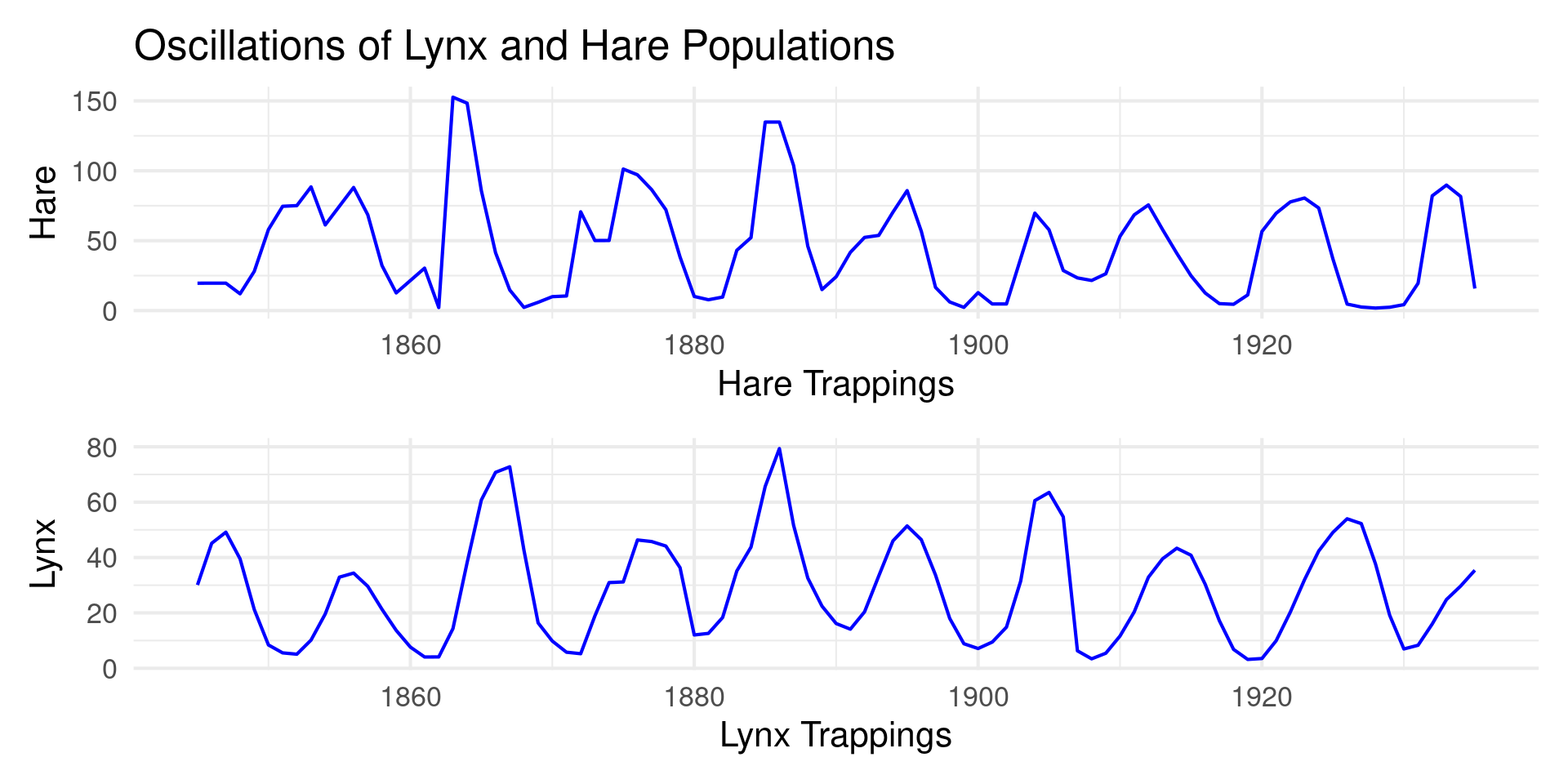
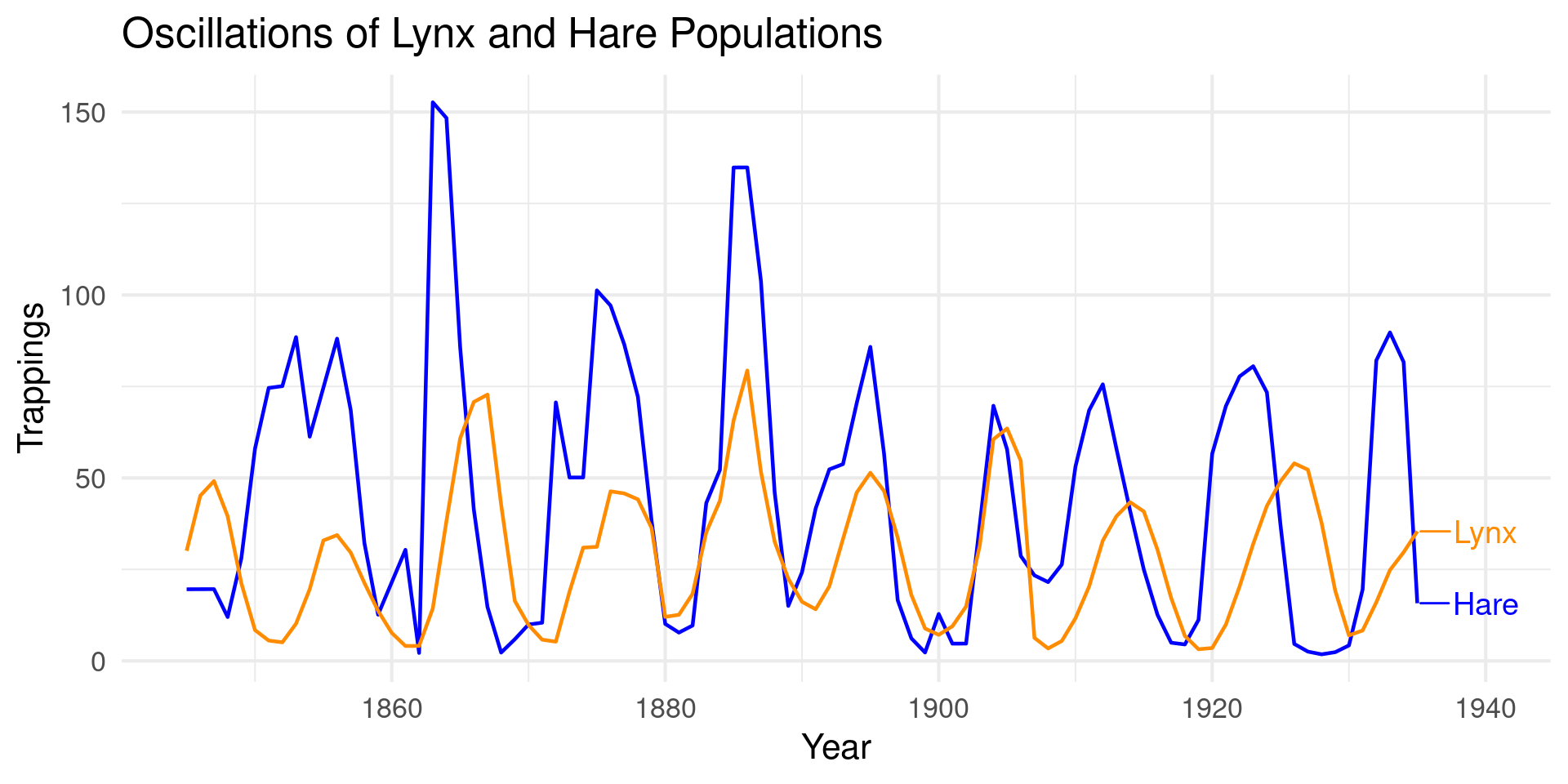
Alternatives: Overlay
Alternatives: Overlay

hare_lynx_long = hare_lynx |>
  pivot_longer(c(Hare, Lynx), names_to = "Species", values_to = "Trappings")

p_overlay = hare_lynx_long |> ggplot(aes(x=Year,y=Trappings,color=Species)) +
  geom_line(linewidth=0.8) +
  geom_text_repel(
    data = hare_lynx_long |> filter(Year == max(Year)),
    aes(label = Species),
    nudge_x = 5, size = 5) +
  scale_color_manual(values = c("Hare" = "blue", "Lynx" = "darkorange")) +
  theme_minimal(base_size = 16) +
    theme( plot.background = element_rect(color = NA)) +
  labs(title = "Oscillations of Lynx and Hare Populations") +
  ylab("Trappings") +
  guides(color="none")

p_overlay

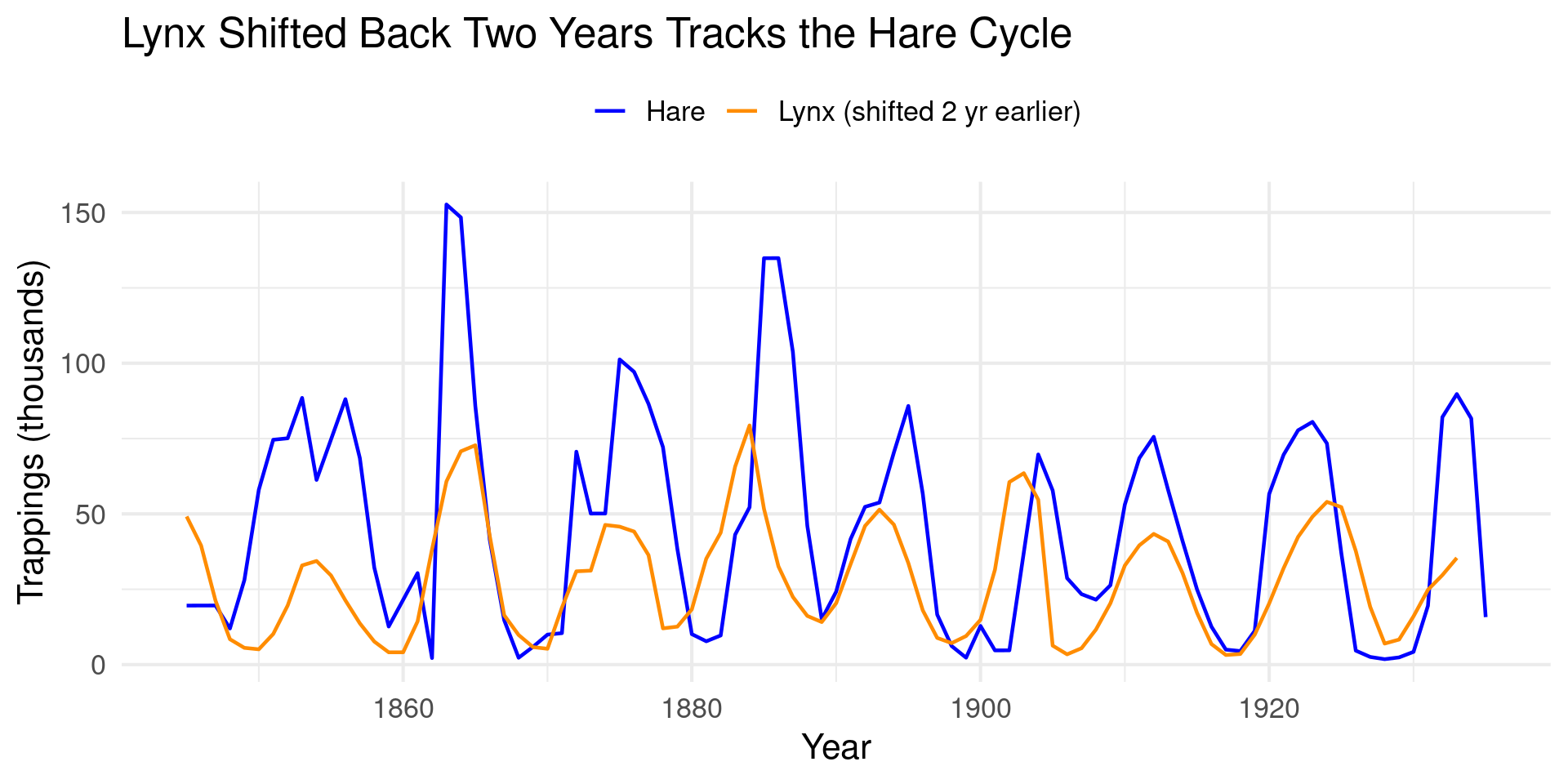
Alternatives: Lag Shift

Alternatives: Lag Shift

p_shift = hare_lynx |>
  mutate(`Lynx (shifted 2 yr earlier)` = lead(Lynx, 2)) |>
  select(-Lynx) |>
  pivot_longer(-Year, names_to = "Species", values_to = "Trappings") |>
  ggplot(aes(x=Year,y=Trappings,color=Species)) +
  geom_line(linewidth=0.8, na.rm=TRUE) +
  scale_color_manual(values = c("blue","darkorange"), name = NULL) +
  theme_minimal(base_size = 16) +
    theme( plot.background = element_rect(color = NA),
           legend.position = "top") +
  labs(title = "Lynx Shifted Back Two Years Tracks the Hare Cycle") +
  ylab("Trappings (thousands)")

p_shift

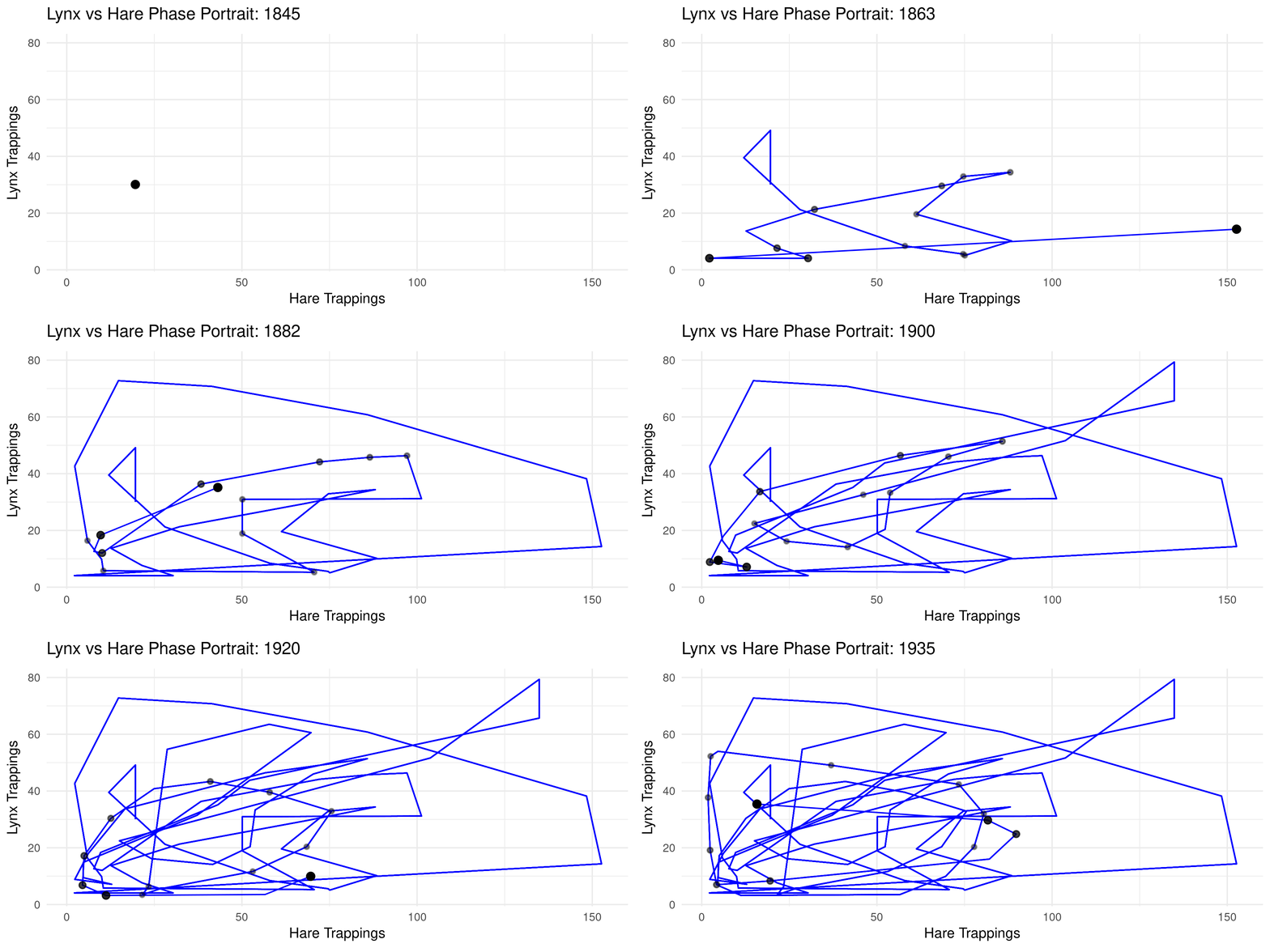
Alternatives: animation

Alternatives: animation

library(gganimate)

anim = hare_lynx |> ggplot(aes(x=Hare,y=Lynx)) +
  geom_path(color="blue") +
  geom_point(size=4,color="black") +
  theme_minimal(base_size = 16) +
    theme( plot.background = element_rect(color = NA)) +
  labs(title = "Lynx vs Hare Phase Portrait: {as.integer(frame_along)}") +
  xlab("Hare Trappings") +
  ylab("Lynx Trappings") +
  transition_reveal(Year) +
  shadow_wake(wake_length = 0.5, alpha = 0.8, size = 1.5, wrap = FALSE)

animate(anim, fps = 10, end_pause = 25)

Thanks