Meetup 5: Visualizing Geospatial Data

George I. Hagstrom

October 1st Meetup Postponed

  • Apologies
  • Next meetup likely November 3rd stay tuned

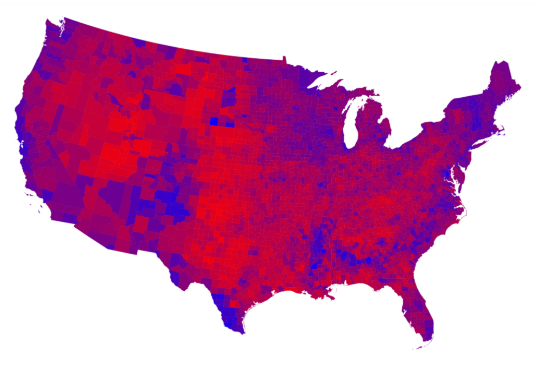
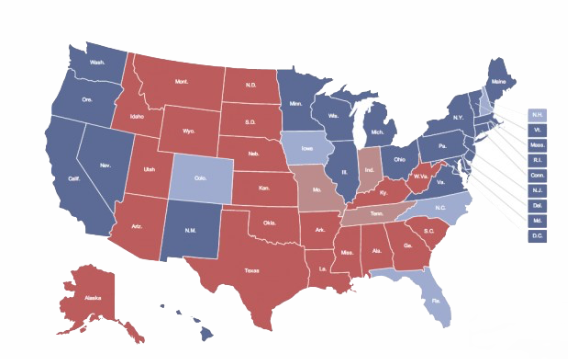
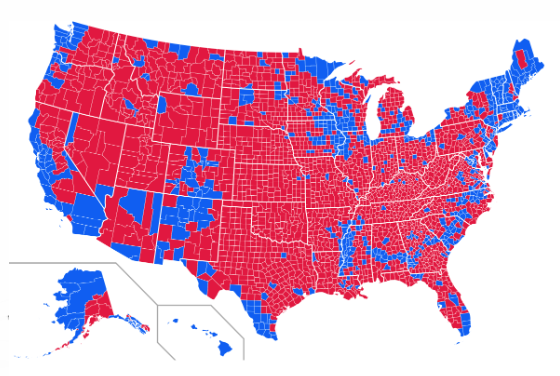
Many Ways to Map the Same Data

  • Results of 2016 US Election Healy 7.1

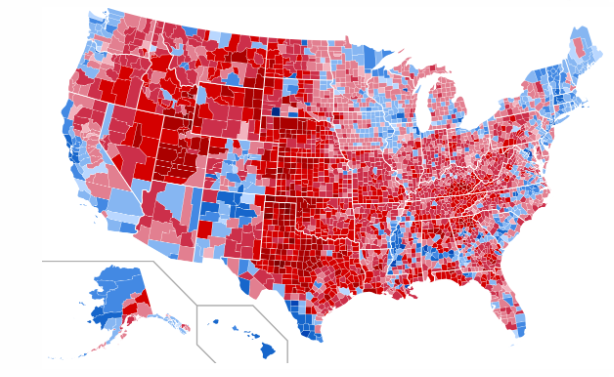
Many Ways to Map the Same Data

  • Results of 2016 US Election Healy 7.1

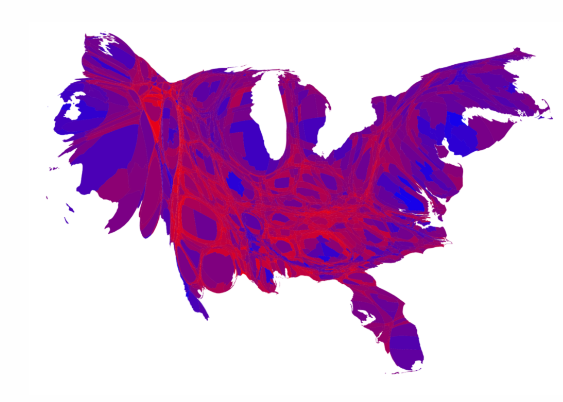
Many Ways to Map the Same Data

  • Results of 2016 US Election Healy 7.1

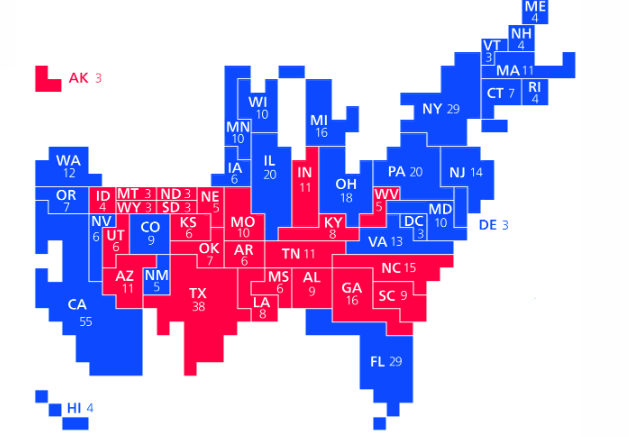
Many Ways to Map the Same Data

  • Results of 2016 US Election

Healy 7.1

Many Ways to Map the Same Data

  • Results of 2016 US Election Healy 7.1

Many Ways to Map the Same Data

  • Results of 2016 US Election Healy 7.1

Many Ways to “Map” the Same Data

Several Differences

  • Areas of different regions vary by a lot
  • Number of people vary by a lot
  • Different resolution shows different patterns
  • Pattern of votes vs. Meaningful outcome
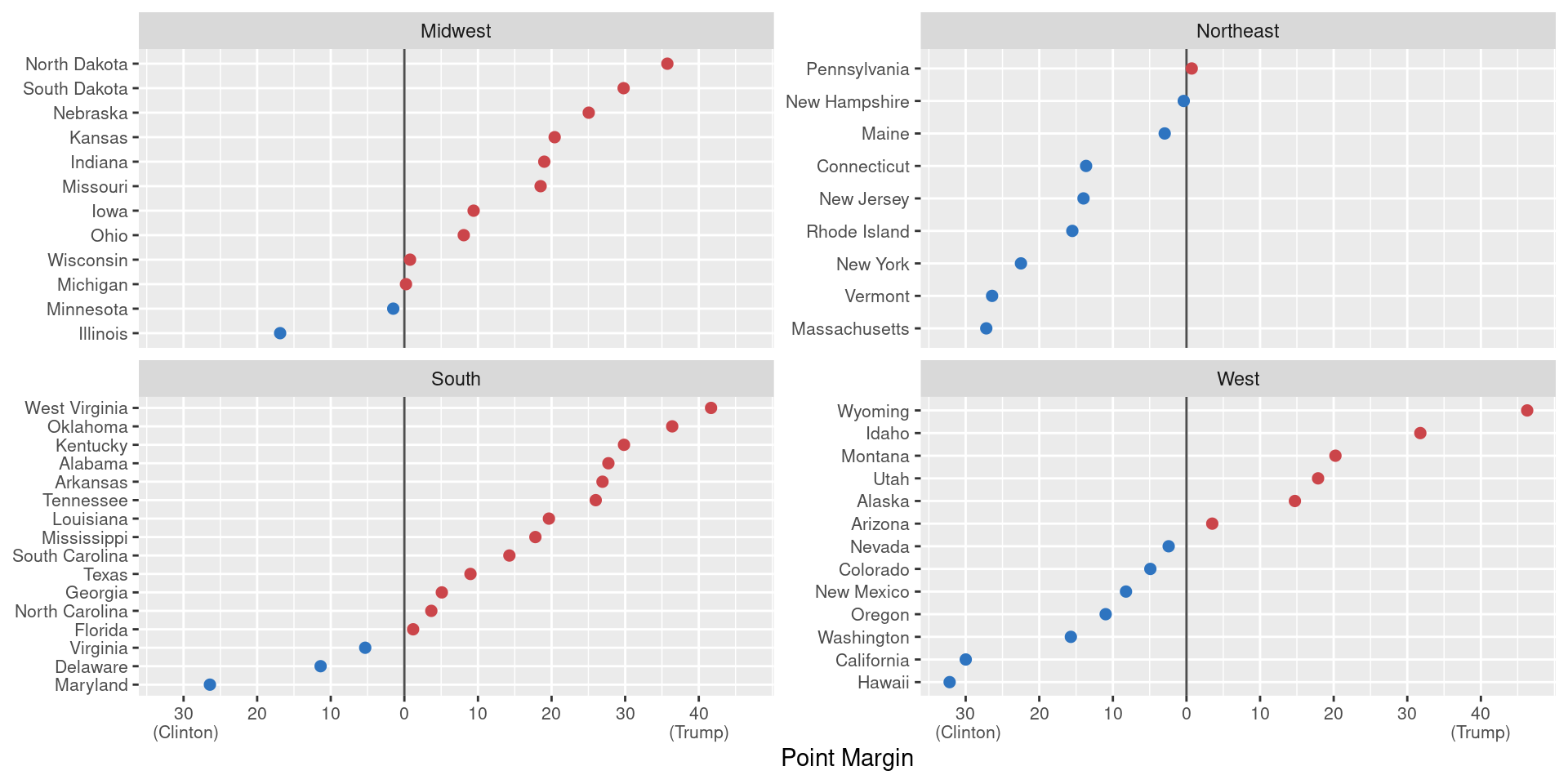
  • For numbers, the dot-plot is better

Week Summary

  • Reading for the week:
    • Chapter 15 of Wilke
    • Chapter 7 of Healy (especially if R user)
    • Cartopy Tutorial (for pythonistas)
    • Ecological Fallacy Section
  • Discussion: Find a lying map
  • New Lab Available

How Does R Draw Maps?

  • Let’s Look at the data available in a map:
library(maps)
us_counties = map_data("county") |> as_tibble()
head(us_counties)
# A tibble: 6 × 6
   long   lat group order region  subregion
  <dbl> <dbl> <dbl> <int> <chr>   <chr>    
1 -86.5  32.3     1     1 alabama autauga  
2 -86.5  32.4     1     2 alabama autauga  
3 -86.5  32.4     1     3 alabama autauga  
4 -86.6  32.4     1     4 alabama autauga  
5 -86.6  32.4     1     5 alabama autauga  
6 -86.6  32.4     1     6 alabama autauga  
  • Each unit is a polygon with coordinates and ordering

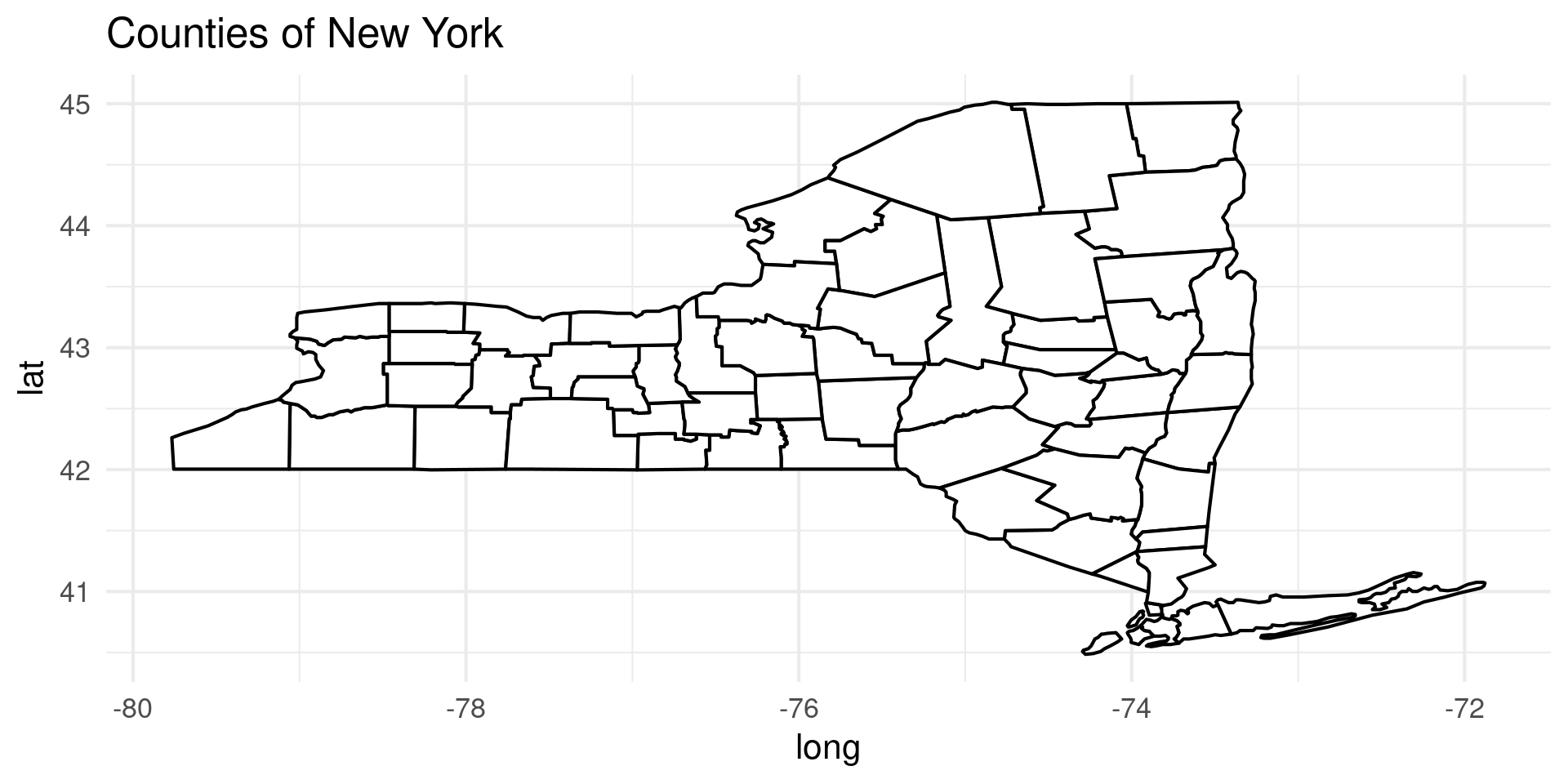
Draw Some Polygons

  • Use geom_polygon to see how it works
us_counties |> filter(region == "new york") |>  ggplot(aes(x=long,y=lat,group=group)) +
  geom_polygon(fill="white",color="black") +
  theme_minimal(base_size=16) +
  labs(title="Counties of New York")

Mapping Libraries

  • There are several tools which are better at making maps:
    • sf or simple features
    • tmap or tidy maps
  • These bring full suit of GIS (Geographic Information Systems Tools)
  • Projections

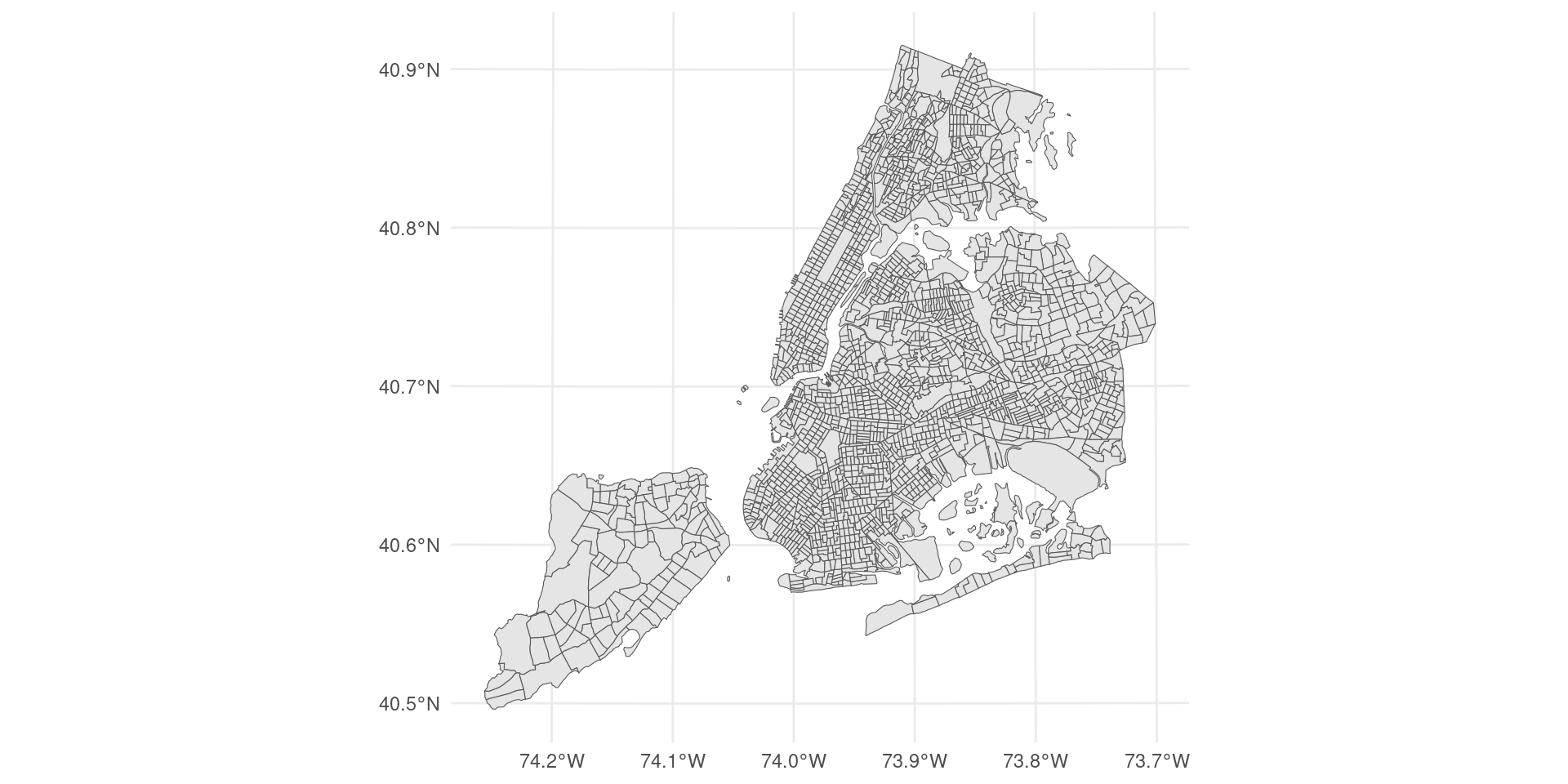
Mapping NYC

Simple feature collection with 2166 features and 12 fields
Geometry type: MULTIPOLYGON
Dimension:     XY
Bounding box:  xmin: 913180.2 ymin: 120131.4 xmax: 1067382 ymax: 272798.5
Projected CRS: NAD83 / New York Long Island (ftUS)
# A tibble: 2,166 × 13
   geoid       borough_tract_id state_fips county_fips tract_id county_name
   <chr>       <chr>            <chr>      <chr>       <chr>    <chr>      
 1 36061000100 1000100          36         061         000100   New York   
 2 36061000201 1000201          36         061         000201   New York   
 3 36061000202 1000202          36         061         000202   New York   
 4 36061000500 1000500          36         061         000500   New York   
 5 36061000600 1000600          36         061         000600   New York   
 6 36061000700 1000700          36         061         000700   New York   
 7 36061000800 1000800          36         061         000800   New York   
 8 36061000900 1000900          36         061         000900   New York   
 9 36061001001 1001001          36         061         001001   New York   
10 36061001002 1001002          36         061         001002   New York   
# ℹ 2,156 more rows
# ℹ 7 more variables: borough_name <chr>, borough_id <chr>, nta_id <chr>,
#   nta_name <chr>, puma_id <chr>, puma_name <chr>,
#   geometry <MULTIPOLYGON [US_survey_foot]>

Mapping NYC

Mapping NYC

  • Let’s get some data

Mapping NYC

  • Let’s get some data
tract_acs_data |> select(pop_total_est:med_age_est) |> head(10)
# A tibble: 10 × 3
   pop_total_est pop_total_moe med_age_est
           <dbl>         <dbl>       <dbl>
 1          1382           132        48.4
 2          8881           973        30.2
 3          1674           217        33.6
 4          8604          1004        42.4
 5          8811          1035        45.8
 6         15149          1399        35.8
 7          4920           415        39.7
 8          5621           616        38.7
 9             0            11        NA  
10          3990           331        39.9

Mapping NYC

  • Let’s get some data
nyc_boundaries(geography = "tract") 
Simple feature collection with 2166 features and 12 fields
Geometry type: MULTIPOLYGON
Dimension:     XY
Bounding box:  xmin: 913180.2 ymin: 120131.4 xmax: 1067382 ymax: 272798.5
Projected CRS: NAD83 / New York Long Island (ftUS)
# A tibble: 2,166 × 13
   geoid       borough_tract_id state_fips county_fips tract_id county_name
   <chr>       <chr>            <chr>      <chr>       <chr>    <chr>      
 1 36061000100 1000100          36         061         000100   New York   
 2 36061000201 1000201          36         061         000201   New York   
 3 36061000202 1000202          36         061         000202   New York   
 4 36061000500 1000500          36         061         000500   New York   
 5 36061000600 1000600          36         061         000600   New York   
 6 36061000700 1000700          36         061         000700   New York   
 7 36061000800 1000800          36         061         000800   New York   
 8 36061000900 1000900          36         061         000900   New York   
 9 36061001001 1001001          36         061         001001   New York   
10 36061001002 1001002          36         061         001002   New York   
# ℹ 2,156 more rows
# ℹ 7 more variables: borough_name <chr>, borough_id <chr>, nta_id <chr>,
#   nta_name <chr>, puma_id <chr>, puma_name <chr>,
#   geometry <MULTIPOLYGON [US_survey_foot]>

Mapping NYC

  • Let’s get some data
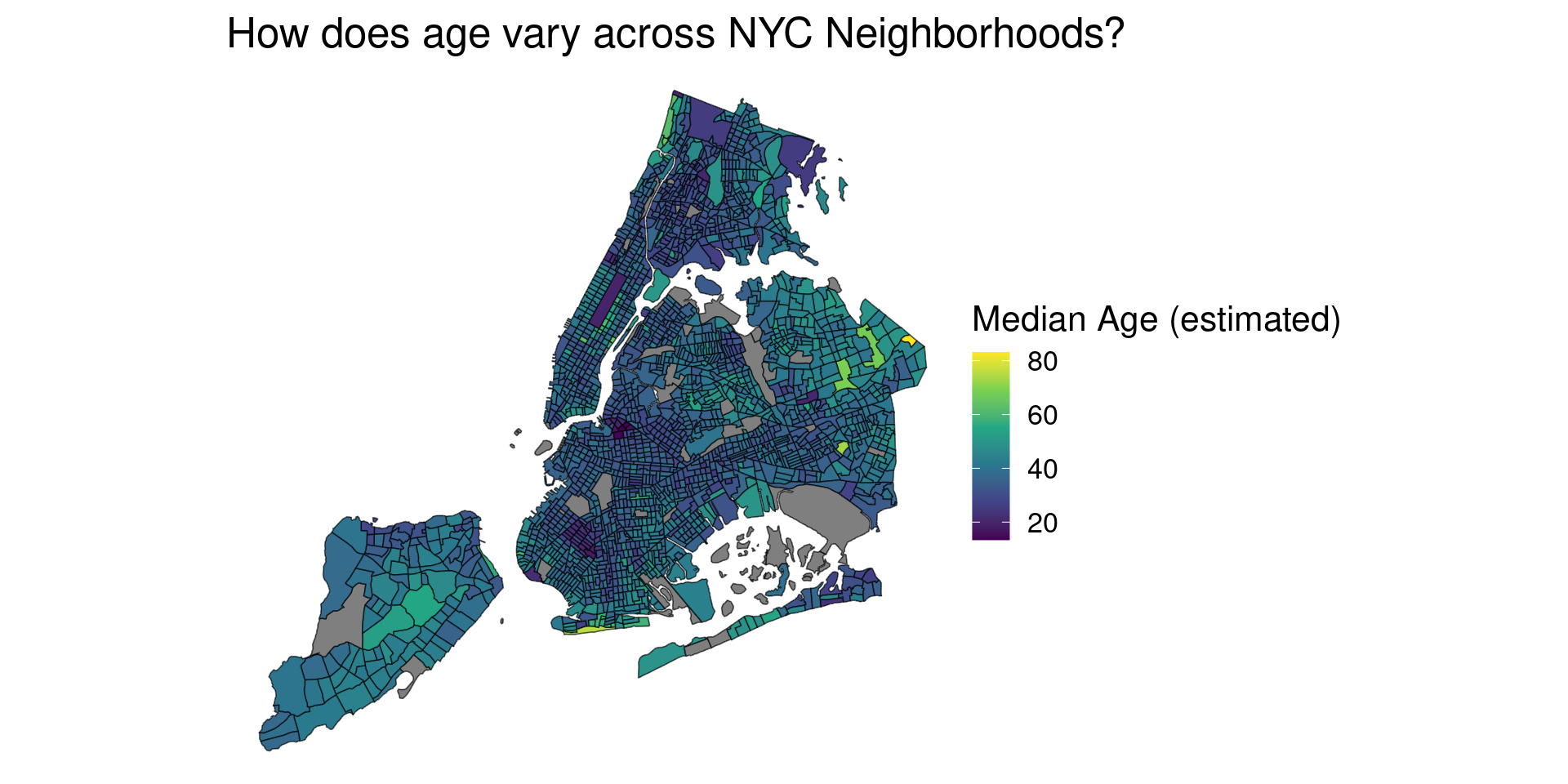
tract_age = tract_acs_data |> select(med_age_est,geoid)

nyc_boundaries(geography = "tract") %>% 
  left_join(tract_age, by = c("geoid" = "geoid")) %>% 
  ggplot() +
  geom_sf(aes(fill = med_age_est)) +
  scale_fill_viridis_c(name = "Median Age (estimated)") +
  theme_void() +
  labs(title = "How does age vary across NYC Neighborhoods?")

Projections

  • Mapping transforms from a spherical surface to a 2D plane
  • Many Choices

Projections

  • Mapping transforms from a spherical surface to a 2D plane
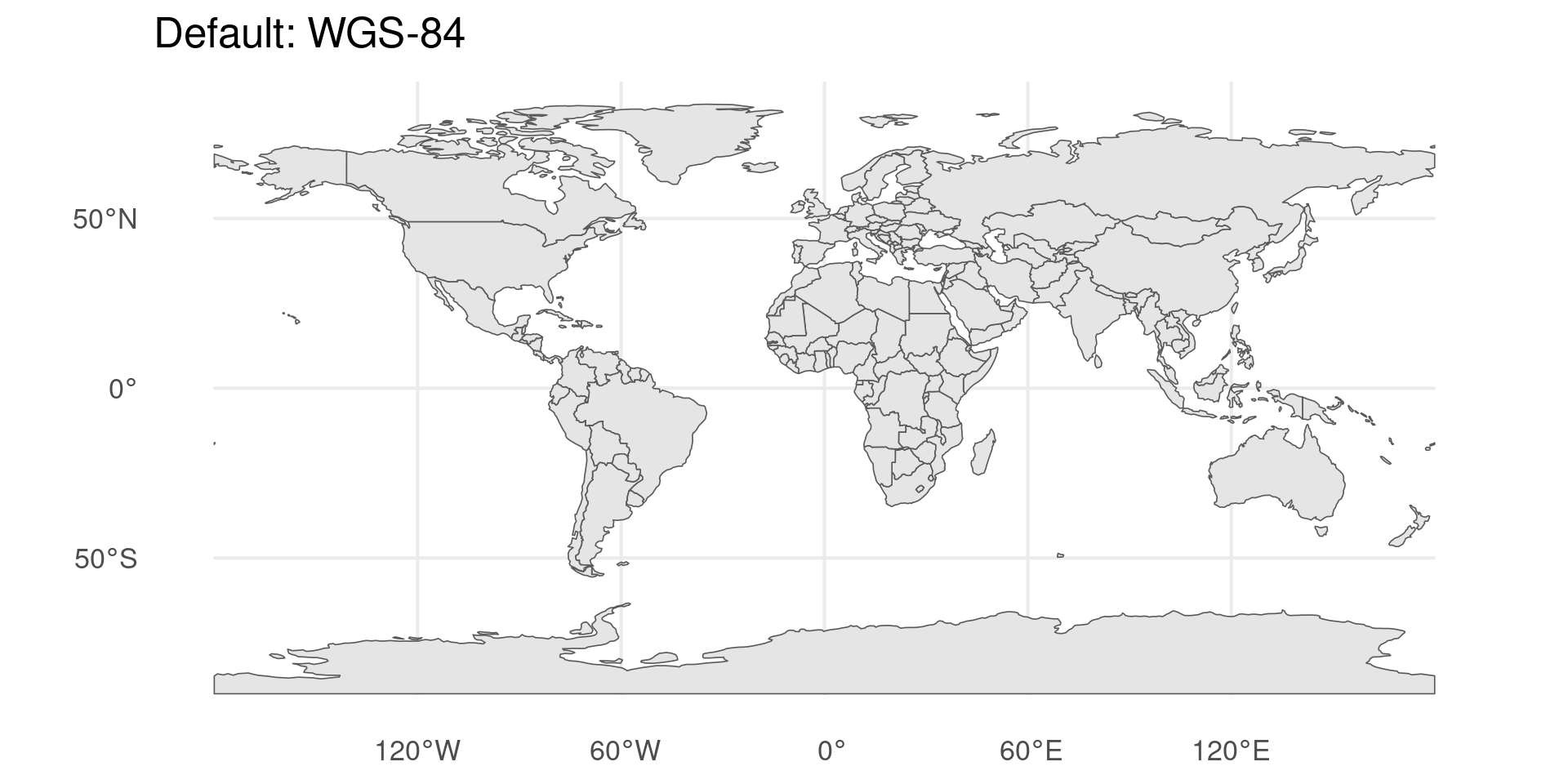
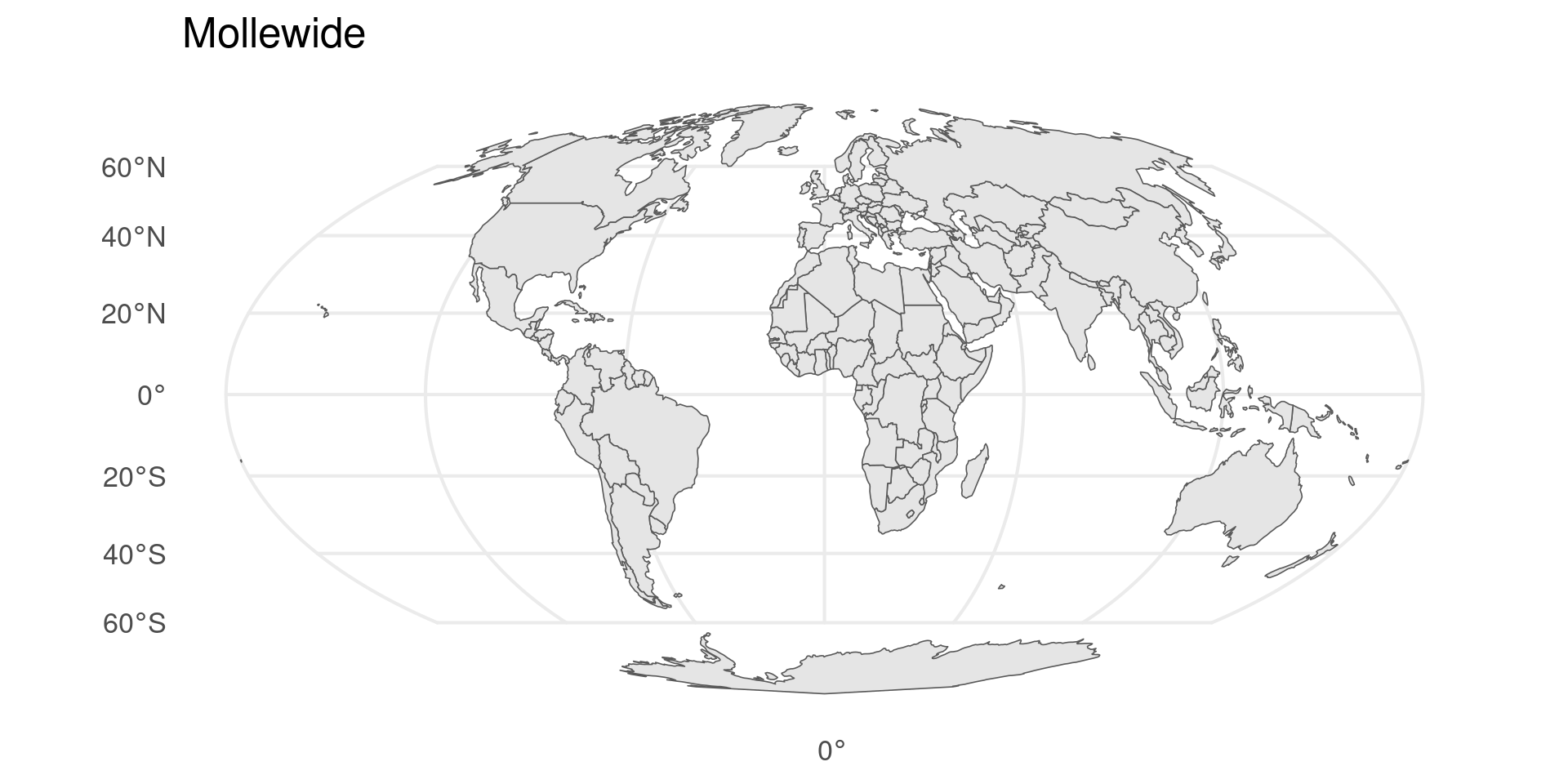
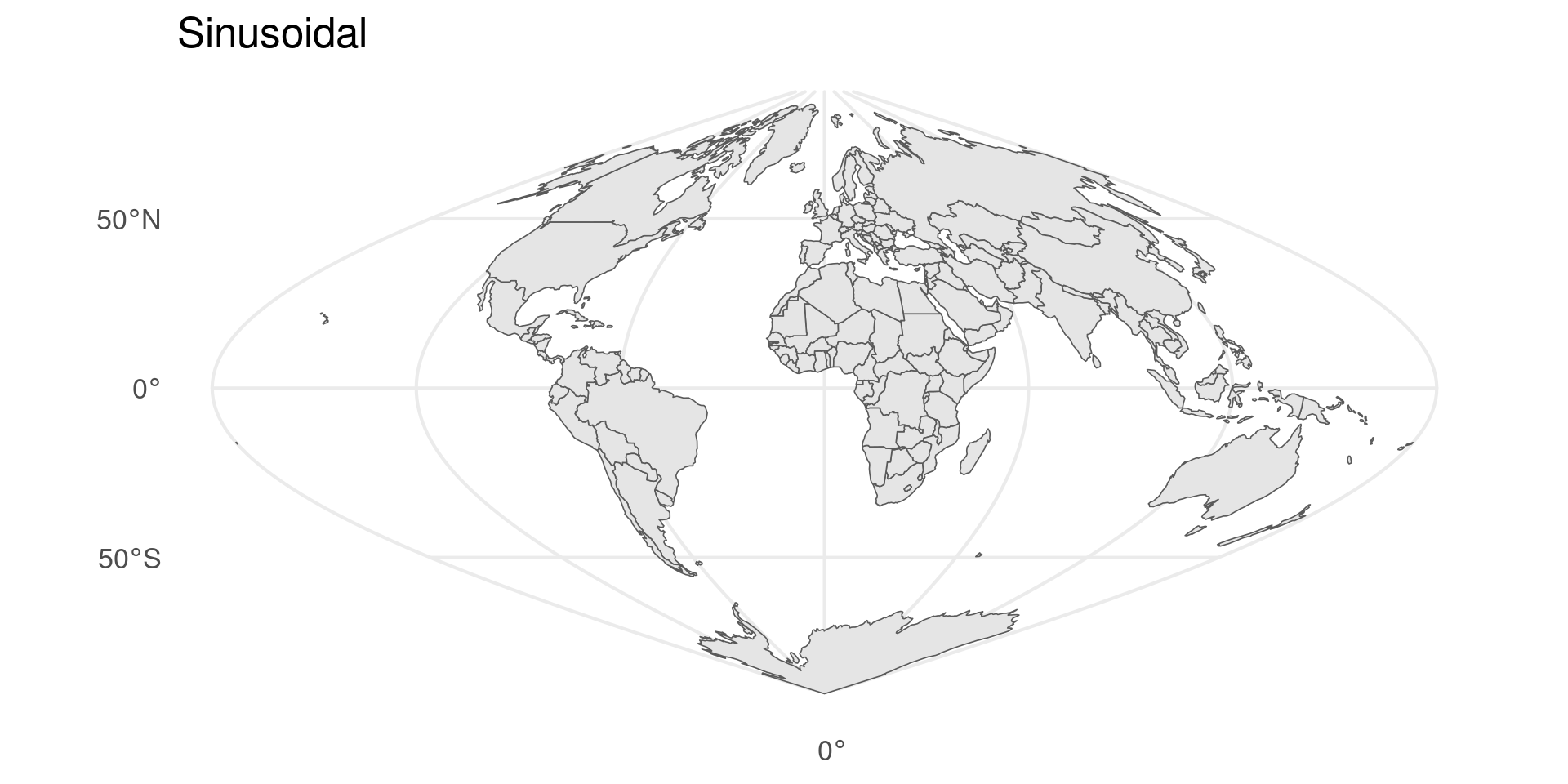
  • Control with coord_sf
library(rnaturalearth)
sf_world <- ne_countries(returnclass='sf')
ggplot(sf_world) + geom_sf() +
  theme_minimal(base_size=16) +
  labs(title="Default: WGS-84") +
  coord_sf(crs = st_crs("ESRI:54009"))

Projections

  • Mapping transforms from a spherical surface to a 2D plane
  • Control with coord_sf

Projections

  • Mapping transforms from a spherical surface to a 2D plane
  • Control with coord_sf

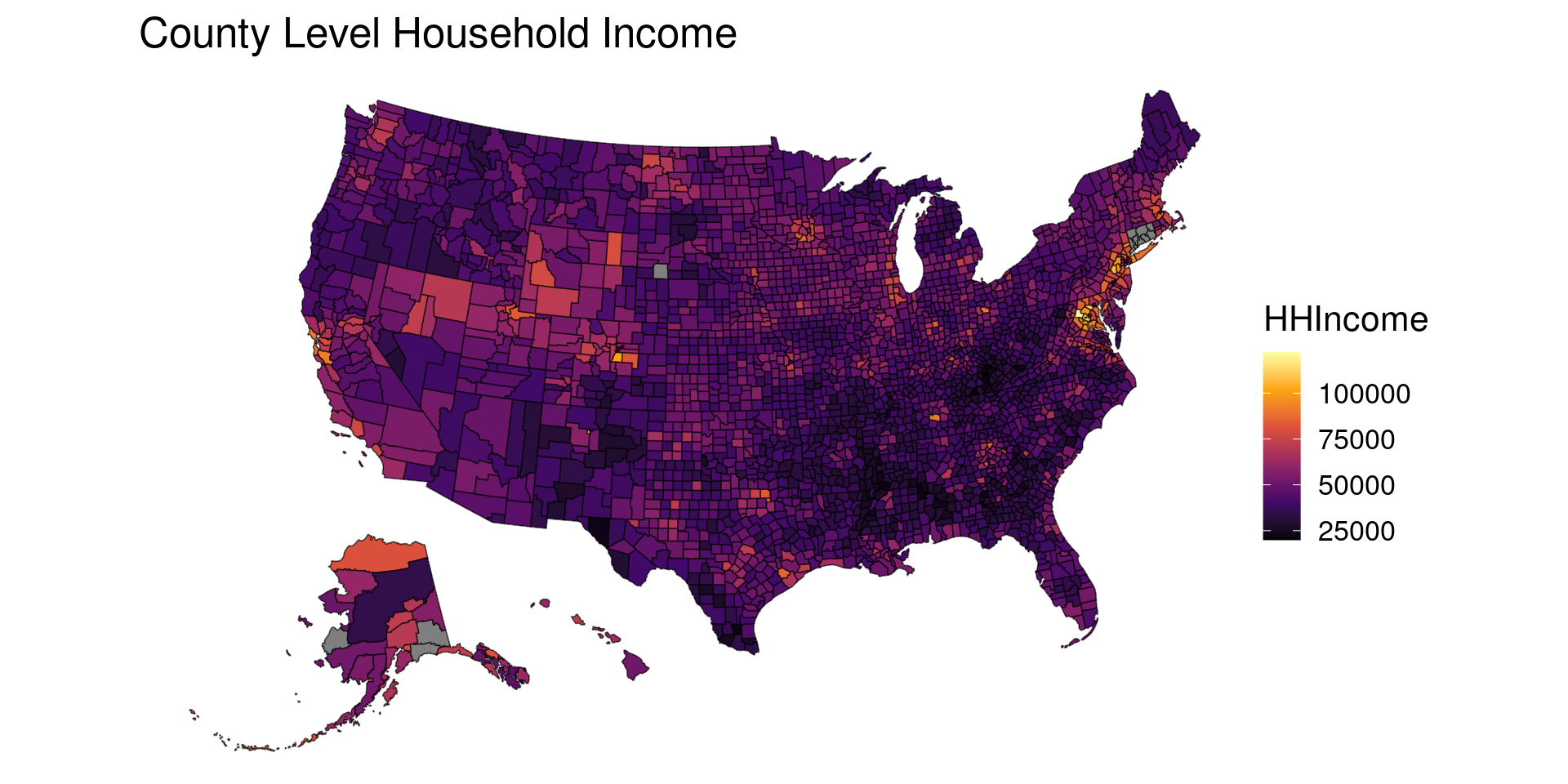
Choropleth Maps

  • Maps that color regions based on data

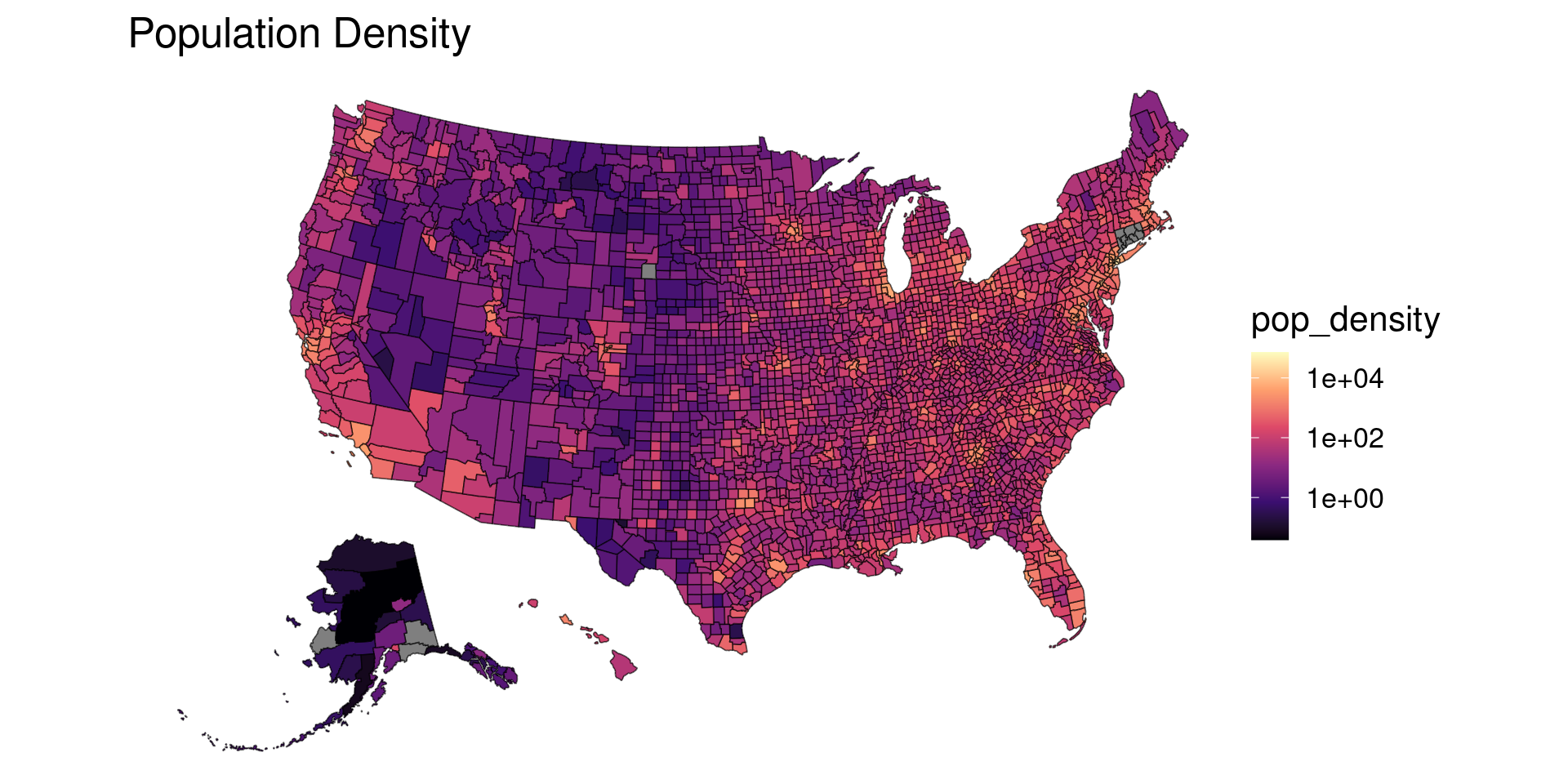
Problems With Choropleths

  • Population distribution very heterogeneous
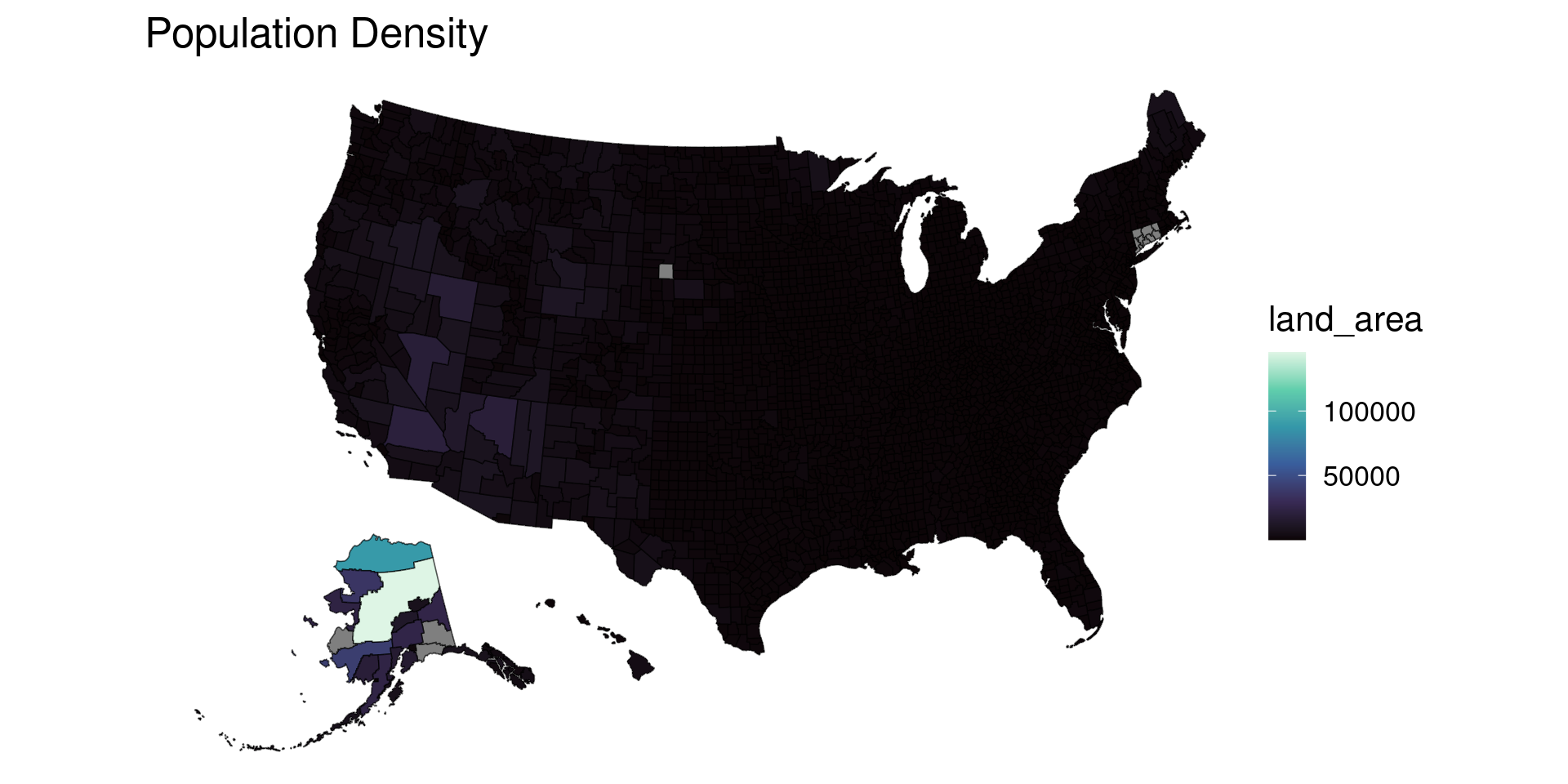
Problems with Choropleths

  • Geographic definitions also heterogeneous
Problems with Choropleths

  • Geographic definitions also heterogeneous
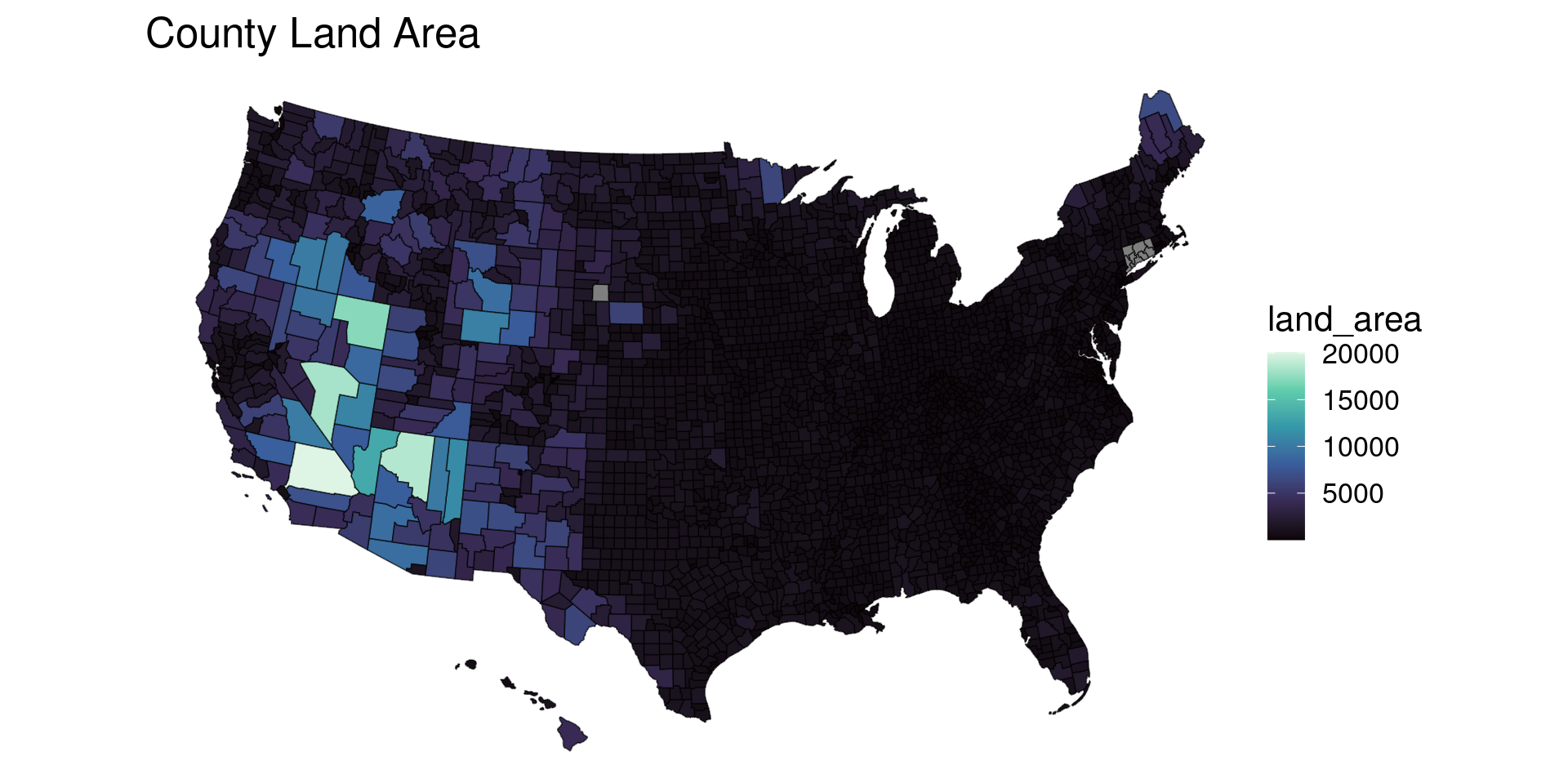
county_full |> 
  filter(abbr != "AK")
ggplot(aes(fill = land_area)) +
  geom_sf() +
  scale_fill_viridis_c(option="G") +
  theme_void(base_size=16) +
  theme(panel.grid = element_line(color = "transparent")) +
  labs(title = "Population Density")

Problems with Choropleths

  • Geographic definitions also heterogeneous

Ecological Fallacy

  • Properties of individuals may not correspond to mean properties of the group
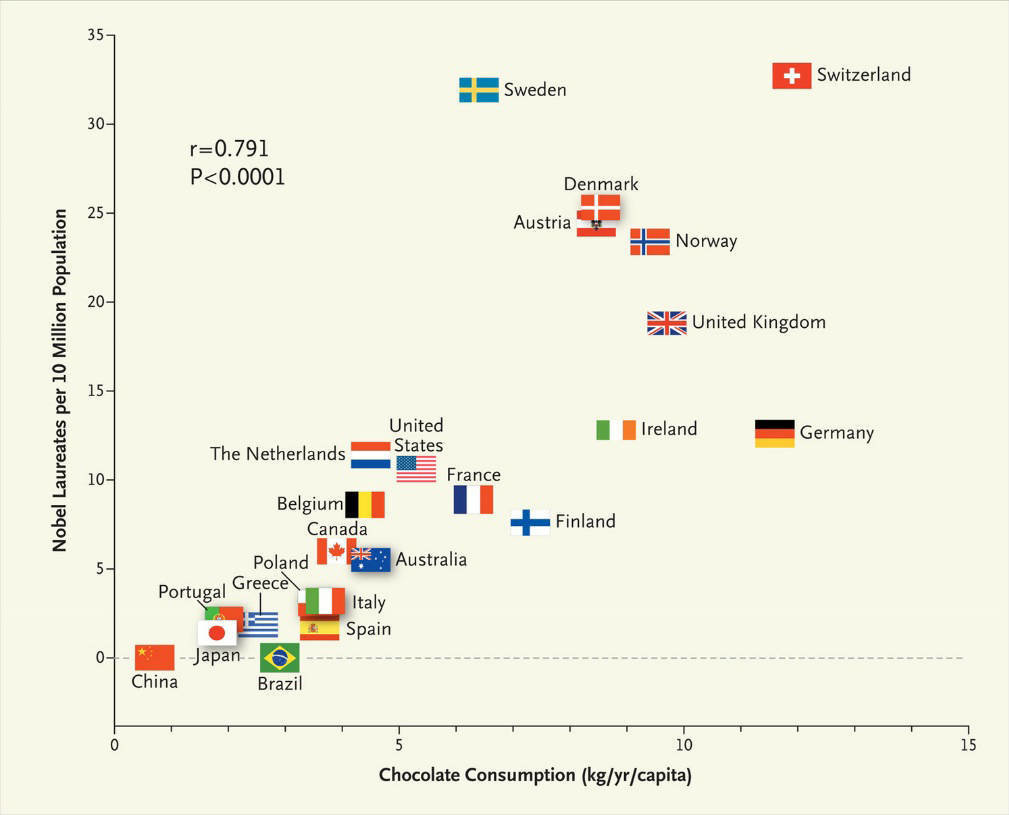
Ecological Fallacy

  • Properties of individuals may not correspond to mean properties of the group
  • Group level correlation may not apply at individual level
  • Nobel Laureates may not eat chocolate

Modifiable Areal Units Problem

  • Maps version of ecological fallacy
    • Different areas may show different story

Modifiable Areal Units Problem

  • Geographical disparities in cancer stage at diagnosis
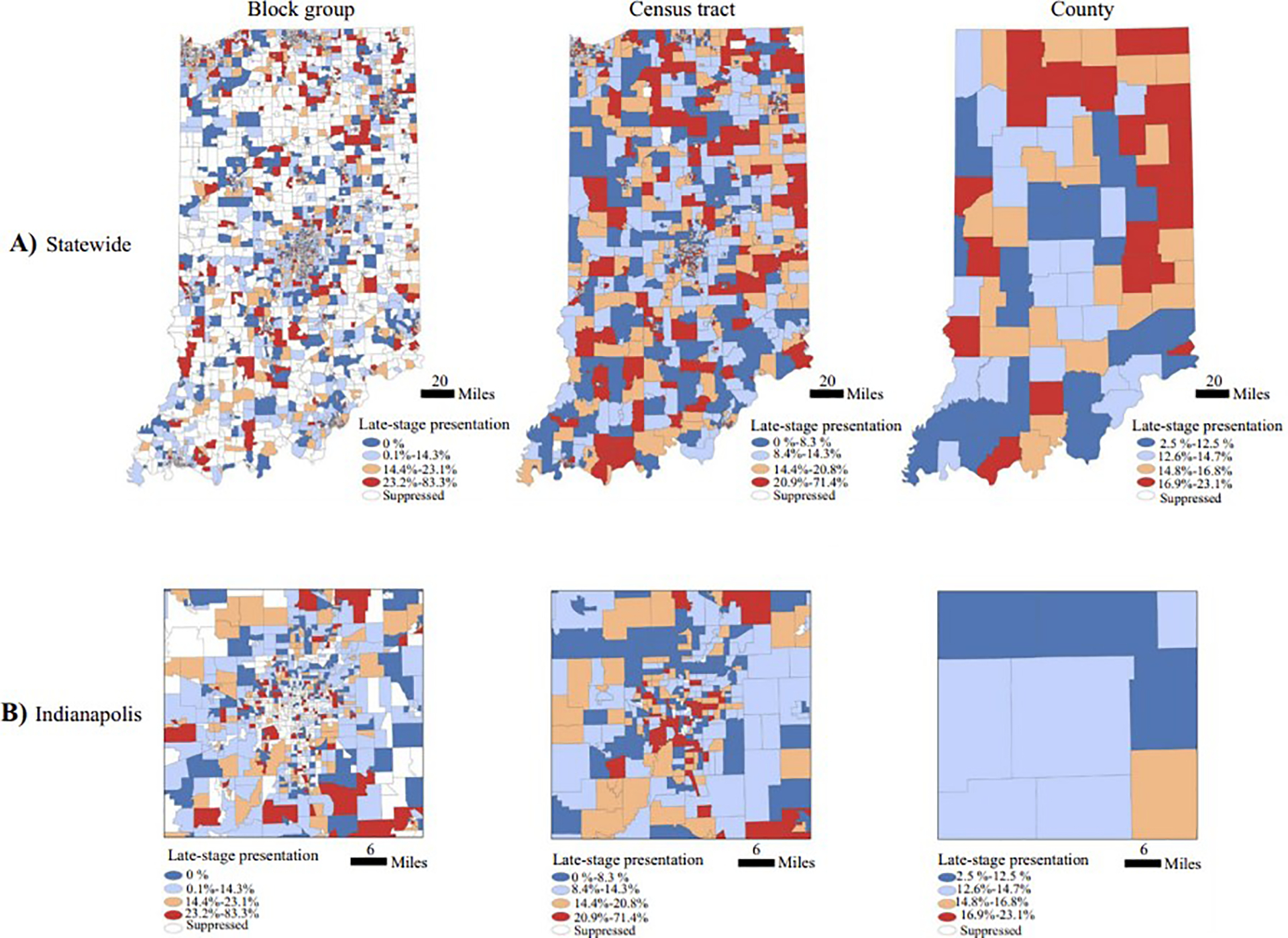
Fontanet et al 2024

Facing the MAUP

  1. Plot data at different resolutions if you can
  2. Check and see if the result changes
  3. Choose the resolution most appropriate to your question

Cartogram

  • Equalize areas while retaining geography
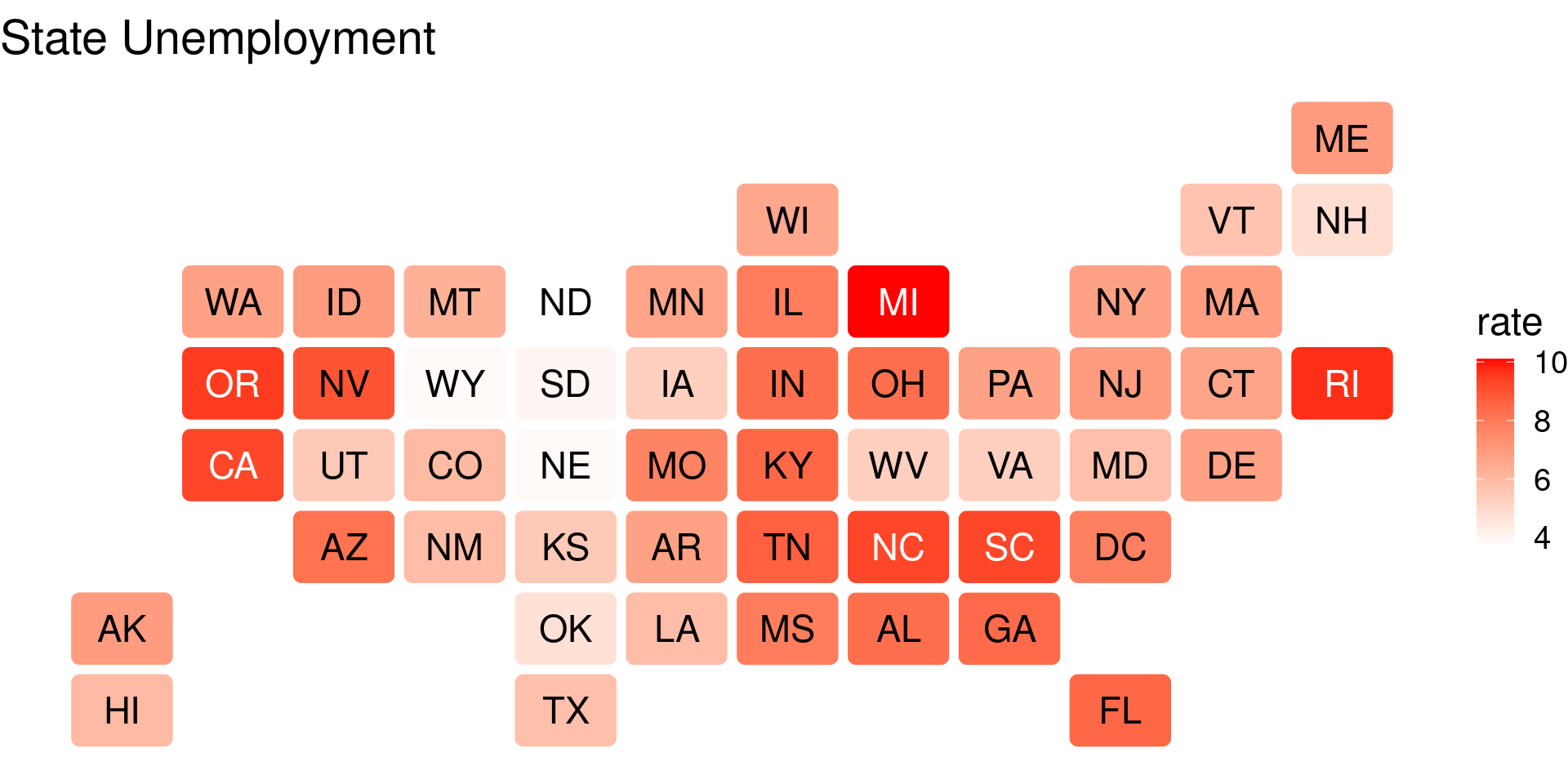
statebins library

  • geom_statebins
library(geofacet)
library(statebins)
state_unemp |> as_tibble() |> filter(year==2008) |>
  ggplot(aes(fill=rate, state=state)) + 
  geom_statebins(lbl_size = 6) +
  scale_fill_gradient(low="white",high="red") +
  theme_void(base_size=18) +
  labs(title="State Unemployment")

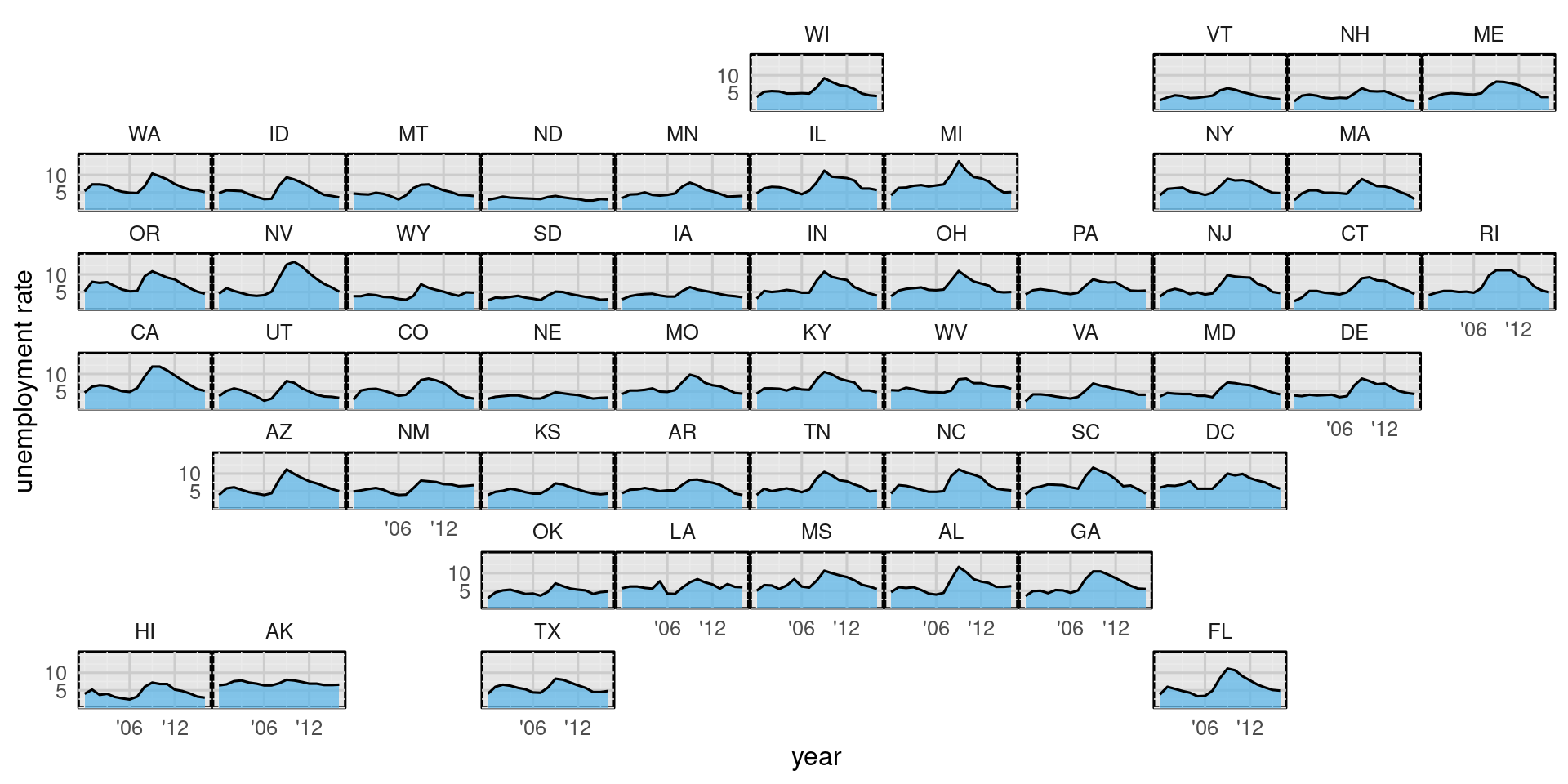
Time Series in Each Bin

Time Series in Each Bin

state_unemp %>%
  ggplot(aes(year, rate)) + 
  geom_area(fill = "#56B4E9", alpha = 0.7) +
  geom_line() + 
  scale_y_continuous(
    name = "unemployment rate",
    limits = c(0, 16), expand = c(0, 0),
    breaks = c(5, 10),
    labels = c( "5", "10")
  ) +
  scale_x_continuous(breaks = c(2006, 2012),
    labels = c("\'06", "\'12")) +
  coord_cartesian(clip = "off") +
  facet_geo(~state, grid = "us_state_grid1") +
  theme_minimal(base_size=12) +
  theme(
    axis.line.x = element_blank(),
    panel.spacing.x = grid::unit(1, "pt"),
    panel.spacing.y = grid::unit(1, "pt"),
    panel.grid.major = element_line(color = "gray80"),
    panel.background = element_rect(fill = "gray90")
  ) 

Time Series in Each Bin

  • ‘geofacet’ and ‘ggplot’ currently break
assignInNamespace("get_full_geo_grid", function(grid) {
  grd <- geofacet:::get_grid(grid)
  nr <- max(grd$row); nc <- max(grd$col)
  gd <- expand.grid(col = seq_len(nc), row = seq_len(nr))
  grd <- merge(grd, gd, all.y = TRUE)
  grd <- grd[order(grd$row, grd$col), ]
  grd$panel <- paste0("panel-", grd$col, "-", grd$row)
  grd$strip <- paste0("strip-t-", grd$col, "-", grd$row)
  grd
}, ns = "geofacet")

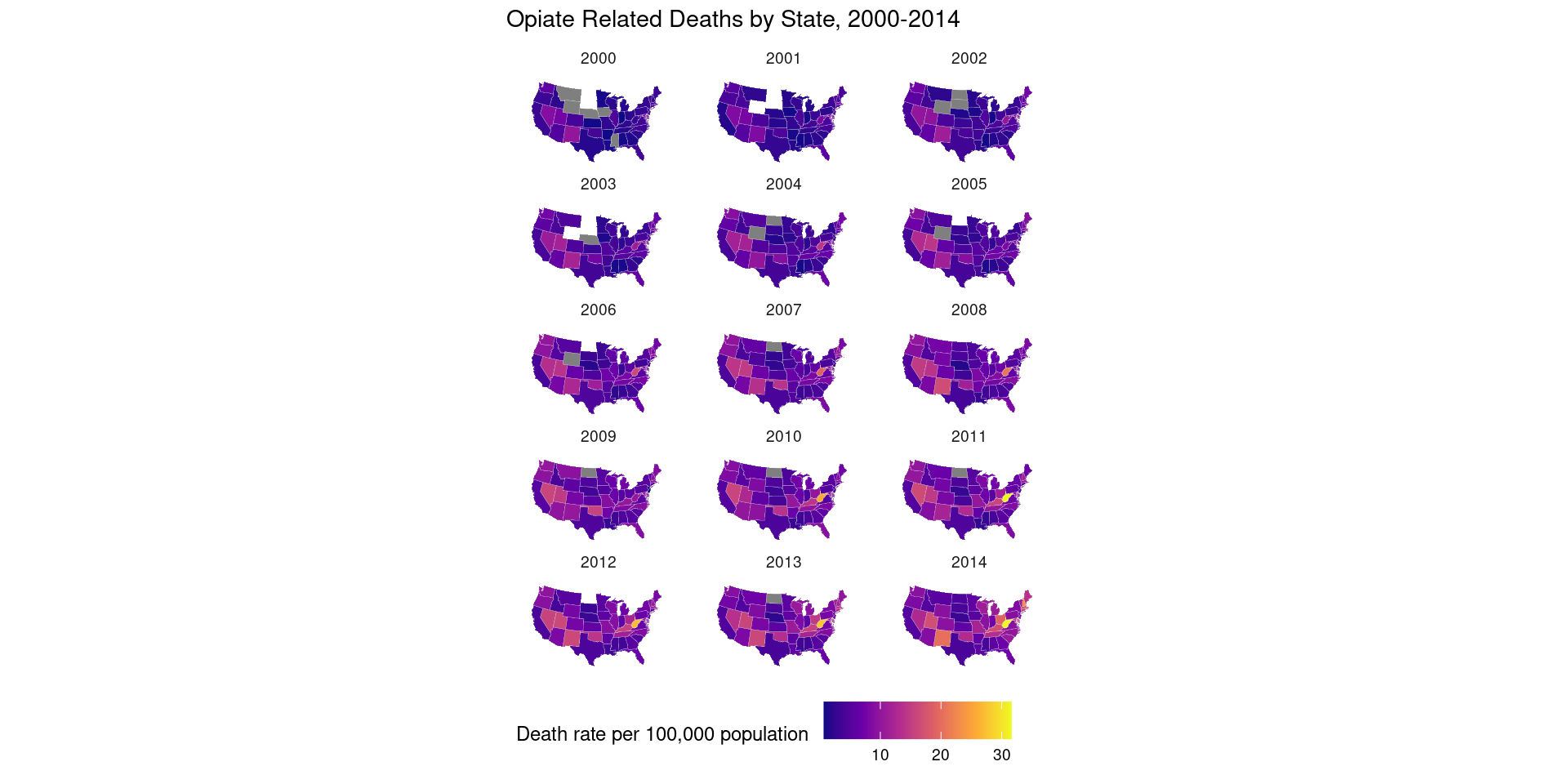
Small Multiples

  • Facet by time

Small Multiples

opiates$region <- tolower(opiates$state)
opiates_map <- left_join(us_states, opiates)

p0 <- ggplot(data = subset(opiates_map, year > 1999),
             mapping = aes(x = long, y = lat,
                 group = group,
                 fill = adjusted))

p1 <- p0 + geom_polygon(color = "gray90", size = 0.05) +
    coord_map(projection = "albers", lat0 = 39, lat1 = 45) 

p2 <- p1 + scale_fill_viridis_c(option = "plasma")

p2 + theme_map() + facet_wrap(~ year, ncol = 3) +
    theme(legend.position = "bottom",
          strip.background = element_blank()) +
    labs(fill = "Death rate per 100,000 population ",
         title = "Opiate Related Deaths by State, 2000-2014")

Non-Spatial Plots

  • Direct numerical visualization more precise than colors
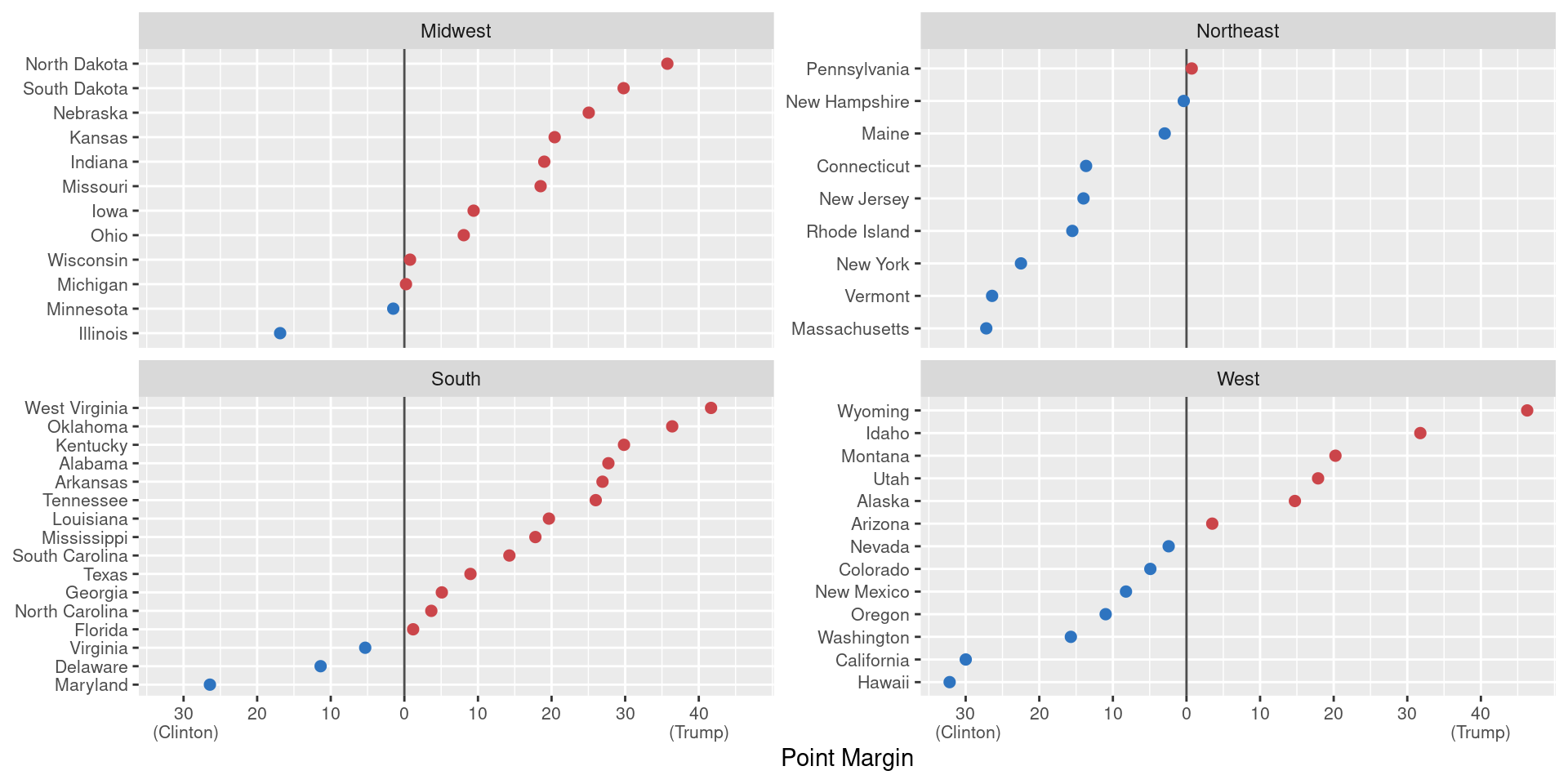
Non-Spatial Plots

  • Direct numerical visualization more precise than colors
 election |> filter(state != "DC") |> ggplot(
   aes(x = r_points, y = reorder(state, r_points),
                           color = party)) + geom_vline(xintercept = 0, color = "gray30") +
    geom_point(size = 2) + scale_color_manual(values = party_colors) + scale_x_continuous(breaks = c(-30, -20, -10, 0, 10, 20, 30, 40),                              labels = c("30\n (Clinton)", "20", "10", "0",
                                         "10", "20", "30", "40\n(Trump)")) + 
   facet_wrap(~ census, scales="free_y",ncol=2) +
    guides(color=FALSE) + labs(x = "Point Margin", y = NULL) +
    theme(axis.text=element_text(size=8))

Thanks

References

  • Kieran Healy Data Visualization and Github