DATA 608 Meetup 9: Models and Uncertainty

George I. Hagstrom

Week Summary

  • This week is about visualizing models and uncertainty
  • Next week is about dimensionality reduction techniques
  • Assignment: Make a model of house sale prices and tell a story about it
  • Reading: Healy Visualization, Fundamentals of Data Visualization 16
  • Bonus Readings: Marginal Effects Book: 2-3, 15

How to talk about models

  • You have just fitted a model
  • You have an array of model coefficients, accuracy measures, and summary statistics
  • How do you convey insights from the model to a PM, supervisor, or even a colleague?

Model Coefficients Hard to Interpret

  • Thornton dataset: How much does a monetary incentive impact the decision to get an HIV test?
dat = get_dataset("thornton")
mod_thornton = glm(outcome ~ incentive * (agecat + distance), 
    data = dat, family = binomial)
dat |> head()
# A data frame: 6 × 8
  village outcome distance amount incentive   age hiv2004 agecat
*   <int>   <int>    <dbl>  <dbl>     <int> <int>   <int> <fct> 
1      43       1    0.549      0         0    14       0 <18   
2     117       0    0.840      0         0    14       0 <18   
3       2       0    3.34       0         0    15       0 <18   
4       6       0    2.32       0         0    15       0 <18   
5      11       0    1.39       0         0    15       0 <18   
6      14       0    3.87       0         0    15       0 <18   

Model Coefficients Hard to Interpret

  • What do these numbers mean?
  • Are log-odds-ratios intuitive to you?
             (Intercept)                incentive           agecat18 to 35 
             -0.48616576               2.05760093               0.07937246 
               agecat>35                 distance incentive:agecat18 to 35 
              0.34522236              -0.18439675              -0.05850445 
     incentive:agecat>35       incentive:distance 
             -0.12468320               0.02304394 
  • Leads to poor decisions (like ignoring everything but sign)

Model Coefficients Hard to Interpret

  • This isn’t unique to logistic regression
  • For any model but simple linear regression
  • Need a better way to present model results

Alternative Workflow

  • Don’t focus on parameter estimates
  • Instead transform them to quantities that shed light on your analytic questions
  • Predictions, Comparisons, Slopes
  • Always Show Uncertainty

Predictions

  • A prediction shows what your model says would happen for units with hypothetical predictor values

Counterfactual Comparisons

Slopes

Look inside a model object

ames = read_csv("/home/georgehagstrom/work/Teaching/DATA608/DataStory5/train.csv")
mod = lm(SalePrice ~ YearBuilt + BedroomAbvGr + `1stFlrSF` +
           `2ndFlrSF` + GarageArea + Neighborhood,ames)
mod

Call:
lm(formula = SalePrice ~ YearBuilt + BedroomAbvGr + `1stFlrSF` + 
    `2ndFlrSF` + GarageArea + Neighborhood, data = ames)

Coefficients:
        (Intercept)            YearBuilt         BedroomAbvGr  
         -906678.44               477.60             -7057.40  
         `1stFlrSF`           `2ndFlrSF`           GarageArea  
              94.96                69.22                42.01  
NeighborhoodBlueste   NeighborhoodBrDale  NeighborhoodBrkSide  
          -15845.51            -18830.59              8491.97  
NeighborhoodClearCr  NeighborhoodCollgCr  NeighborhoodCrawfor  
           24509.12             14684.76             37778.60  
NeighborhoodEdwards  NeighborhoodGilbert   NeighborhoodIDOTRR  
          -13542.86             10214.85             -8014.57  
NeighborhoodMeadowV  NeighborhoodMitchel    NeighborhoodNAmes  
          -22671.49             -4473.58             -1497.55  
NeighborhoodNoRidge  NeighborhoodNPkVill  NeighborhoodNridgHt  
           71170.54             -5431.58             79487.57  
 NeighborhoodNWAmes  NeighborhoodOldTown   NeighborhoodSawyer  
            -526.35             -5648.44             -3062.98  
NeighborhoodSawyerW  NeighborhoodSomerst  NeighborhoodStoneBr  
            2027.83             27340.82             82622.17  
  NeighborhoodSWISU   NeighborhoodTimber  NeighborhoodVeenker  
             676.90             32879.11             48196.84  

summary for top level info

mod |> summary()

Call:
lm(formula = SalePrice ~ YearBuilt + BedroomAbvGr + `1stFlrSF` + 
    `2ndFlrSF` + GarageArea + Neighborhood, data = ames)

Residuals:
    Min      1Q  Median      3Q     Max 
-428522  -16684     328   15778  269785 

Coefficients:
                      Estimate Std. Error t value Pr(>|t|)    
(Intercept)         -9.067e+05  1.440e+05  -6.297 4.03e-10 ***
YearBuilt            4.776e+02  7.191e+01   6.642 4.39e-11 ***
BedroomAbvGr        -7.057e+03  1.599e+03  -4.412 1.10e-05 ***
`1stFlrSF`           9.496e+01  3.591e+00  26.443  < 2e-16 ***
`2ndFlrSF`           6.922e+01  3.309e+00  20.919  < 2e-16 ***
GarageArea           4.201e+01  6.353e+00   6.613 5.29e-11 ***
NeighborhoodBlueste -1.585e+04  2.834e+04  -0.559  0.57612    
NeighborhoodBrDale  -1.883e+04  1.355e+04  -1.390  0.16488    
NeighborhoodBrkSide  8.492e+03  1.165e+04   0.729  0.46628    
NeighborhoodClearCr  2.451e+04  1.195e+04   2.050  0.04052 *  
NeighborhoodCollgCr  1.468e+04  9.803e+03   1.498  0.13434    
NeighborhoodCrawfor  3.778e+04  1.151e+04   3.283  0.00105 ** 
NeighborhoodEdwards -1.354e+04  1.055e+04  -1.284  0.19950    
NeighborhoodGilbert  1.021e+04  1.035e+04   0.987  0.32400    
NeighborhoodIDOTRR  -8.015e+03  1.236e+04  -0.649  0.51670    
NeighborhoodMeadowV -2.267e+04  1.328e+04  -1.708  0.08792 .  
NeighborhoodMitchel -4.474e+03  1.084e+04  -0.413  0.67998    
NeighborhoodNAmes   -1.498e+03  1.011e+04  -0.148  0.88227    
NeighborhoodNoRidge  7.117e+04  1.125e+04   6.326 3.36e-10 ***
NeighborhoodNPkVill -5.432e+03  1.575e+04  -0.345  0.73021    
NeighborhoodNridgHt  7.949e+04  1.024e+04   7.761 1.59e-14 ***
NeighborhoodNWAmes  -5.264e+02  1.051e+04  -0.050  0.96007    
NeighborhoodOldTown -5.648e+03  1.142e+04  -0.495  0.62102    
NeighborhoodSawyer  -3.063e+03  1.068e+04  -0.287  0.77435    
NeighborhoodSawyerW  2.028e+03  1.055e+04   0.192  0.84760    
NeighborhoodSomerst  2.734e+04  1.017e+04   2.688  0.00726 ** 
NeighborhoodStoneBr  8.262e+04  1.191e+04   6.938 6.00e-12 ***
NeighborhoodSWISU    6.769e+02  1.325e+04   0.051  0.95927    
NeighborhoodTimber   3.288e+04  1.113e+04   2.953  0.00320 ** 
NeighborhoodVeenker  4.820e+04  1.468e+04   3.284  0.00105 ** 
---
Signif. codes:  0 '***' 0.001 '**' 0.01 '*' 0.05 '.' 0.1 ' ' 1

Residual standard error: 37670 on 1430 degrees of freedom
Multiple R-squared:  0.7796,    Adjusted R-squared:  0.7751 
F-statistic: 174.4 on 29 and 1430 DF,  p-value: < 2.2e-16

str for all details

mod |> str()
List of 13
 $ coefficients : Named num [1:30] -906678.4 477.6 -7057.4 95 69.2 ...
  ..- attr(*, "names")= chr [1:30] "(Intercept)" "YearBuilt" "BedroomAbvGr" "`1stFlrSF`" ...
 $ residuals    : Named num [1:1460] 1614 -21747 8140 -55088 -58200 ...
  ..- attr(*, "names")= chr [1:1460] "1" "2" "3" "4" ...
 $ effects      : Named num [1:1460] -6912989 -1586708 -624098 -1370096 -1285383 ...
  ..- attr(*, "names")= chr [1:1460] "(Intercept)" "YearBuilt" "BedroomAbvGr" "`1stFlrSF`" ...
 $ rank         : int 30
 $ fitted.values: Named num [1:1460] 206886 203247 215360 195088 308200 ...
  ..- attr(*, "names")= chr [1:1460] "1" "2" "3" "4" ...
 $ assign       : int [1:30] 0 1 2 3 4 5 6 6 6 6 ...
 $ qr           :List of 5
  ..$ qr   : num [1:1460, 1:30] -38.2099 0.0262 0.0262 0.0262 0.0262 ...
  .. ..- attr(*, "dimnames")=List of 2
  .. .. ..$ : chr [1:1460] "1" "2" "3" "4" ...
  .. .. ..$ : chr [1:30] "(Intercept)" "YearBuilt" "BedroomAbvGr" "`1stFlrSF`" ...
  .. ..- attr(*, "assign")= int [1:30] 0 1 2 3 4 5 6 6 6 6 ...
  .. ..- attr(*, "contrasts")=List of 1
  .. .. ..$ Neighborhood: chr "contr.treatment"
  ..$ qraux: num [1:30] 1.03 1 1.01 1 1.02 ...
  ..$ pivot: int [1:30] 1 2 3 4 5 6 7 8 9 10 ...
  ..$ tol  : num 1e-07
  ..$ rank : int 30
  ..- attr(*, "class")= chr "qr"
 $ df.residual  : int 1430
 $ contrasts    :List of 1
  ..$ Neighborhood: chr "contr.treatment"
 $ xlevels      :List of 1
  ..$ Neighborhood: chr [1:25] "Blmngtn" "Blueste" "BrDale" "BrkSide" ...
 $ call         : language lm(formula = SalePrice ~ YearBuilt + BedroomAbvGr + `1stFlrSF` + `2ndFlrSF` +      GarageArea + Neighborhood, data = ames)
 $ terms        :Classes 'terms', 'formula'  language SalePrice ~ YearBuilt + BedroomAbvGr + `1stFlrSF` + `2ndFlrSF` + GarageArea +      Neighborhood
  .. ..- attr(*, "variables")= language list(SalePrice, YearBuilt, BedroomAbvGr, `1stFlrSF`, `2ndFlrSF`, GarageArea,      Neighborhood)
  .. ..- attr(*, "factors")= int [1:7, 1:6] 0 1 0 0 0 0 0 0 0 1 ...
  .. .. ..- attr(*, "dimnames")=List of 2
  .. .. .. ..$ : chr [1:7] "SalePrice" "YearBuilt" "BedroomAbvGr" "`1stFlrSF`" ...
  .. .. .. ..$ : chr [1:6] "YearBuilt" "BedroomAbvGr" "`1stFlrSF`" "`2ndFlrSF`" ...
  .. ..- attr(*, "term.labels")= chr [1:6] "YearBuilt" "BedroomAbvGr" "`1stFlrSF`" "`2ndFlrSF`" ...
  .. ..- attr(*, "order")= int [1:6] 1 1 1 1 1 1
  .. ..- attr(*, "intercept")= int 1
  .. ..- attr(*, "response")= int 1
  .. ..- attr(*, ".Environment")=<environment: R_GlobalEnv> 
  .. ..- attr(*, "predvars")= language list(SalePrice, YearBuilt, BedroomAbvGr, `1stFlrSF`, `2ndFlrSF`, GarageArea,      Neighborhood)
  .. ..- attr(*, "dataClasses")= Named chr [1:7] "numeric" "numeric" "numeric" "numeric" ...
  .. .. ..- attr(*, "names")= chr [1:7] "SalePrice" "YearBuilt" "BedroomAbvGr" "1stFlrSF" ...
 $ model        :'data.frame':  1460 obs. of  7 variables:
  ..$ SalePrice   : num [1:1460] 208500 181500 223500 140000 250000 ...
  ..$ YearBuilt   : num [1:1460] 2003 1976 2001 1915 2000 ...
  ..$ BedroomAbvGr: num [1:1460] 3 3 3 3 4 1 3 3 2 2 ...
  ..$ 1stFlrSF    : num [1:1460] 856 1262 920 961 1145 ...
  ..$ 2ndFlrSF    : num [1:1460] 854 0 866 756 1053 ...
  ..$ GarageArea  : num [1:1460] 548 460 608 642 836 480 636 484 468 205 ...
  ..$ Neighborhood: chr [1:1460] "CollgCr" "Veenker" "CollgCr" "Crawfor" ...
  ..- attr(*, "terms")=Classes 'terms', 'formula'  language SalePrice ~ YearBuilt + BedroomAbvGr + `1stFlrSF` + `2ndFlrSF` + GarageArea +      Neighborhood
  .. .. ..- attr(*, "variables")= language list(SalePrice, YearBuilt, BedroomAbvGr, `1stFlrSF`, `2ndFlrSF`, GarageArea,      Neighborhood)
  .. .. ..- attr(*, "factors")= int [1:7, 1:6] 0 1 0 0 0 0 0 0 0 1 ...
  .. .. .. ..- attr(*, "dimnames")=List of 2
  .. .. .. .. ..$ : chr [1:7] "SalePrice" "YearBuilt" "BedroomAbvGr" "`1stFlrSF`" ...
  .. .. .. .. ..$ : chr [1:6] "YearBuilt" "BedroomAbvGr" "`1stFlrSF`" "`2ndFlrSF`" ...
  .. .. ..- attr(*, "term.labels")= chr [1:6] "YearBuilt" "BedroomAbvGr" "`1stFlrSF`" "`2ndFlrSF`" ...
  .. .. ..- attr(*, "order")= int [1:6] 1 1 1 1 1 1
  .. .. ..- attr(*, "intercept")= int 1
  .. .. ..- attr(*, "response")= int 1
  .. .. ..- attr(*, ".Environment")=<environment: R_GlobalEnv> 
  .. .. ..- attr(*, "predvars")= language list(SalePrice, YearBuilt, BedroomAbvGr, `1stFlrSF`, `2ndFlrSF`, GarageArea,      Neighborhood)
  .. .. ..- attr(*, "dataClasses")= Named chr [1:7] "numeric" "numeric" "numeric" "numeric" ...
  .. .. .. ..- attr(*, "names")= chr [1:7] "SalePrice" "YearBuilt" "BedroomAbvGr" "1stFlrSF" ...
 - attr(*, "class")= chr "lm"
Tidying Model Objects

  • broom is part of tidymodels family and contains function which tidy the model for you
  • tidy() creates tibble of model components:
mod |> tidy(conf.int = TRUE) 

Model Table from Tidy

# A tibble: 30 × 7
   term                estimate std.error statistic   p.value conf.low conf.high
   <chr>                  <dbl>     <dbl>     <dbl>     <dbl>    <dbl>     <dbl>
 1 (Intercept)          -9.07e5 143987.     -6.30   4.03e- 10  -1.19e6 -624229. 
 2 YearBuilt             4.78e2     71.9     6.64   4.39e- 11   3.37e2     619. 
 3 BedroomAbvGr         -7.06e3   1599.     -4.41   1.10e-  5  -1.02e4   -3920. 
 4 `1stFlrSF`            9.50e1      3.59   26.4    8.95e-126   8.79e1     102. 
 5 `2ndFlrSF`            6.92e1      3.31   20.9    5.41e- 85   6.27e1      75.7
 6 GarageArea            4.20e1      6.35    6.61   5.29e- 11   2.96e1      54.5
 7 NeighborhoodBlueste  -1.58e4  28337.     -0.559  5.76e-  1  -7.14e4   39741. 
 8 NeighborhoodBrDale   -1.88e4  13551.     -1.39   1.65e-  1  -4.54e4    7752. 
 9 NeighborhoodBrkSide   8.49e3  11653.      0.729  4.66e-  1  -1.44e4   31351. 
10 NeighborhoodClearCr   2.45e4  11954.      2.05   4.05e-  2   1.06e3   47959. 
11 NeighborhoodCollgCr   1.47e4   9803.      1.50   1.34e-  1  -4.54e3   33914. 
12 NeighborhoodCrawfor   3.78e4  11506.      3.28   1.05e-  3   1.52e4   60350. 
13 NeighborhoodEdwards  -1.35e4  10551.     -1.28   1.99e-  1  -3.42e4    7154. 
14 NeighborhoodGilbert   1.02e4  10354.      0.987  3.24e-  1  -1.01e4   30525. 
15 NeighborhoodIDOTRR   -8.01e3  12357.     -0.649  5.17e-  1  -3.23e4   16225. 
16 NeighborhoodMeadowV  -2.27e4  13277.     -1.71   8.79e-  2  -4.87e4    3372. 
17 NeighborhoodMitchel  -4.47e3  10843.     -0.413  6.80e-  1  -2.57e4   16797. 
18 NeighborhoodNAmes    -1.50e3  10110.     -0.148  8.82e-  1  -2.13e4   18335. 
19 NeighborhoodNoRidge   7.12e4  11251.      6.33   3.36e- 10   4.91e4   93240. 
20 NeighborhoodNPkVill  -5.43e3  15748.     -0.345  7.30e-  1  -3.63e4   25460. 
21 NeighborhoodNridgHt   7.95e4  10242.      7.76   1.59e- 14   5.94e4   99578. 
22 NeighborhoodNWAmes   -5.26e2  10511.     -0.0501 9.60e-  1  -2.11e4   20092. 
23 NeighborhoodOldTown  -5.65e3  11422.     -0.495  6.21e-  1  -2.81e4   16758. 
24 NeighborhoodSawyer   -3.06e3  10682.     -0.287  7.74e-  1  -2.40e4   17891. 
25 NeighborhoodSawyerW   2.03e3  10550.      0.192  8.48e-  1  -1.87e4   22723. 
26 NeighborhoodSomerst   2.73e4  10170.      2.69   7.26e-  3   7.39e3   47290. 
27 NeighborhoodStoneBr   8.26e4  11908.      6.94   6.00e- 12   5.93e4  105982. 
28 NeighborhoodSWISU     6.77e2  13254.      0.0511 9.59e-  1  -2.53e4   26675. 
29 NeighborhoodTimber    3.29e4  11134.      2.95   3.20e-  3   1.10e4   54720. 
30 NeighborhoodVeenker   4.82e4  14678.      3.28   1.05e-  3   1.94e4   76990. 

Plotting Coefficients

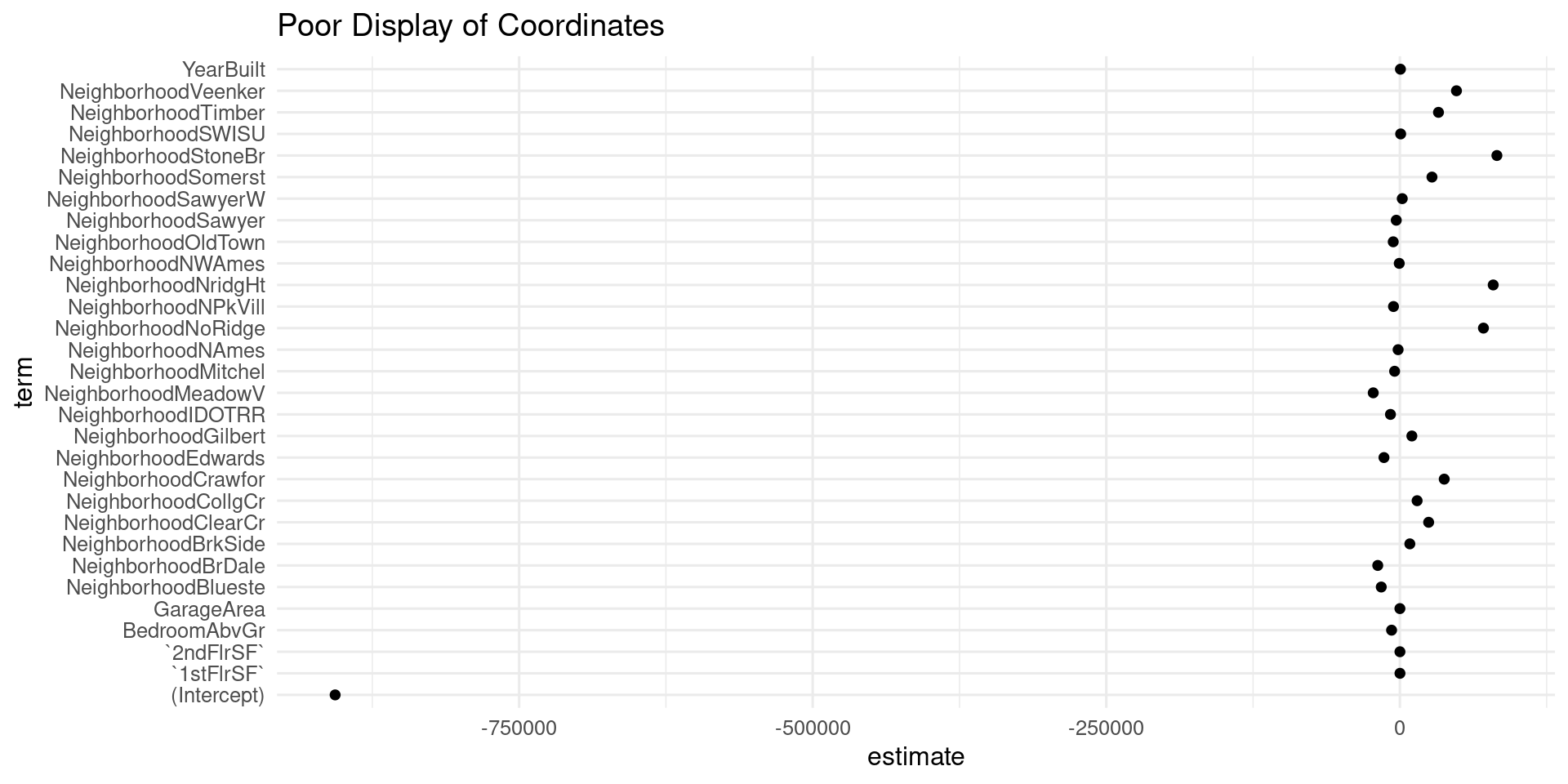
  • tidy lets us make plots of coordinates
tidy_ames = tidy(mod)
tidy_ames |> ggplot(mapping = aes(x = term,
                            y = estimate)) +
  geom_point() +
  coord_flip() +
  theme_minimal(base_size=12) +
  labs(title="Poor Display of Coordinates")

Plotting Coefficients

  • tidy lets us make plots of coordinates

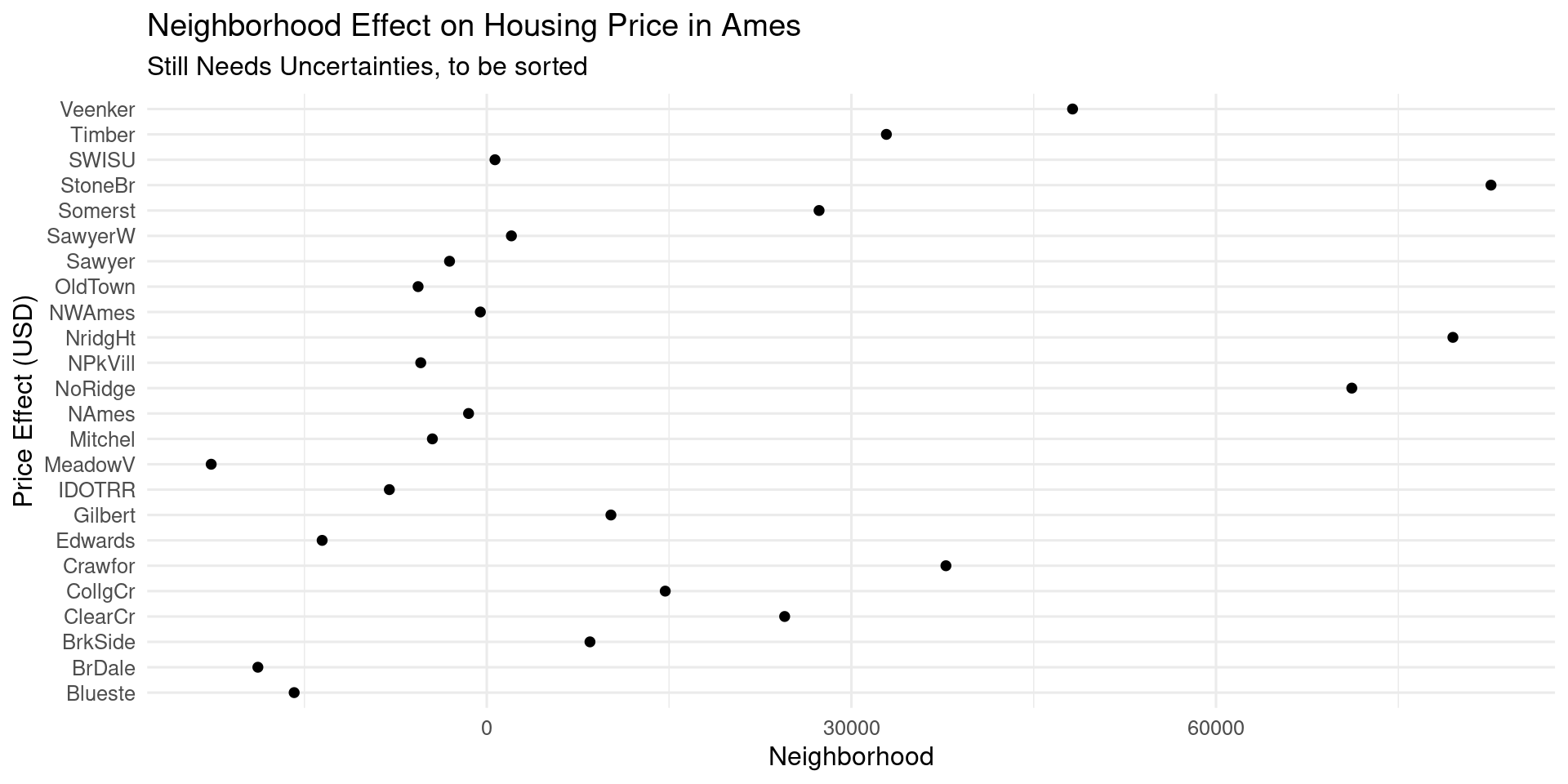
Select Neighborhood, Clean Names

tidy_ames |> filter(str_detect(term,"Neighborhood")) |> 
  mutate(term = str_remove_all(term,"Neighborhood")) |> 
  ggplot(mapping = aes(x = term,
                            y = estimate)) +
  geom_point() +
  coord_flip() +
  theme_minimal(base_size=12) +
  labs(title="Neighborhood Effect on Housing Price in Ames",
       subtitle= "Still Needs Uncertainties, to be sorted",
       y="Neighborhood",
       x = "Price Effect (USD)")

Select Neighborhood, Clean Names

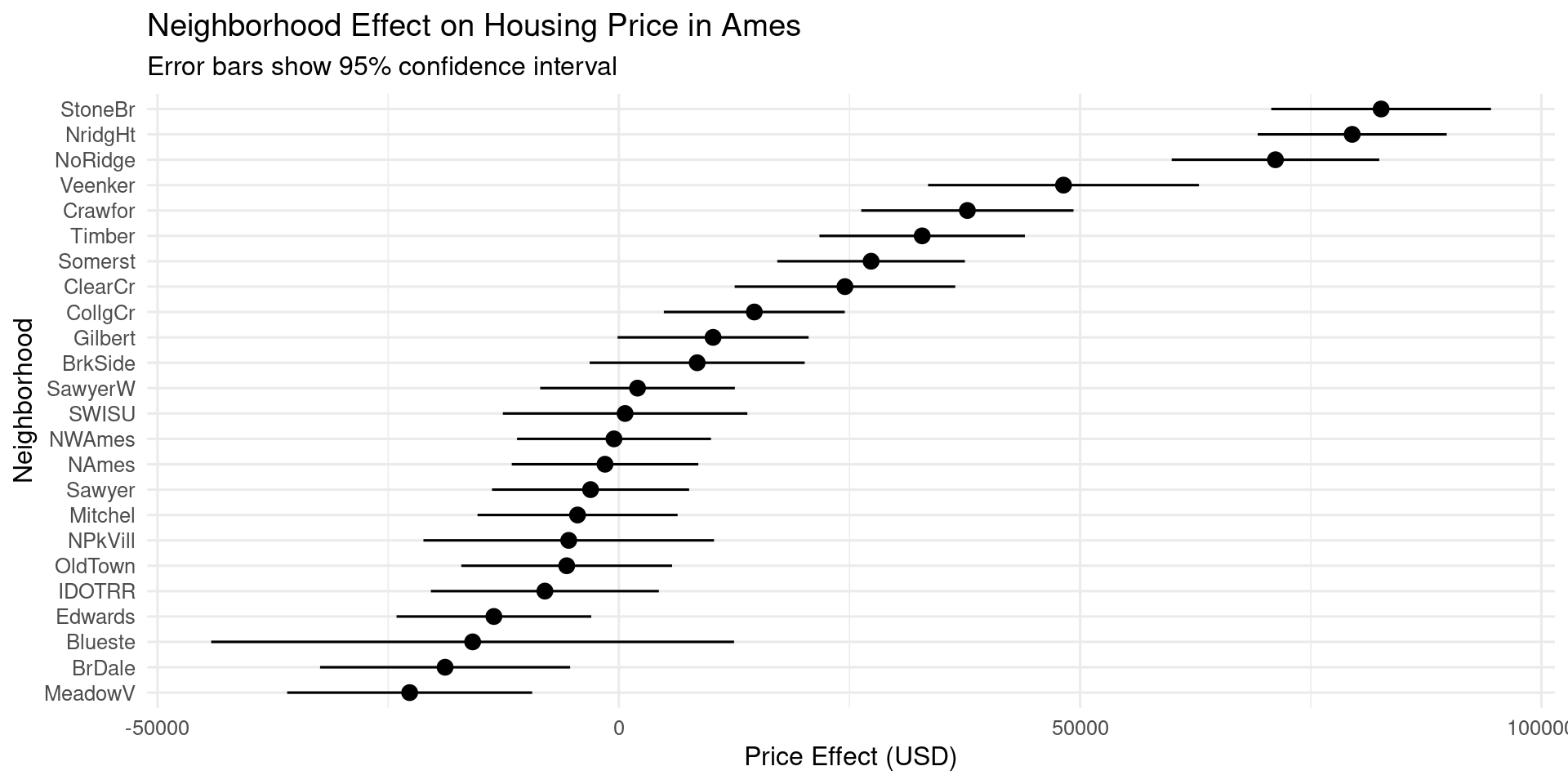
Sort and add Uncertainty

tidy_ames |> filter(str_detect(term,"Neighborhood")) |> 
  mutate(term = str_remove_all(term,"Neighborhood")) |> 
  ggplot(mapping = aes(x = reorder(term,estimate),
                       y = estimate,
                       ymin = estimate - std.error, 
                       ymax = estimate + std.error)) +
  geom_pointrange() +
  coord_flip() +
  theme_minimal(base_size=12) +
  labs(title="Neighborhood Effect on Housing Price in Ames", subtitle = "Error bars show 95% confidence interval",
       y = "Price Effect (USD)",
       x = "Neighborhood")

Sort and add Uncertainty

Augment adds fits to data

ames_fit = mod |> augment(ames)
ames_fit |> select(SalePrice:.std.resid)
# A tibble: 1,460 × 7
   SalePrice .fitted  .resid    .hat .sigma     .cooksd .std.resid
       <dbl>   <dbl>   <dbl>   <dbl>  <dbl>       <dbl>      <dbl>
 1    208500 206886.   1614. 0.00851 37688. 0.000000530     0.0430
 2    181500 203247. -21747. 0.0932  37683. 0.00126        -0.606 
 3    223500 215360.   8140. 0.00842 37687. 0.0000133       0.217 
 4    140000 195088. -55088. 0.0254  37659. 0.00190        -1.48  
 5    250000 308200. -58200. 0.0276  37655. 0.00232        -1.57  
 6    143000 168576. -25576. 0.0295  37682. 0.000482       -0.689 
 7    307000 244182.  62818. 0.0145  37651. 0.00139         1.68  
 8    200000 207423.  -7423. 0.0166  37687. 0.0000222      -0.199 
 9    129900 164566. -34666. 0.0117  37676. 0.000338       -0.926 
10    118000 124647.  -6647. 0.0185  37687. 0.0000199      -0.178 
# ℹ 1,450 more rows

purrr and broom: work with many models

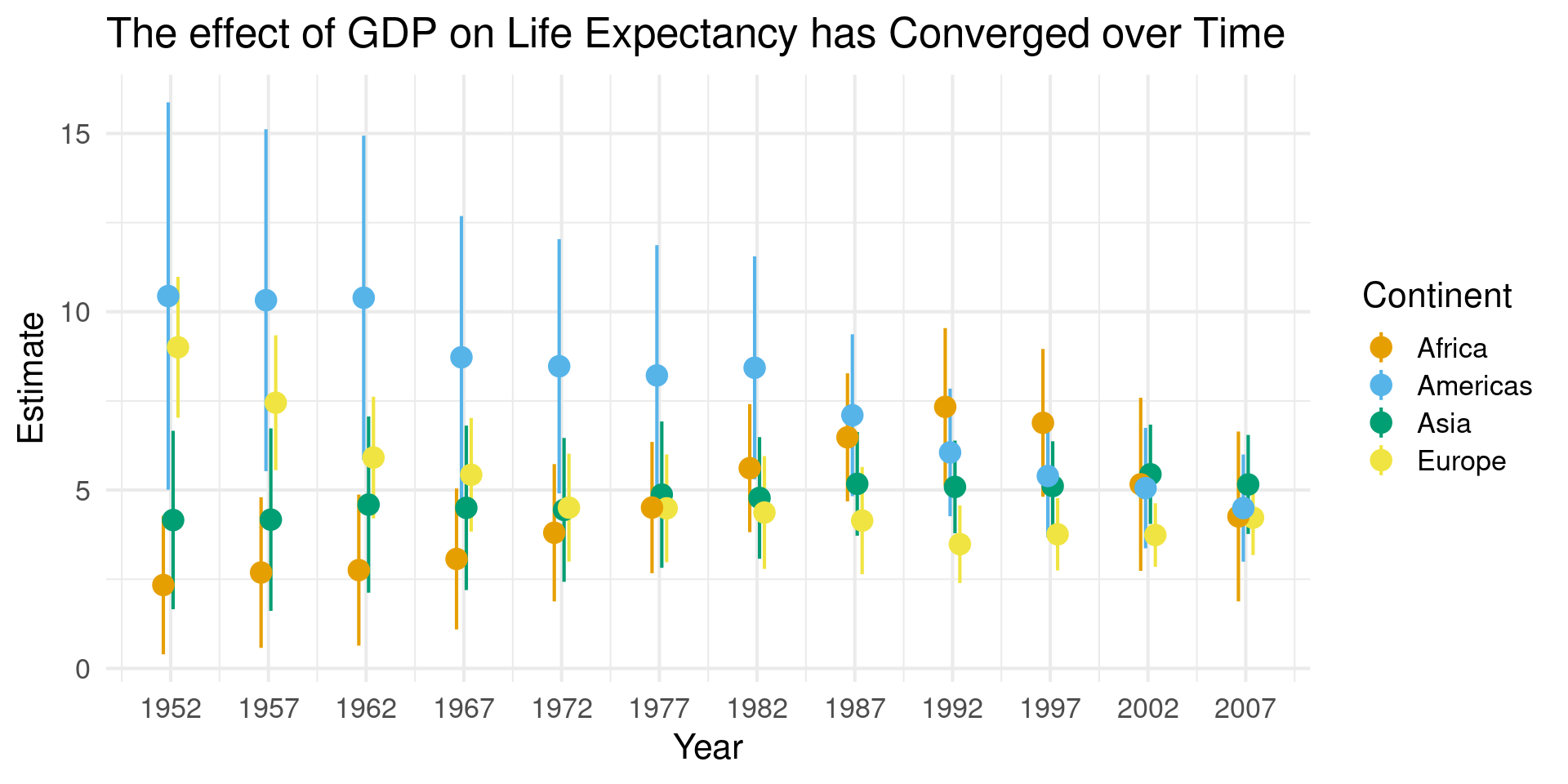
  • Use gapminder data on GDP and life expectancy
library(gapminder)
gapminder
# A tibble: 1,704 × 6
   country     continent  year lifeExp      pop gdpPercap
   <fct>       <fct>     <int>   <dbl>    <int>     <dbl>
 1 Afghanistan Asia       1952    28.8  8425333      779.
 2 Afghanistan Asia       1957    30.3  9240934      821.
 3 Afghanistan Asia       1962    32.0 10267083      853.
 4 Afghanistan Asia       1967    34.0 11537966      836.
 5 Afghanistan Asia       1972    36.1 13079460      740.
 6 Afghanistan Asia       1977    38.4 14880372      786.
 7 Afghanistan Asia       1982    39.9 12881816      978.
 8 Afghanistan Asia       1987    40.8 13867957      852.
 9 Afghanistan Asia       1992    41.7 16317921      649.
10 Afghanistan Asia       1997    41.8 22227415      635.
# ℹ 1,694 more rows

nest creates a tibble of tibbles

nested_gap = gapminder |> 
  group_by(continent,year) |>
  nest()
nested_gap
# A tibble: 60 × 3
# Groups:   continent, year [60]
   continent  year data             
   <fct>     <int> <list>           
 1 Asia       1952 <tibble [33 × 4]>
 2 Asia       1957 <tibble [33 × 4]>
 3 Asia       1962 <tibble [33 × 4]>
 4 Asia       1967 <tibble [33 × 4]>
 5 Asia       1972 <tibble [33 × 4]>
 6 Asia       1977 <tibble [33 × 4]>
 7 Asia       1982 <tibble [33 × 4]>
 8 Asia       1987 <tibble [33 × 4]>
 9 Asia       1992 <tibble [33 × 4]>
10 Asia       1997 <tibble [33 × 4]>
# ℹ 50 more rows

Use map to fit models

fit_ols <- function(df) {
    lm(lifeExp ~ log(gdpPercap), data = df)
}

out_tidy = nested_gap |> 
    mutate(model = map(data, fit_ols),
           tidied = map(model, tidy))  |> 
    unnest(tidied, .drop = TRUE)  |> 
    filter(term != "(Intercept)" &
           continent != "Oceania")

out_tidy 

Use map to fit models

# A tibble: 15 × 9
# Groups:   continent, year [15]
   continent  year data     model  term    estimate std.error statistic  p.value
   <fct>     <int> <list>   <list> <chr>      <dbl>     <dbl>     <dbl>    <dbl>
 1 Asia       1952 <tibble> <lm>   log(gd…     4.16     1.25       3.33 2.28e- 3
 2 Asia       1957 <tibble> <lm>   log(gd…     4.17     1.28       3.26 2.71e- 3
 3 Asia       1962 <tibble> <lm>   log(gd…     4.59     1.24       3.72 7.94e- 4
 4 Asia       1967 <tibble> <lm>   log(gd…     4.50     1.15       3.90 4.77e- 4
 5 Asia       1972 <tibble> <lm>   log(gd…     4.44     1.01       4.41 1.16e- 4
 6 Asia       1977 <tibble> <lm>   log(gd…     4.87     1.03       4.75 4.42e- 5
 7 Asia       1982 <tibble> <lm>   log(gd…     4.78     0.852      5.61 3.77e- 6
 8 Asia       1987 <tibble> <lm>   log(gd…     5.17     0.727      7.12 5.31e- 8
 9 Asia       1992 <tibble> <lm>   log(gd…     5.09     0.649      7.84 7.60e- 9
10 Asia       1997 <tibble> <lm>   log(gd…     5.11     0.628      8.15 3.35e- 9
11 Asia       2002 <tibble> <lm>   log(gd…     5.44     0.696      7.82 8.05e- 9
12 Asia       2007 <tibble> <lm>   log(gd…     5.16     0.694      7.43 2.26e- 8
13 Europe     1952 <tibble> <lm>   log(gd…     9.00     0.987      9.12 7.04e-10
14 Europe     1957 <tibble> <lm>   log(gd…     7.45     0.945      7.88 1.39e- 8
15 Europe     1962 <tibble> <lm>   log(gd…     5.91     0.853      6.93 1.56e- 7

Use Map to Fit Models

Marginal Effects Package

  • marginaleffects is a powerful package in both python and R for model interpretation
  • Comes with a book Marginal Effects
  • Several alternatives exist (detailed there)
  • Can be used with nearly any type of model, from statistical, to Bayesian, to Machine Learning

Plotting Predictions

  • plot_predictions function (also predictions)
  • Specify grid of data on which to predict
  • Do this with condition
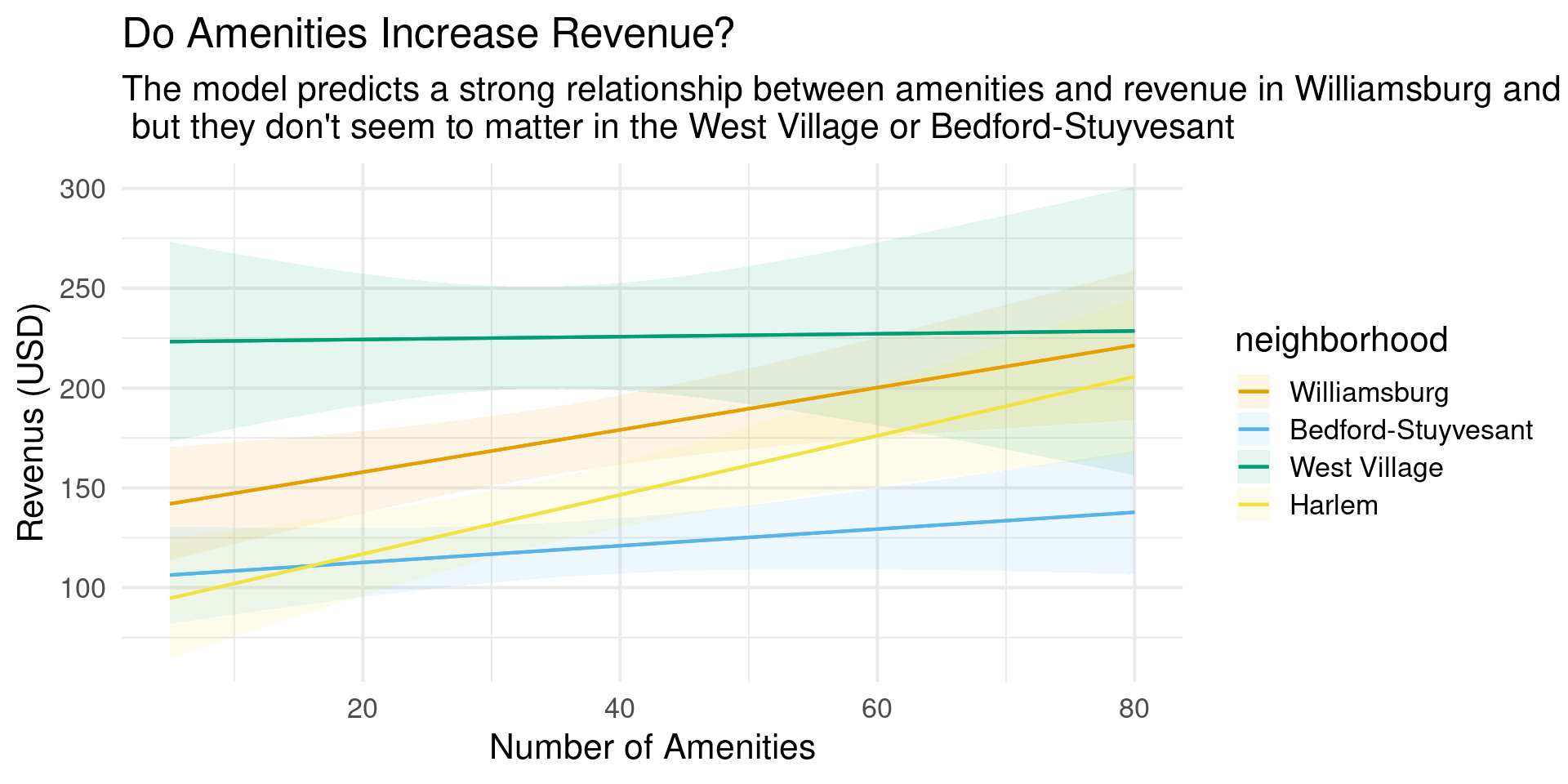
mod = lm(revenue ~ . + host_is_superhost*bedrooms +
           host_is_superhost*neighborhood +
           num_amenities*neighborhood + 
           num_amenities*bedrooms  ,
         data = nyc_bnb_slim)

mod |> plot_predictions(condition = c("num_amenities", "neighborhood")) +
  theme_minimal(base_size = 16) +
  labs(title = "Amenities increase revenues",
       x="Number of Amenities",
       y="Revenus (USD)")

Plotting Predictions

Changing the Conditions

  • Can provide a range of conditions
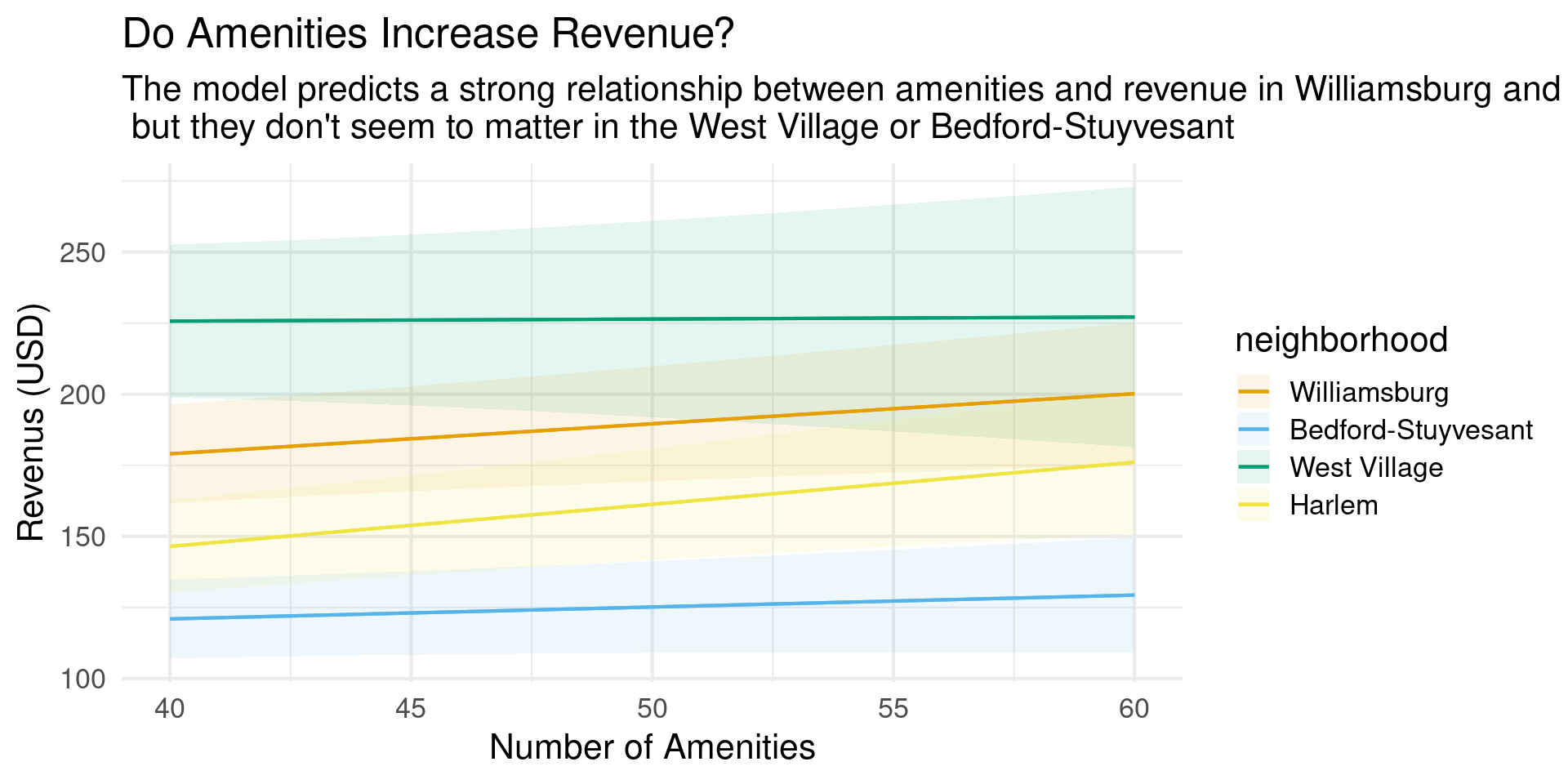
mod |> plot_predictions(condition = 
          list("num_amenities" = 40:60, 
            "neighborhood")) +
  theme_minimal(base_size = 16) +
  labs(title = "Do Amenities Increase Revenue?",
       subtitle = "The model predicts a strong relationship between amenities and revenue in Williamsburg and Harlem,\n but they don't seem to matter in the West Village or Bedford-Stuyvesant",
       x="Number of Amenities",
       y="Revenus (USD)")

Changing the Conditions

  • Can provide a range of conditions

Changing the Conditions

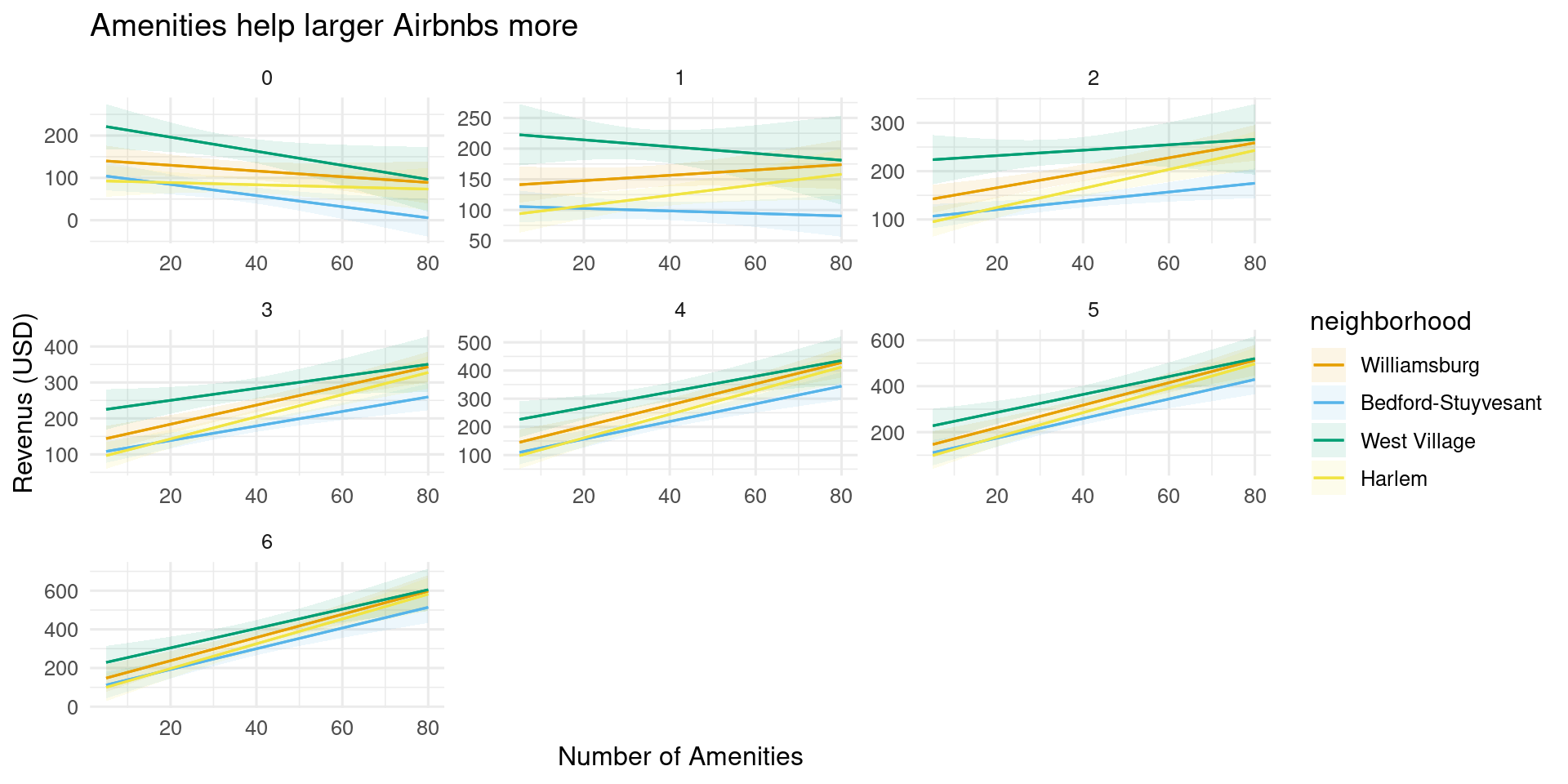
  • Can split into subplots
mod |> plot_predictions(condition = 
          list("num_amenities", 
            "neighborhood",
            "bedrooms" = unique)) +
  theme_minimal(base_size = 16) +
  labs(title = "Do Amenities Increase Revenue?",
       x="Number of Amenities",
       y="Revenus (USD)")

Changing the Conditions

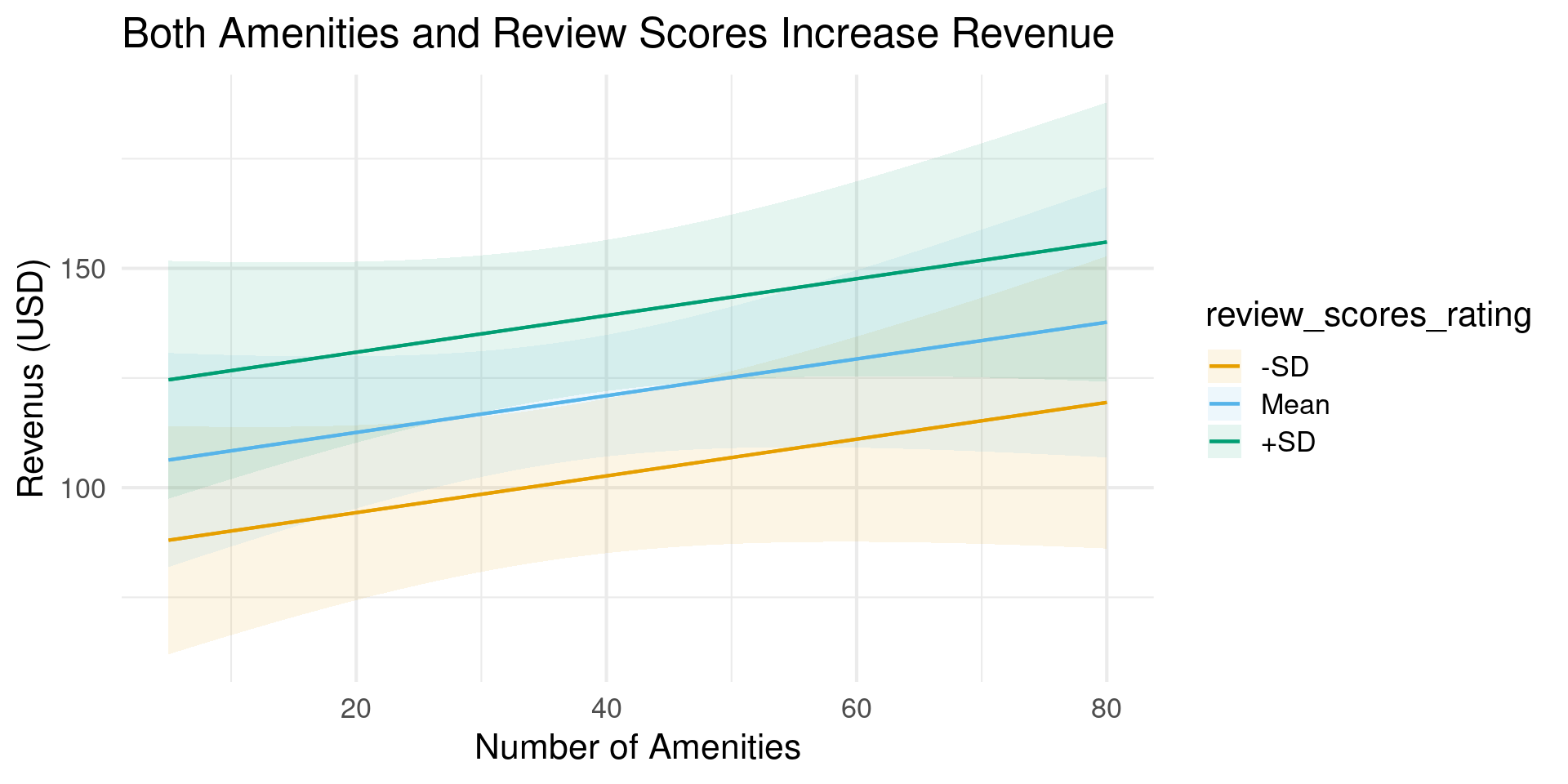
Adding Cases

  • “threenum” keyword plots \(\mathrm{mean}\pm\mathrm{\sigma}\)
  • Other options include “minmax”, “quartile”, check ?plot_predictions
mod |> plot_predictions(condition = 
          list("num_amenities",
               "review_scores_rating" = "threenum")) +
  theme_minimal(base_size = 16) +
  labs(title = "Do Amenities Increase Revenue?",
       subtitle = "The model predicts a strong relationship between amenities and revenue in Williamsburg and Harlem,\n but they don't seem to matter in the West Village or Bedford-Stuyvesant",
       x="Number of Amenities",
       y="Revenus (USD)")

Adding Cases

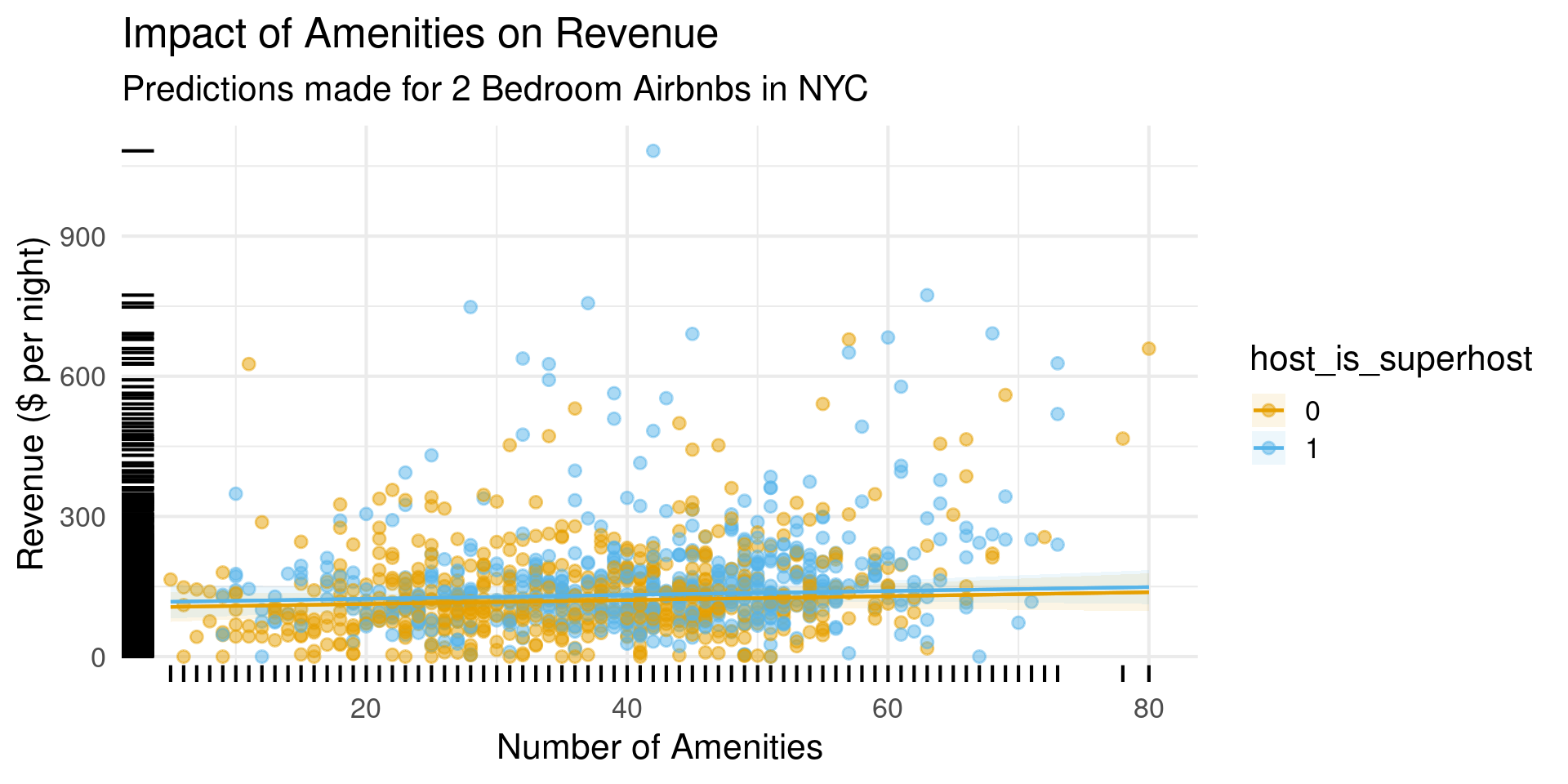
Show Your Data

  • If you can, plot your data along with predictions
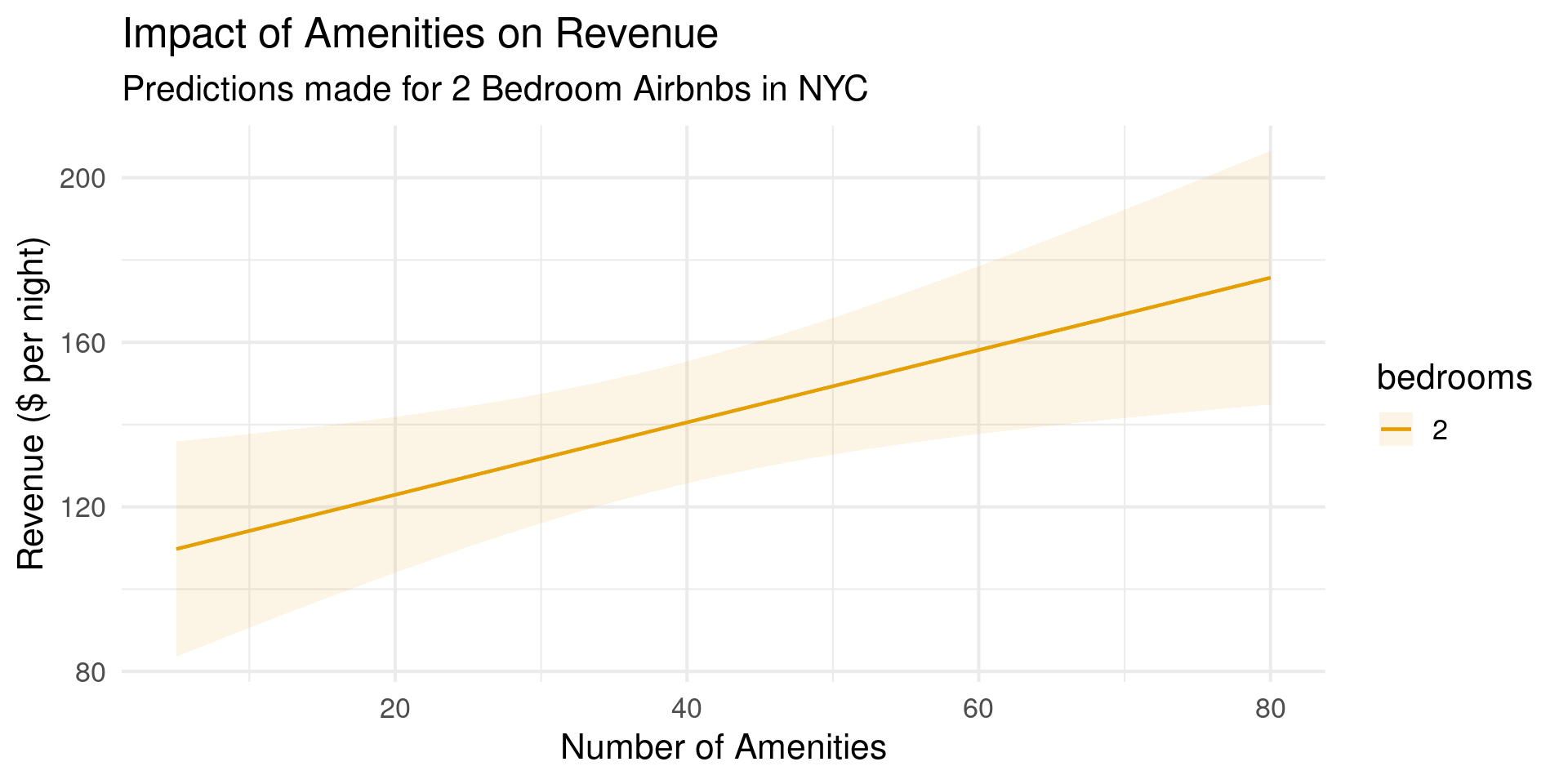
plot_predictions(
    mod,conf_level = .99,
    condition = list(
        "num_amenities",
        "host_is_superhost"), points = .5, rug = TRUE) +
  theme_minimal(base_size=16) +
  labs(title = "Impact of Amenities on Revenue",
       subtitle = "Predictions made for 2 Bedroom Airbnbs in NYC", x = "Number of Amenities",y="Revenue ($ per night)")

Show Your Data

  • If you can, plot your data along with predictions

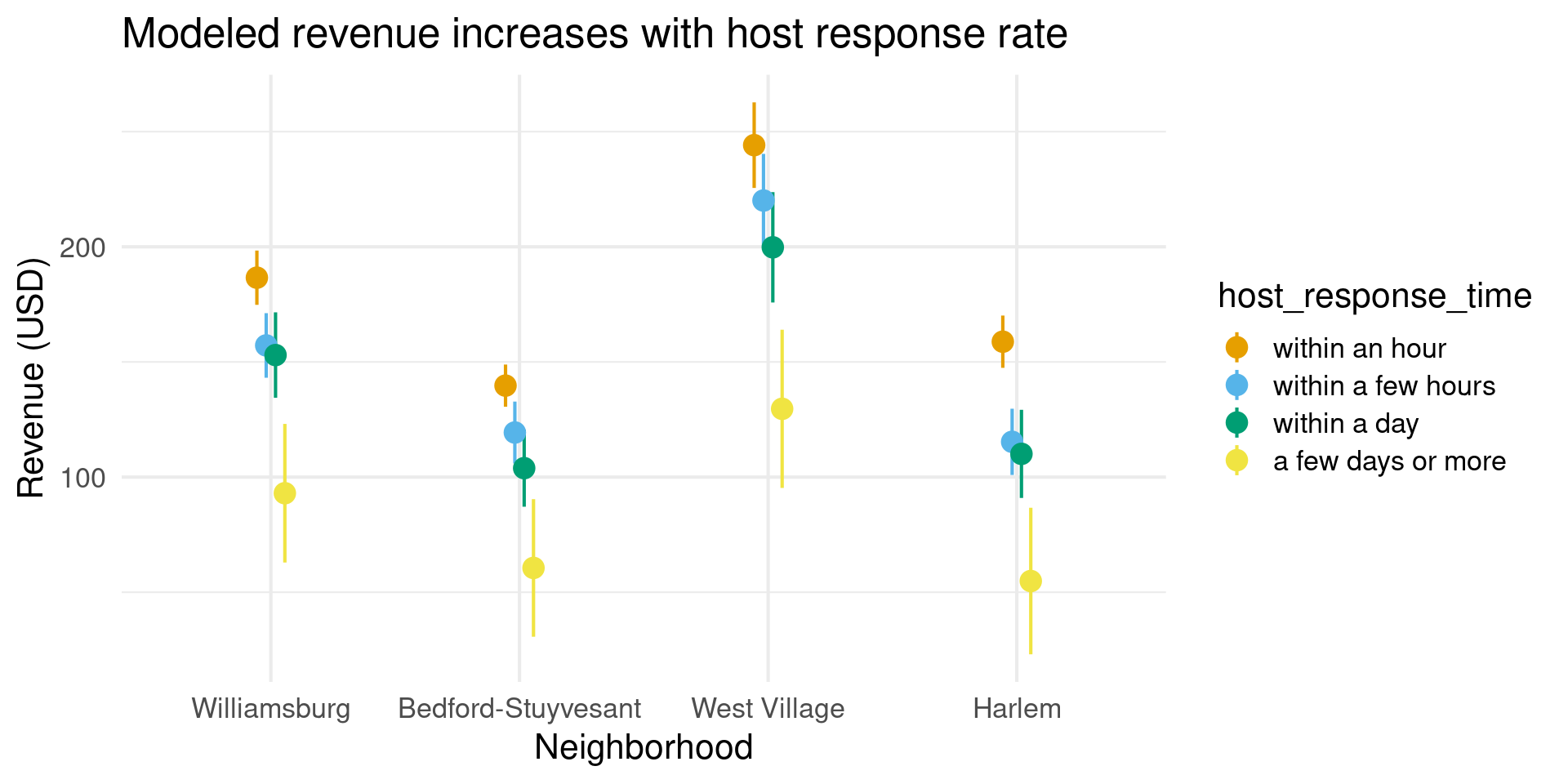
Marginal Predictions

  • Marginal prediction is averaged over a grouping
  • Use by keyword to specify aggregation
mod |> plot_predictions(by = c("neighborhood", "host_response_time")) +
  theme_minimal(base_size=16) +
  labs(title = "Modeled revenue increases with host response rate",
       y = "Revenue (USD)",
       x = "Neighborhood")

Marginal Predictions

Plotting Comparisons

  • Comparisons with plot_comparisons
  • Similar syntax to plot_predictions
  • Very useful for categorical outcomes

Thornton Revisited

  • Thornton dataset: How much does a monetary incentive impact the decision to get an HIV test?

Call:
lm(formula = revenue ~ . + host_is_superhost * bedrooms + host_is_superhost * 
    neighborhood + num_amenities * neighborhood + num_amenities * 
    bedrooms, data = nyc_bnb_slim)

Residuals:
    Min      1Q  Median      3Q     Max 
-282.29  -50.44   -7.98   40.73  654.75 

Coefficients: (1 not defined because of singularities)
                                                   Estimate Std. Error t value
(Intercept)                                      -156.33072  126.44123  -1.236
neighborhoodBedford-Stuyvesant                    -32.49483   20.36231  -1.596
neighborhoodWest Village                           86.16582   32.33182   2.665
neighborhoodHarlem                                -49.46094   22.80865  -2.169
neighbourhood_groupManhattan                             NA         NA      NA
bedrooms                                           -4.25002    8.31598  -0.511
num_amenities                                      -0.67673    0.51225  -1.321
review_scores_rating                              101.90580   29.98804   3.398
review_scores_accuracy                            -20.50176   26.14237  -0.784
review_scores_cleanliness                          14.11705   15.63285   0.903
review_scores_checkin                             -12.03781   19.43860  -0.619
review_scores_communication                        -0.27244   24.45593  -0.011
review_scores_value                               -26.11923   17.62562  -1.482
review_scores_location                             -3.66151   15.54947  -0.235
host_has_profile_pic                                8.87632   23.59085   0.376
host_is_superhost                                  -7.50775   14.06849  -0.534
host_response_timewithin a few hours              -18.89199    6.87368  -2.748
host_response_timewithin a day                    -24.08064    9.57480  -2.515
host_response_timea few days or more              -56.27695   34.10359  -1.650
host_response_rate                                  0.07002    0.35042   0.200
host_acceptance_rate                                0.29018    0.17252   1.682
bedrooms:host_is_superhost                         12.82689    5.69852   2.251
neighborhoodBedford-Stuyvesant:host_is_superhost   -1.32929   14.14480  -0.094
neighborhoodWest Village:host_is_superhost         44.61606   21.77459   2.049
neighborhoodHarlem:host_is_superhost               -2.75697   15.55588  -0.177
neighborhoodBedford-Stuyvesant:num_amenities       -0.63934    0.49032  -1.304
neighborhoodWest Village:num_amenities             -0.98698    0.84379  -1.170
neighborhoodHarlem:num_amenities                    0.42245    0.55395   0.763
bedrooms:num_amenities                              1.11220    0.19711   5.642
                                                 Pr(>|t|)    
(Intercept)                                      0.216584    
neighborhoodBedford-Stuyvesant                   0.110820    
neighborhoodWest Village                         0.007813 ** 
neighborhoodHarlem                               0.030338 *  
neighbourhood_groupManhattan                           NA    
bedrooms                                         0.609409    
num_amenities                                    0.186757    
review_scores_rating                             0.000703 ***
review_scores_accuracy                           0.433075    
review_scores_cleanliness                        0.366708    
review_scores_checkin                            0.535868    
review_scores_communication                      0.991114    
review_scores_value                              0.138663    
review_scores_location                           0.813885    
host_has_profile_pic                             0.706797    
host_is_superhost                                0.593689    
host_response_timewithin a few hours             0.006088 ** 
host_response_timewithin a day                   0.012048 *  
host_response_timea few days or more             0.099199 .  
host_response_rate                               0.841655    
host_acceptance_rate                             0.092862 .  
bedrooms:host_is_superhost                       0.024592 *  
neighborhoodBedford-Stuyvesant:host_is_superhost 0.925144    
neighborhoodWest Village:host_is_superhost       0.040705 *  
neighborhoodHarlem:host_is_superhost             0.859361    
neighborhoodBedford-Stuyvesant:num_amenities     0.192532    
neighborhoodWest Village:num_amenities           0.242378    
neighborhoodHarlem:num_amenities                 0.445867    
bedrooms:num_amenities                           2.14e-08 ***
---
Signif. codes:  0 '***' 0.001 '**' 0.01 '*' 0.05 '.' 0.1 ' ' 1

Residual standard error: 89.22 on 1074 degrees of freedom
Multiple R-squared:  0.3773,    Adjusted R-squared:  0.3617 
F-statistic:  24.1 on 27 and 1074 DF,  p-value: < 2.2e-16

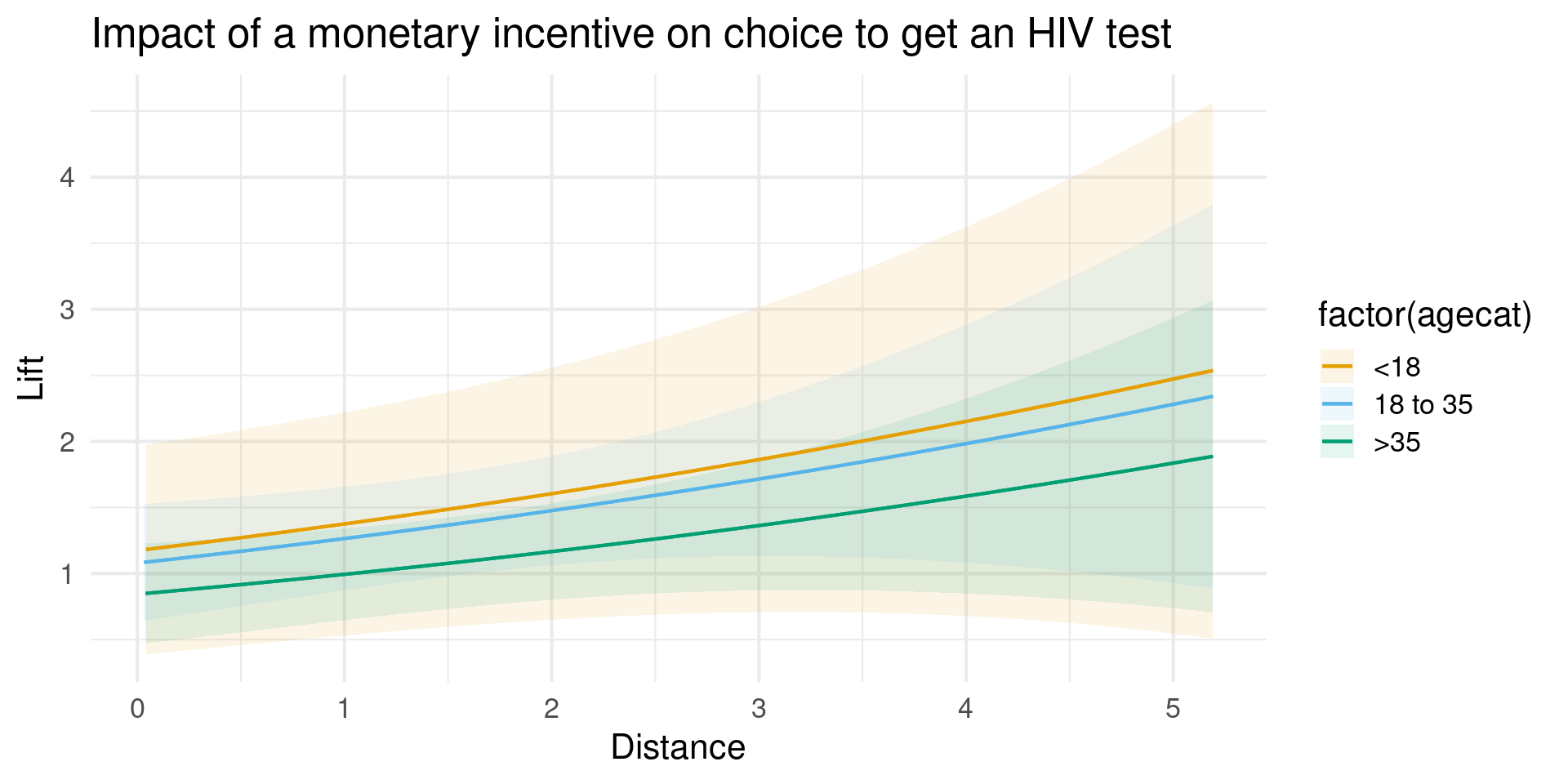
Comparisons

  • variable is what is compared across
  • by provides additional levels
plot_comparisons(mod_thornton,
  variables = c("incentive"),
  by = c("agecat"),
  comparison = "lift") +
  theme_minimal(base_size=16) +
  labs(title = "Impact of a monetary incentive on choice to get an HIV test", y = "Lift",x="Age Category")

Comparisons

Comparison Functions

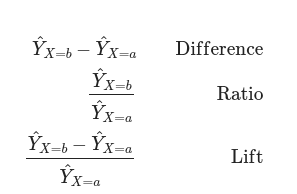
  • difference, ratio, odds, arbitrary functions possible

Model to Meaning

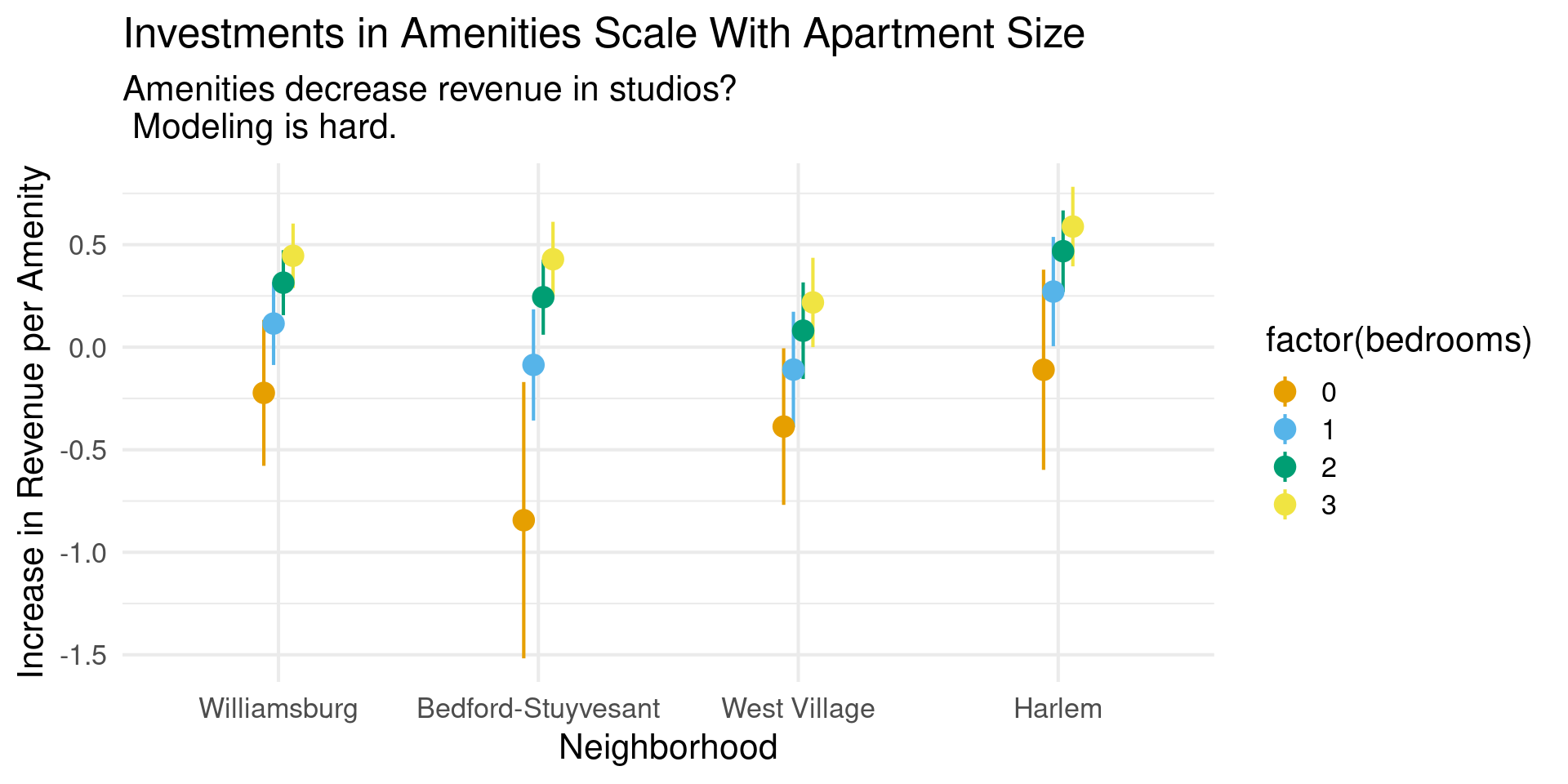
Slopes

  • The slope is the sensitivity of outcome to a predictor
  • eyex keyword computes elasticity
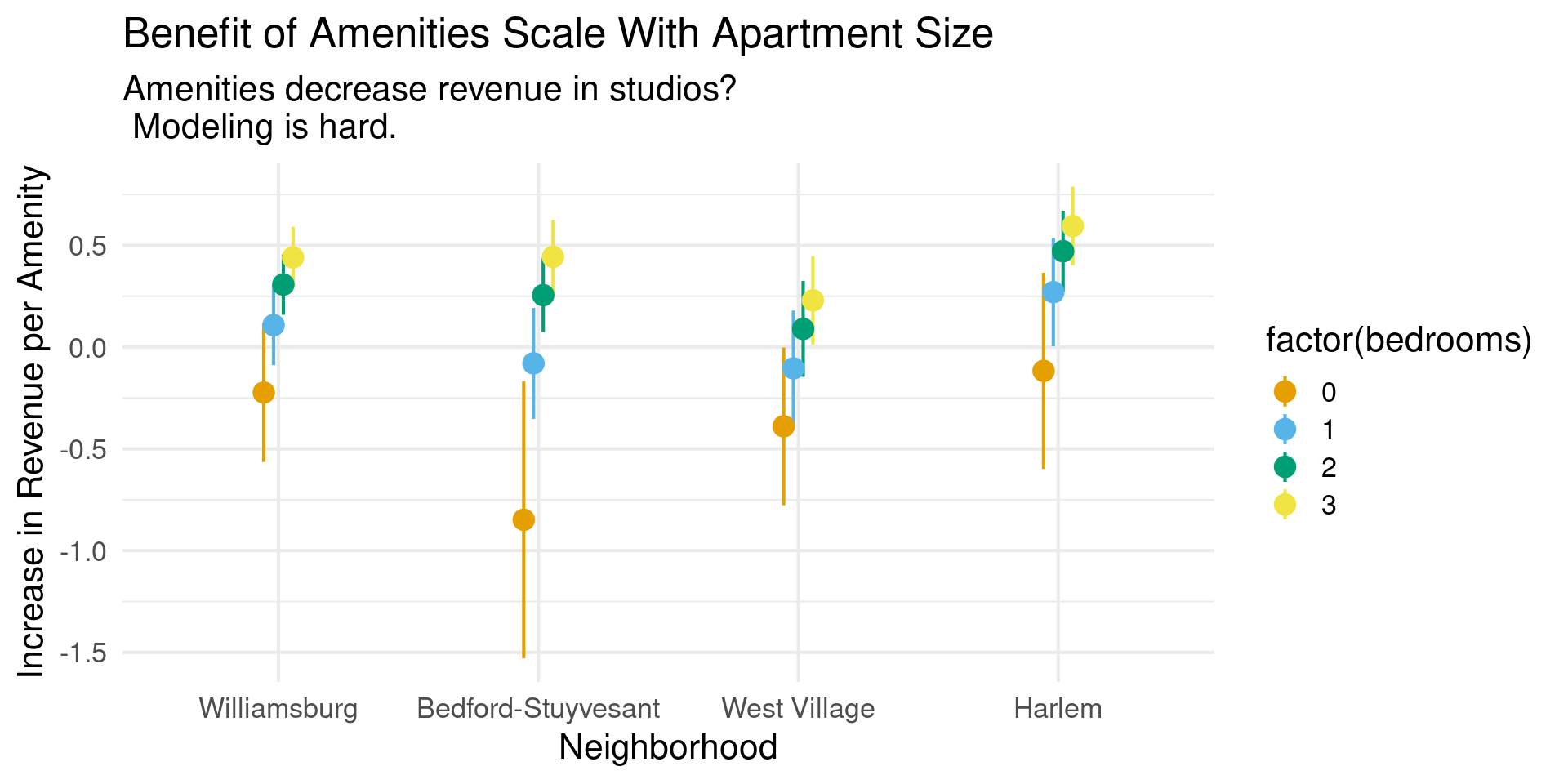
plot_slopes(mod,
  variables = "num_amenities",
  slope = "eyex",
  condition = list("neighborhood", "bedrooms"= 0:3)) +
  theme_minimal(base_size=16) +
  labs(title="Investments in Amenities Scale With Apartment Size",
       subtitle= "Decrease in revenue for studios suggests either a flaw in model formulation or very unusual dynamics",y="Increase in Revenue per Amenity",x="Neighborhood")

Slopes

Thanks!